Opening the Black Box

Interpreting ML Models with SHAP Values in R

uRos2026

Thelma Panaïotis

2026-11-18

What you will take away

Read SHAP explanations

One prediction (local), the whole model (global)

Build them yourself

By hand, then with DALEX

Know their limits

Correlated variables, causality

1. Introduction

Why interpret a model?

The data

adult (Census Income): about 48,000 US individuals, 12 predictors.

age education occupation hours/week capital gain sex relationship income
31 Masters Prof-specialty 50 14084 Female Not-in-family >50K
54 HS-grad Other-service 20 0 Female Unmarried <=50K
35 9th Farming-fishing 40 0 Male Husband <=50K
45 Bachelors Exec-managerial 40 0 Male Own-child <=50K
31 Some-college Sales 38 0 Male Husband >50K

Target: income >50K vs. <=50K. About 24% of people are in the high class.

Demographics, education, work, capital: that is what the model sees.

The model

Gradient boosting (LightGBM, via tidymodels): many shallow trees, each correcting the previous ones.

Accuracy 0.87 · Precision 0.77 · Recall 0.65

Always predicting “<=50K” would already be right 76% of the time.

Good enough to be worth explaining. The question is now why it predicts what it predicts.

Training script (R/01_train_model.R) · download

The black box problem

Good accuracy, no transparency: far too many trees to read.

In official statistics (imputation, automatic coding, anomaly detection): someone will ask why this record?

Two ways to explain: global (the model on average) or local (one prediction). Only local answers “why this case?”

Our tool: DALEX

One package to explain any model (tidymodels, xgboost, caret…), with the same functions.

Every explanation compares one prediction with the average prediction: DALEX needs the model and reference data, wrapped in an explainer.

explainer <- explain_tidymodels(
  model,   # the fitted tidymodels model
  data     # predictors only: the reference data
)

No outcome y needed: explanations work on fresh, unlabelled data.

Your turn to code: warm-up

Objective: check your set-up, build your explainer, and pick two contrasted people you will explain all along.

Script: R/02_shap_exercises.R (Part 0)

1. Build your explainer

Wrap the model and the test set in one DALEX object with explain_tidymodels(). Use a random sample of 500 rows as reference data, without the target income: it keeps the computation fast. Your numbers will differ slightly from your neighbour’s.

Hint
  • data: adult_test without the income column (select(-income)), with slice_sample(n = 500)
  • mandatory arguments: model, data
  • warnings about the target variable y are expected: no y is needed here

2. Pick two contrasted observations

Predict the probability of income >50K for the first 30 rows of adult_test, using predict() on the explainer you just created.

Keep the row number of one person with a low probability and one with a high probability: low_id and high_id in the script.

Hint
  • call predict() on the explainer, you need to specify the newdata that you want to predict
  • put the result in a tibble with the row numbers

3. Compare with the average

Compute the average prediction on the reference data. Where do your two people stand?

Hint
  • mean() of predict() on explainer$data

Warm-up: my two people

Mine, chosen the same way as yours: one low, one high probability that income is >50K.

age education occupation hours/week capital gain P(>50K)
Low probability 54 HS-grad Other-service 20 0 0
High probability 31 Masters Prof-specialty 50 14084 1

Average prediction: about 0.24. Yours: as contrasted as mine?

2. Panorama

Feature importance and PDP: useful, but limited

Permutation importance and PDP

Shuffle one variable: loss rises
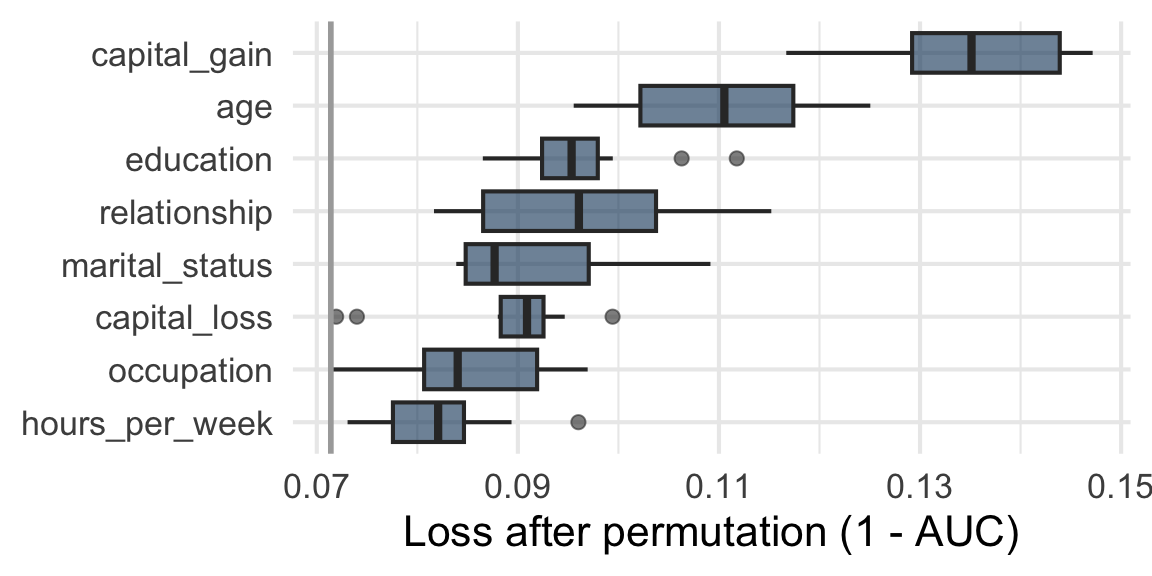
Grey: individuals. Blue: the PDP
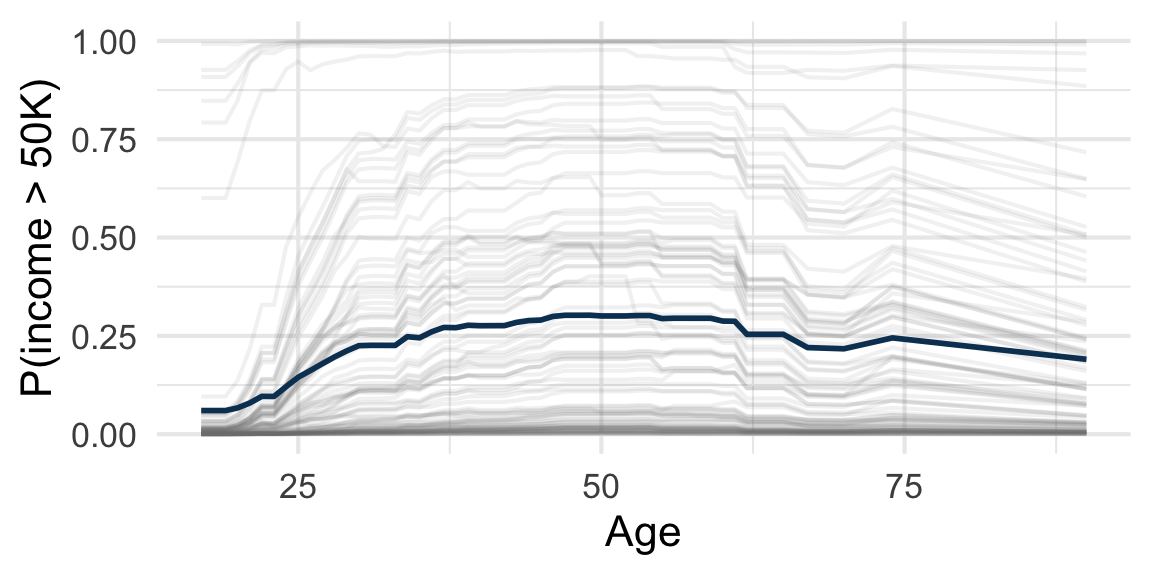
Both are aggregates: neither answers “why did this person get this prediction?”

Their limits, and a caution about capital_gain: see the course notes.

3. Intuition

Sharing a prediction fairly among variables

How to split a bonus fairly?

Three colleagues team up on a project and earn a bonus.

Designer (A)    Developer (B)    Sales (C)

They do not contribute equally, and they work better together. Who deserves what?

Before clicking a group: guess its bonus.

Next slide: the widget. Or open it in a new tab.

What does each person add?

Compare two groups that differ by one person: the gap is what that person adds.

How much does A add to an empty group? To B and C together?

Next slide: the widget. Or open it in a new tab.

Same problem, with a model

What A adds depends on who is already there, so on the order in which they join. Same with a model:

Bonus sharing Explaining a prediction
Three colleagues Three variables (age, education, hours_per_week)
The bonus The prediction, compared with the average
Joining the project The model gets to know the variable’s value (until then, the average is used)

What a variable adds depends on the variables already known. Let’s check on real predictions.

4. Individual level

One prediction, one explanation

What is a break-down?

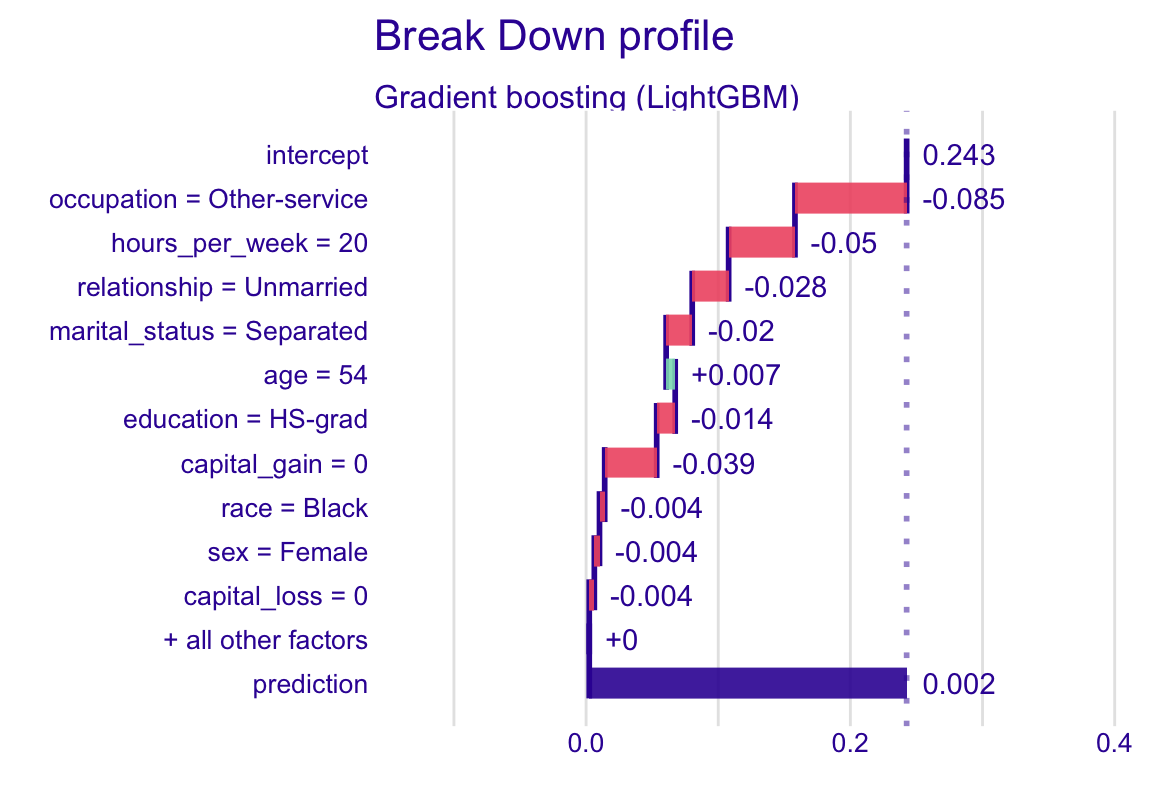
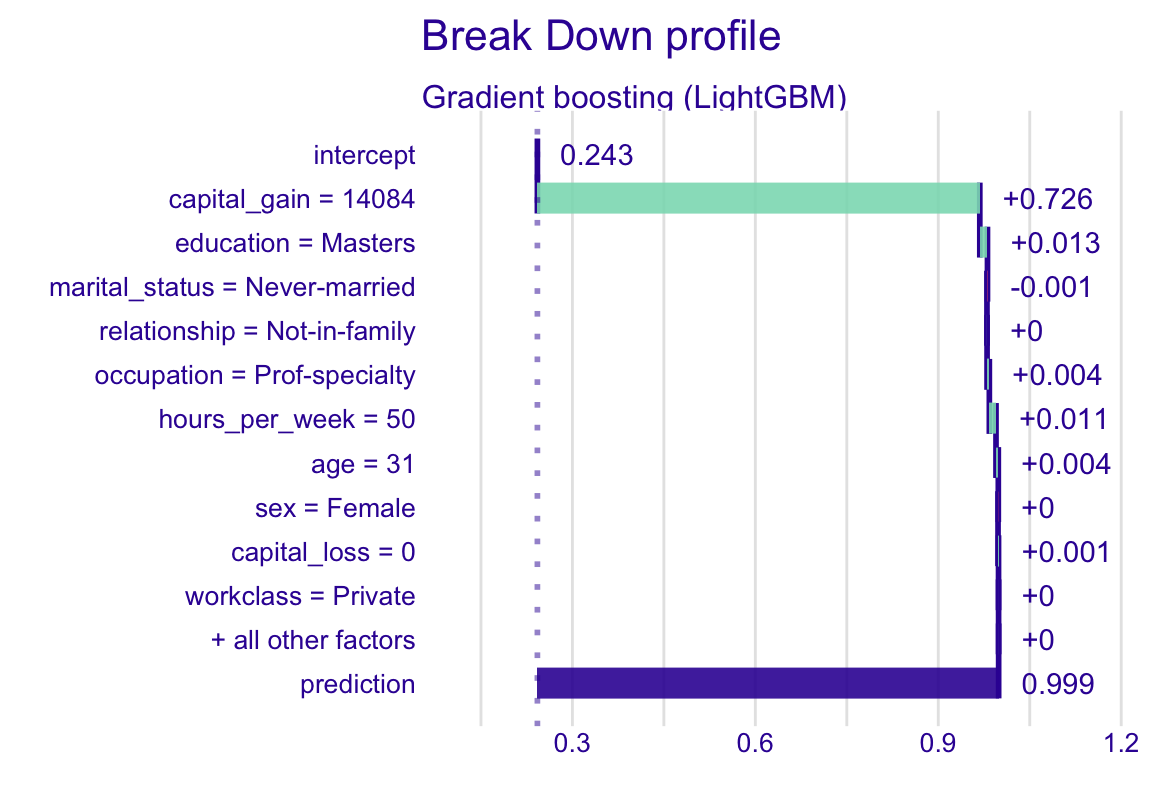
One prediction, explained one variable at a time:
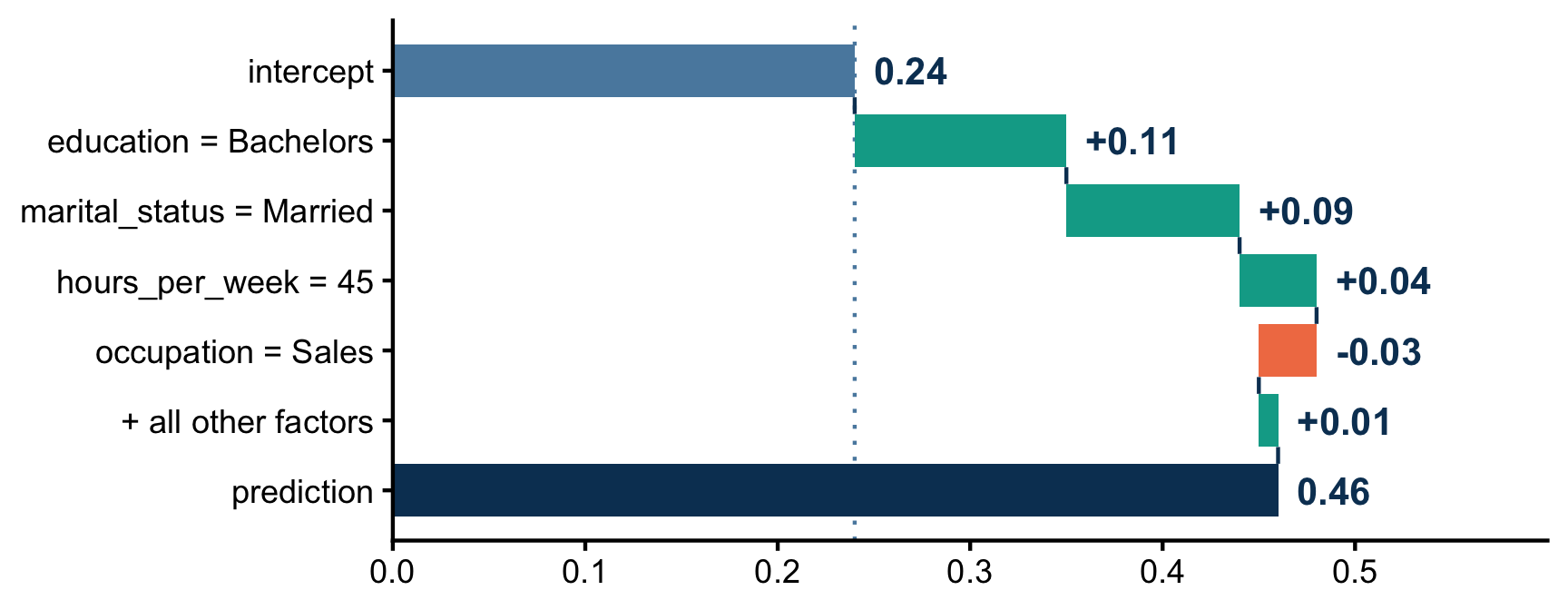
The changes add up to the gap between the prediction and the average.

Your turn to code: break-down

Objective: explain your two people with a break-down: start at the average prediction, add one variable at a time, end at their prediction. Then shuffle the order.

Script: R/02_shap_exercises.R (Part 1)

1. Break-down of your two observations (Part 1 a)

Compute and plot the break-down of my_low and my_high. Which variables push each prediction up, which push it down? As you expected?

Hint
  • predict_parts() takes the explainer, the observation (new_observation) and type = "break_down"
  • then call plot() on the result

2. Shuffle the order (Part 1 b)

Compute the same break-down of my_low, with the variables added in a random order. Run it twice: do the contributions change?

Hint
  • same call, plus order = sample(vars): vars holds the names of the 12 predictors

Stuck with R, or done early? Explore other observations in the app (shiny-uros2026.pyranhia.eu, during the session only), tab Break-down.

Reading a break-down

Start: the average prediction. Each bar: the change, given the variables already added. End: the prediction.

Low: almost every variable pulls down, hours_per_week and occupation the most. High: capital_gain alone does almost everything, the others have no room left.

Same person, another order
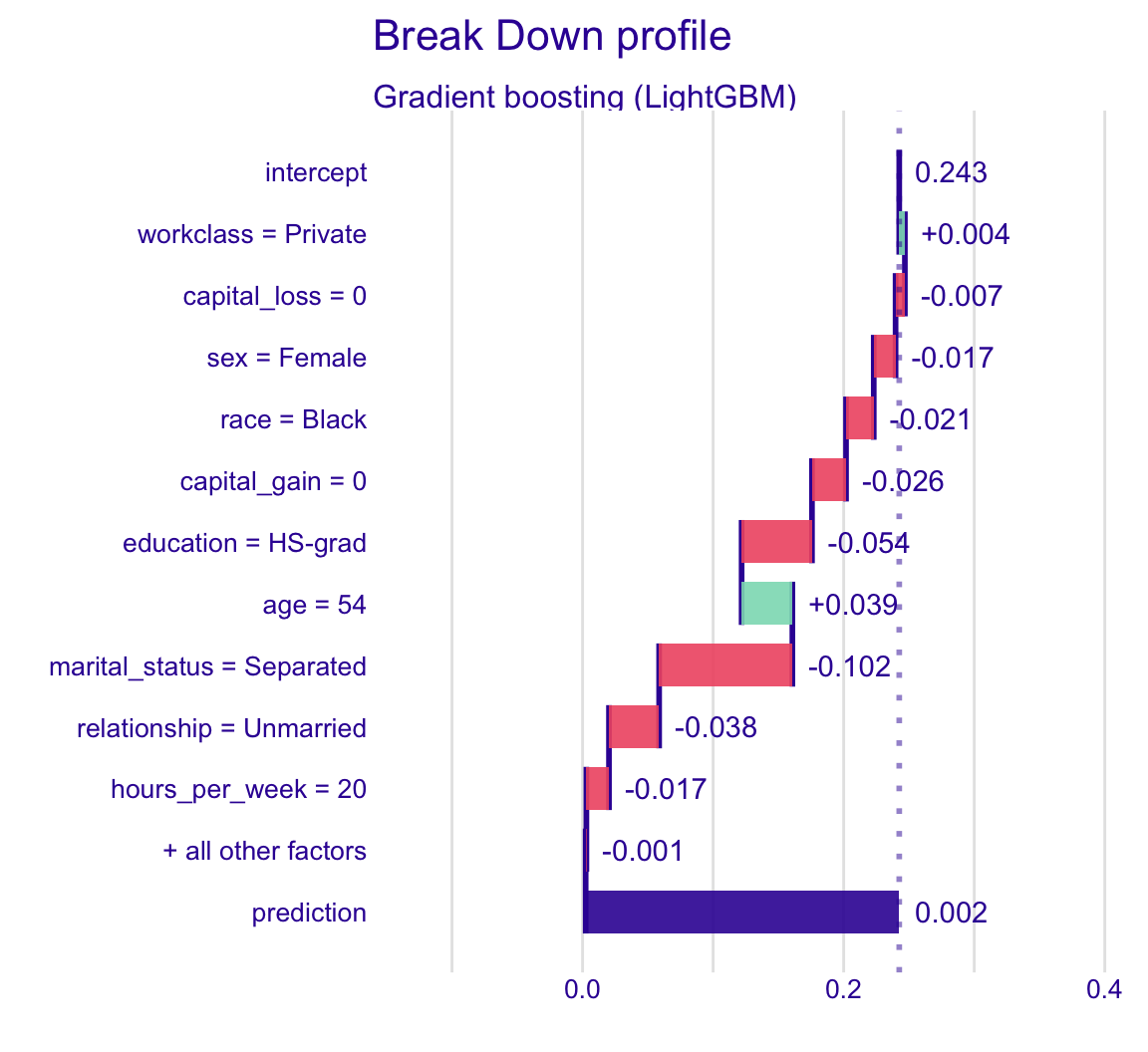
Variables added in the reverse order: same prediction, different contributions.

Which order is the right one? None. Just like the bonus.

Back to the bonus: Shapley’s answer

Same problem: what A adds depends on the order. Imagine every order in which they could join the project.

Each person gets the average of what they add when they arrive.

In how many of the 6 orders does A arrive first?

Fair: no order is favoured.

Next slide: the widget. Or open it in a new tab.

Each person’s fair share

Averaging over orders = weighting each comparison by how often its group is already there. The weighted sum is the Shapley value.

Compute A’s share before revealing it.

Next slide: the widget. Or open it in a new tab.

Your turn to code: SHAP values by hand

Objective: do with variables what Shapley did with colleagues. Average what each variable adds over 10 random orders: these are SHAP values, computed by hand.

Script: R/02_shap_exercises.R (Part 2)

1. Ten random orders (Part 2 a)

Complete the skeleton in the script: 10 break-downs of my_low, each with a random order, stacked in one data frame bd_10_orders.

Hint
  • new_observation: my_low
  • order: sample(vars), a new random order at each iteration
Solution
bd_10_orders <- map(1:10, \(i) {
  predict_parts(
    explainer = explainer,
    new_observation = my_low,
    type = "break_down",
    order = sample(vars)
  ) |>
    as_tibble()
}) |>
  list_rbind()

2. Average over the orders (Part 2 b)

Average the contribution of each variable over the 10 orders: your SHAP values.

Hint
  • drop the rows whose variable_name is "intercept" or "" (the baseline and the prediction)
  • group_by(variable_name), then summarise() with mean(contribution)
Solution
shap_by_hand <- bd_10_orders |>
  filter(!variable_name %in% c("intercept", "")) |>
  group_by(variable_name) |>
  summarise(shap_by_hand = mean(contribution))

My SHAP values by hand

variable_name shap_by_hand
marital_status -0.057
hours_per_week -0.043
relationship -0.039
capital_gain -0.033
education -0.033
occupation -0.032
age 0.032
sex -0.018
capital_loss -0.014
race -0.013
workclass 0.003
native_country 0.001

My shap_by_hand: one number per variable, its contribution averaged over 10 random orders (sorted here).

These are SHAP values, estimated: run it again and they move slightly. 10 orders out of 479 million is few.

In practice: DALEX does it for you

You will never average break-downs by hand: type = "shap" does exactly that.

predict_parts(explainer, my_low, type = "shap")

The same average, over 25 random orders: with 12 variables, there are 479 million of them.

25: the default number of orders (argument B). 479 million: 12! = 479,001,600 possible orders of 12 variables.

Your turn to code: SHAP waterfall

Objective: compute the SHAP values of your two people with DALEX, and check those of my_low against yours.

Script: R/02_shap_exercises.R (Part 3)

1. Waterfall (Part 3 a)

Compute the SHAP values of my_low and my_high (about 15 seconds each) and plot their waterfalls (max_features = 10).

Hint
  • same call as the break-down, with type = "shap" and no order
  • plot() with max_features = 10

2. Compare with your values by hand (Part 3 b)

Keep the averaged SHAP values of my_low, join them with your values by hand, and plot one against the other, with the variable names. Close? Why not identical?

Hint
  • the result of type = "shap" has one row per variable and per order (column B, from 1 to 25), plus the average over the orders, in the rows with B == 0
  • as_tibble(), keep the rows with B == 0, select(variable_name, contribution)
  • left_join() with your shap_by_hand
  • ggrepel::geom_text_repel(aes(label = variable_name)) writes the variable names
  • DALEX averages over 25 random orders, you over 10: both are estimates

Bonus: additivity (Part 3 c)

Add the average prediction and the sum of the SHAP values of my_low, and compare with its prediction. Equal?

Hint
  • sum() of the B == 0 contributions
  • average prediction and prediction: as in the warm-up

Stuck with R, or done early? Explore other observations in the app (shiny-uros2026.pyranhia.eu, during the session only), tab SHAP waterfall.

Reading a SHAP waterfall

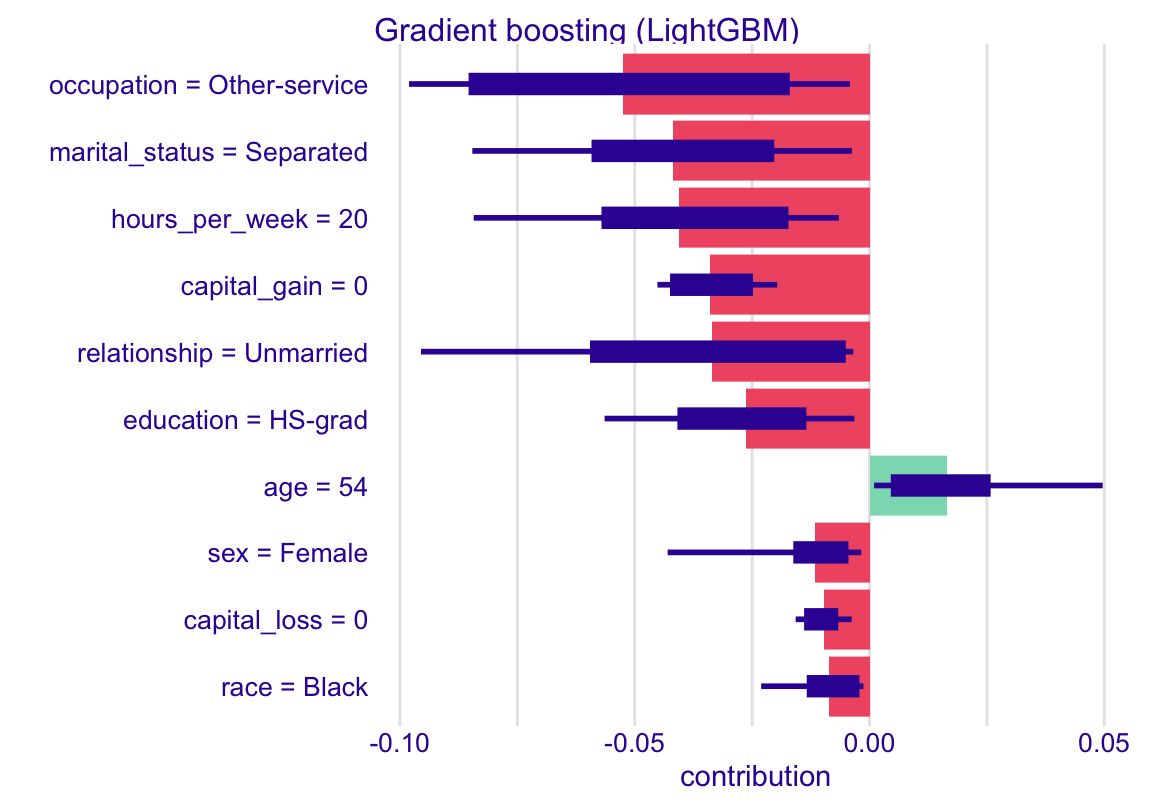
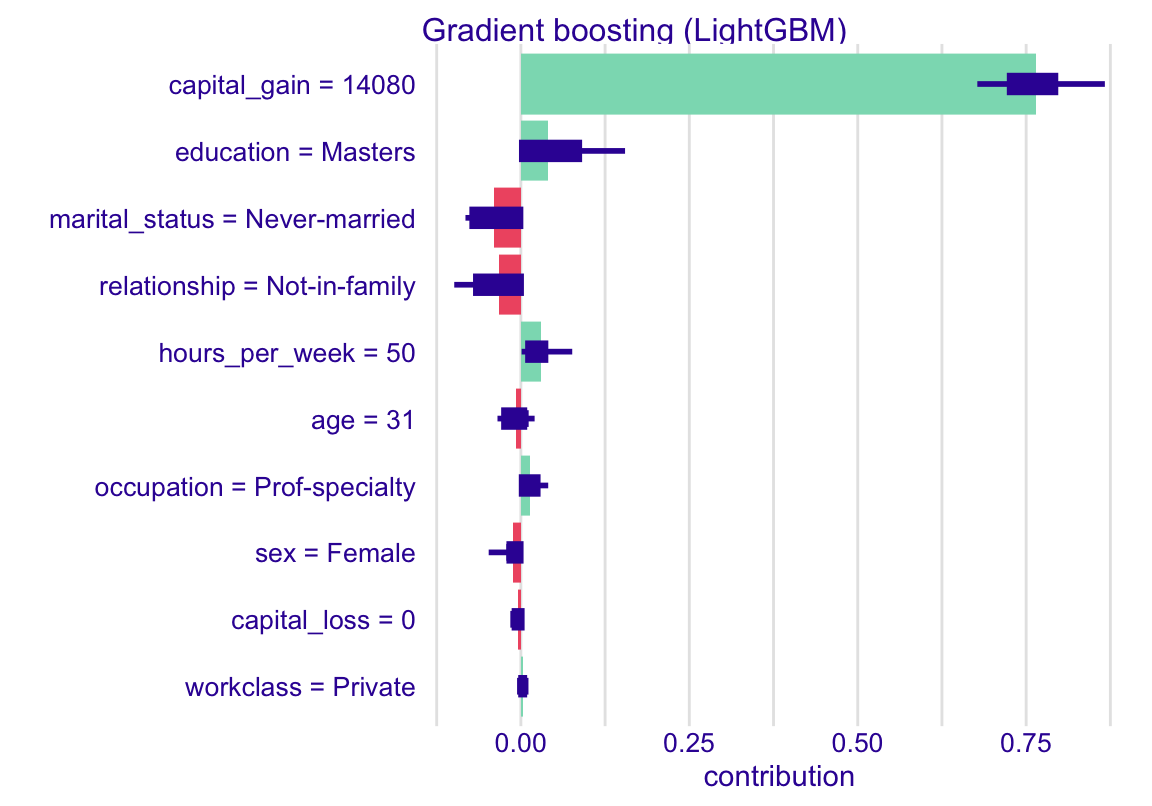
Bar: the average contribution over the 25 orders. Thick box: the middle half of the orders. Thin line: their full spread.

Same story as the break-downs, but the order no longer decides. Average prediction + all 12 bars = the prediction, exactly (only the 10 largest are shown).

By hand vs DALEX
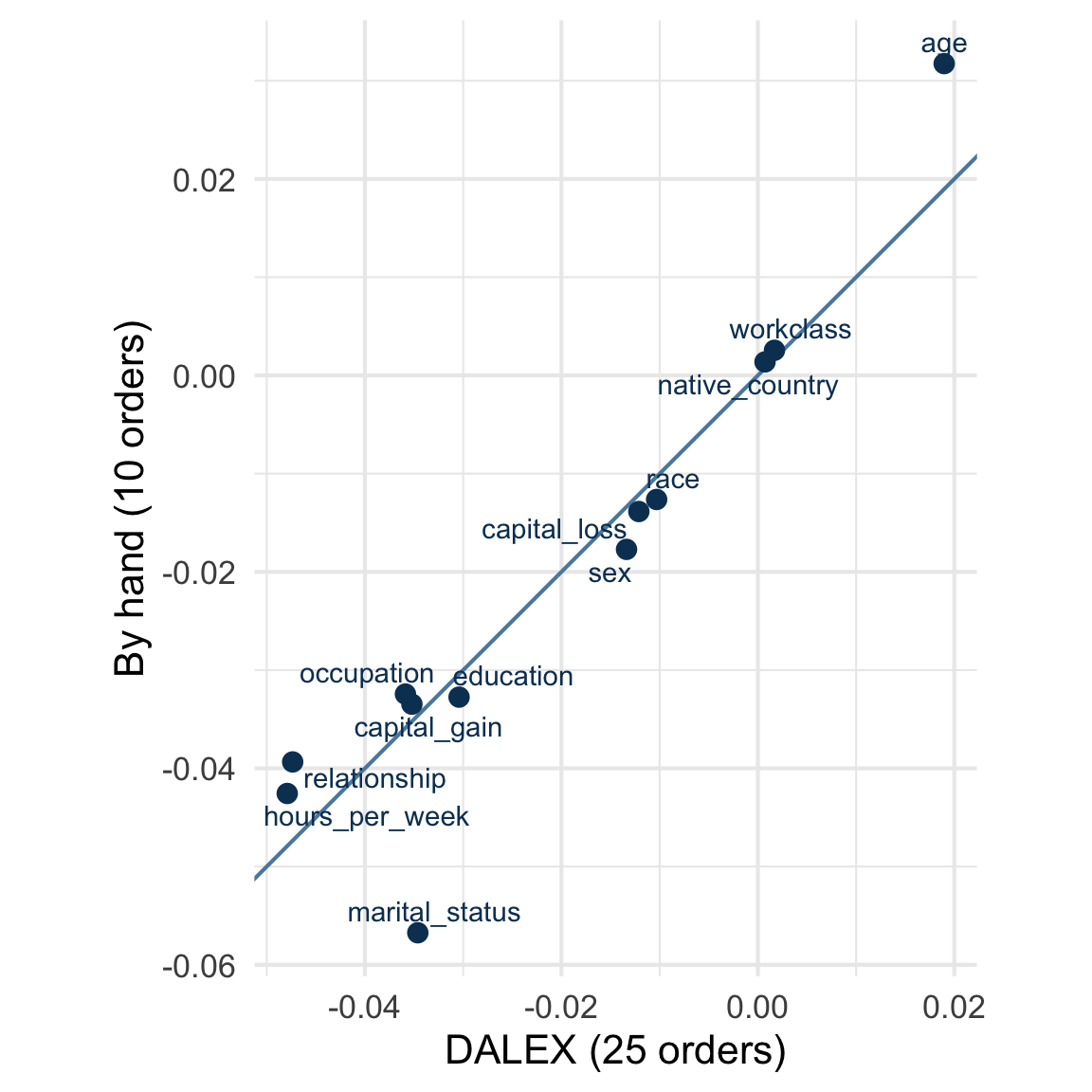
One point per variable, the line is the diagonal.

Close, not identical: same algorithm, same explainer, but two different samples of orders. Both are estimates.

5. Global level

From one prediction to the whole model

5.1 The SHAP summary

Aggregating SHAP values over many observations

SHAP values for many observations

A summary stacks the SHAP values of many observations.

DALEX is too slow for that (over 24 hours for 1000 observations): we load precomputed values. Same format as your B == 0 table, stacked, with an obs_id.

Your turn to code: from local to global

Objective: turn 1000 local explanations into a view of the whole model, with plain dplyr and ggplot2.

Script: R/02_shap_exercises.R (Part 4). The script loads shap_summary: one row per variable and per observation (obs_id, variable_name, variable_value, contribution).

1. Global importance (Part 4 a)

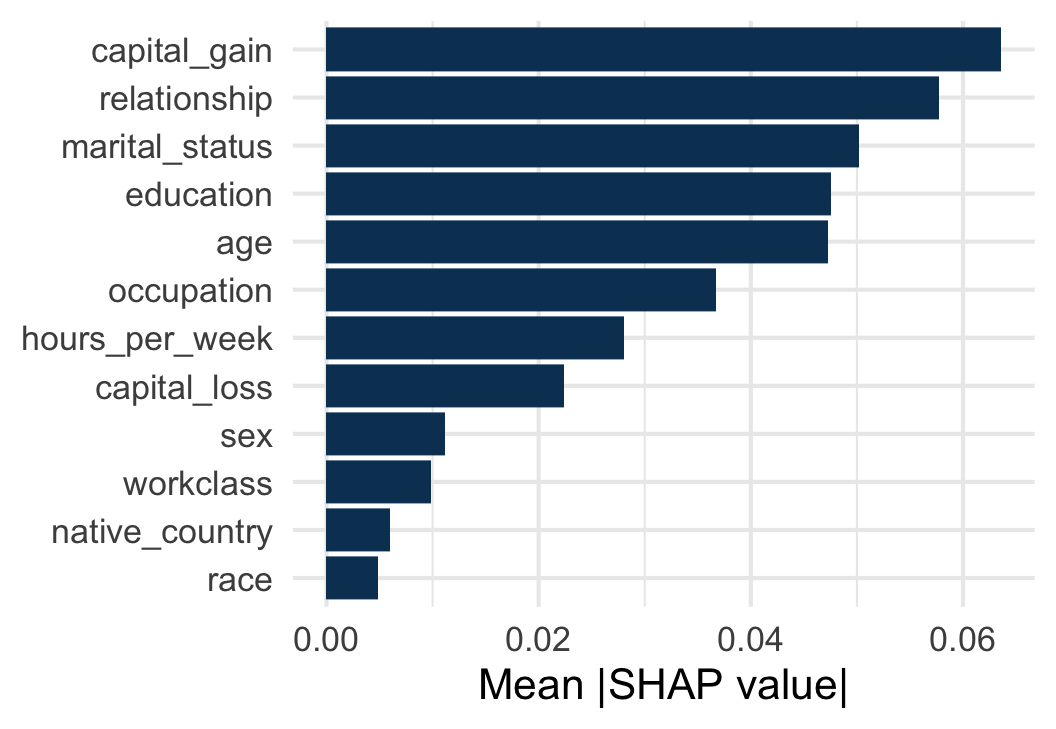
Compute the mean absolute SHAP value of each variable and plot it as a sorted bar chart. Same top variables as the permutation importance (capital_gain, age)?

Hint
  • group_by(variable_name), then summarise(mean_abs = mean(abs(contribution)))
  • sort the bars: arrange(mean_abs), then fct_inorder(variable_name); then geom_col()

2. The effect of age (Part 4 b)

Plot the SHAP value of age against the value of age, one point per observation. Compare with the PDP of age: same shape? What does the spread at a given age tell you?

Hint
  • filter(variable_name == "age")
  • variable_value is stored as text: as.numeric() it
  • geom_point(), with some transparency (alpha)

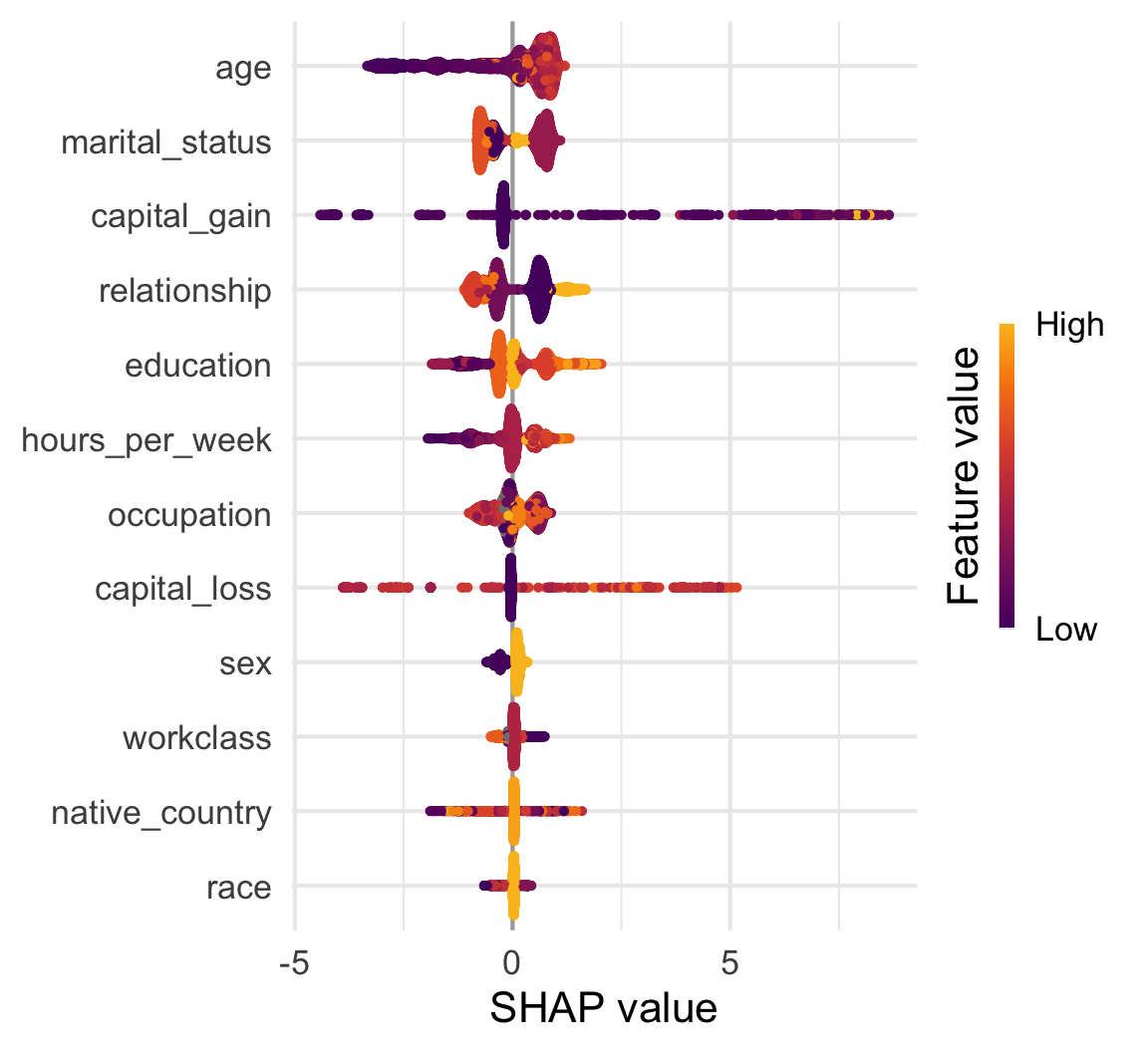
Bonus: a beeswarm (Part 4 c)

Complete the skeleton in the script: the four continuous variables on one plot, in three steps.

Hint
  • 1: "age", "capital_gain", "capital_loss", "hours_per_week"
  • 2: rescale value
  • 3: x = contribution, colour = value_scaled

Stuck with R, or done early? Explore other observations in the app (shiny-uros2026.pyranhia.eu, during the session only), tab SHAP summary.

Importance and the effect of age

capital_gain first, as with permutations. relationship and marital_status next: they carry the same information, SHAP shares the credit, permutations do not (one compensates for the other).
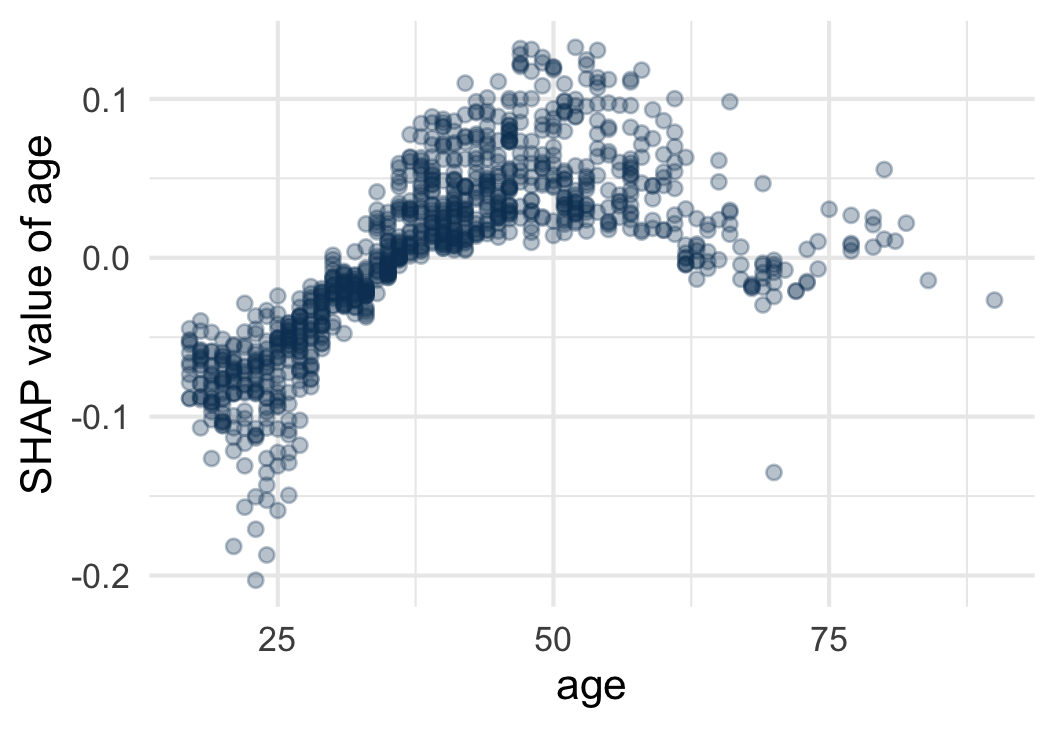
Same shape as the PDP. But at a given age, the points spread out: the effect of age depends on the rest of the profile.

Reading the beeswarm
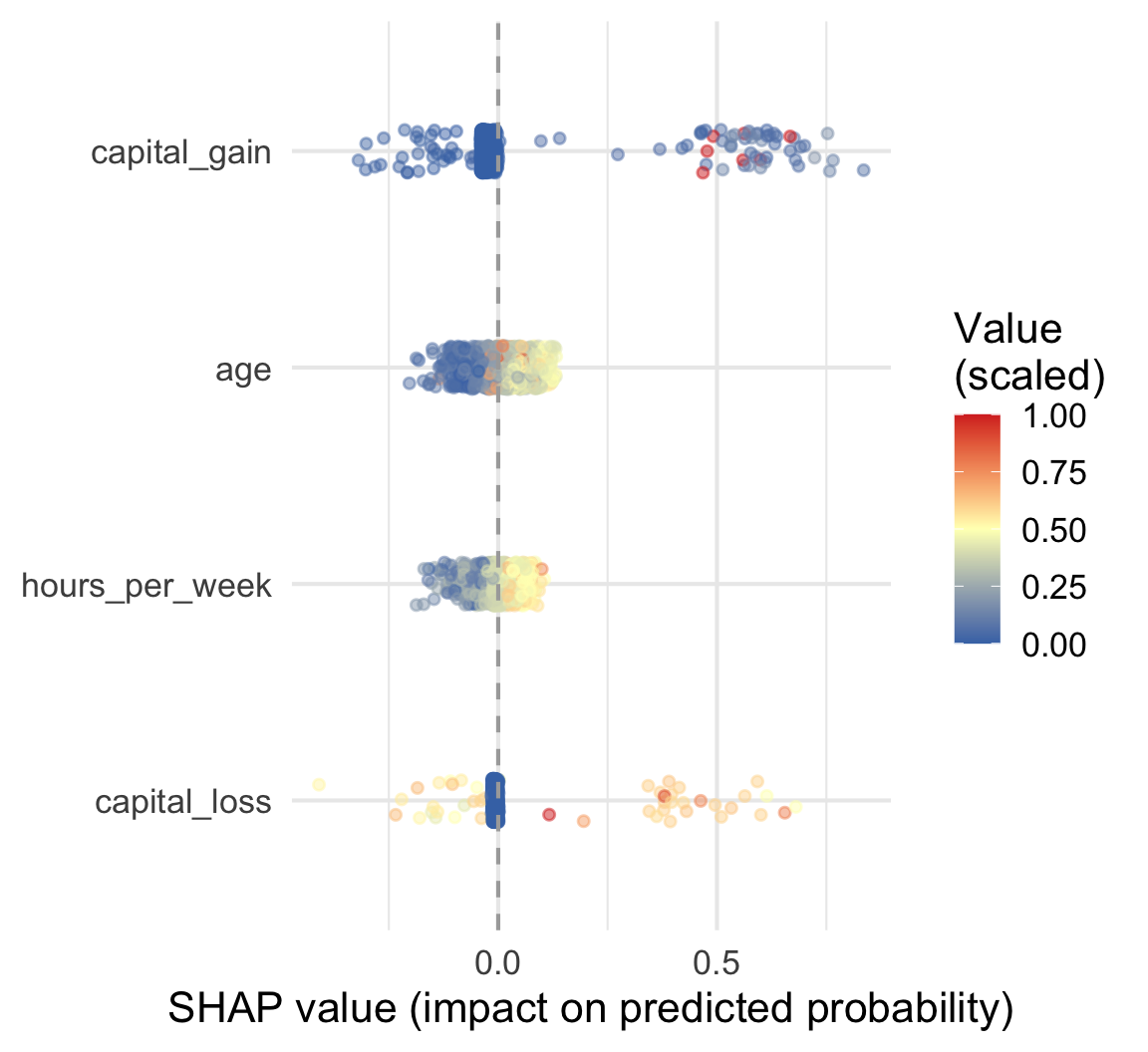
Your two plots, in one:

Vertical: importance (Part 4 a)

Horizontal and colour: direction and size of the effect, against the value (Part 4 b)

One point = one observation.

The categorical variables, and the shape of capital_gain: see the course notes and the app (SHAP summary, All categorical variables).

5.2 In production: TreeSHAP

Exact and fast, for tree-based models

Computing SHAP values

DALEX (so far) TreeSHAP (shapviz)
Principle average over 25 sampled orders follows the paths of the trees
Exact? No (25 sampled orders) Yes, for its own definition
Missing variable values from the reference data training node counts of the trees
Speed about 15 s per observation near-instantaneous, whole test set
Models any model tree-based only

Exact and fast, because it exploits the structure of the trees.

Both give SHAP values, but not of exactly the same quantity: with correlated variables, they can differ beyond the scale. How it works, in the course notes

Your turn to code: TreeSHAP

Objective: compute the SHAP values of the whole test set in one go, and look for an interaction.

Script: R/02_shap_exercises.R (Part 5)

1. Run the given code (Part 5 a)

Run the given code: it computes sv, the TreeSHAP values of every row of the test set. How long does it take, compared with one DALEX waterfall?

2. Beeswarm of the whole test set (Part 5 b)

Plot the beeswarm of the whole test set with sv_importance(). Same story as the DALEX beeswarm?

Hint
  • sv_importance() takes sv and kind = "beeswarm"
  • beware: for categorical variables, the colour has no meaning

3. The effect of sex (Part 5 c)

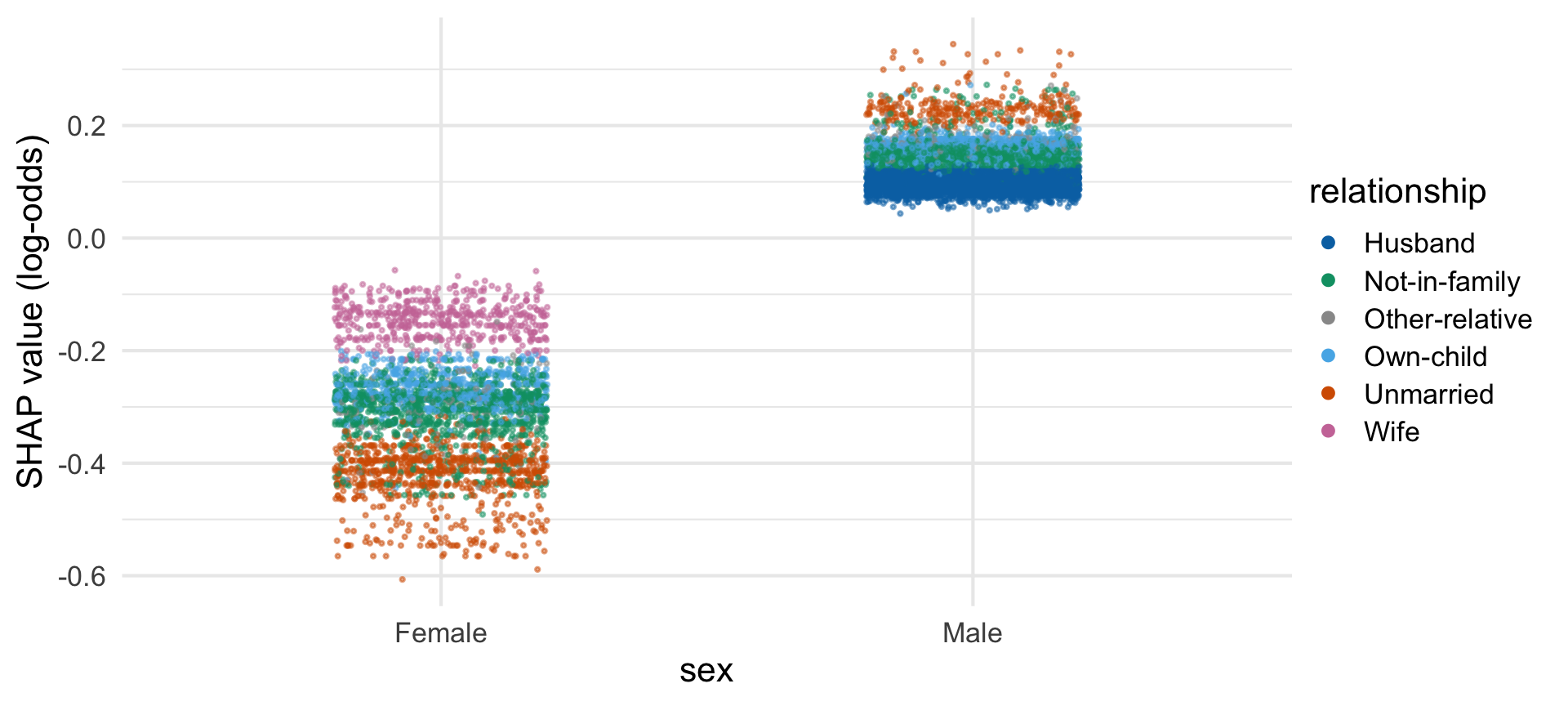
Draw the dependence plot of sex with sv_dependence(), then colour the points by relationship. What do you see?

Hint
  • sv_dependence() takes sv, the variable v and color_var (NULL for no colour)

Bonus: TreeSHAP waterfall (Part 5 d)

Plot the TreeSHAP waterfall of my_low with sv_waterfall(). Same story as the DALEX waterfall?

Hint
  • sv_waterfall() takes sv and row_id = low_id

Stuck with R, or done early? Explore other observations in the app (shiny-uros2026.pyranhia.eu, during the session only), tab shapviz.

TreeSHAP: your results

Time: a few seconds for the whole test set, against about 15 s for one DALEX waterfall.

Same story as with DALEX: same top variables as your importance plot, same directions for the continuous ones. Only the unit changes: log-odds.

Reading a dependence plot: sex
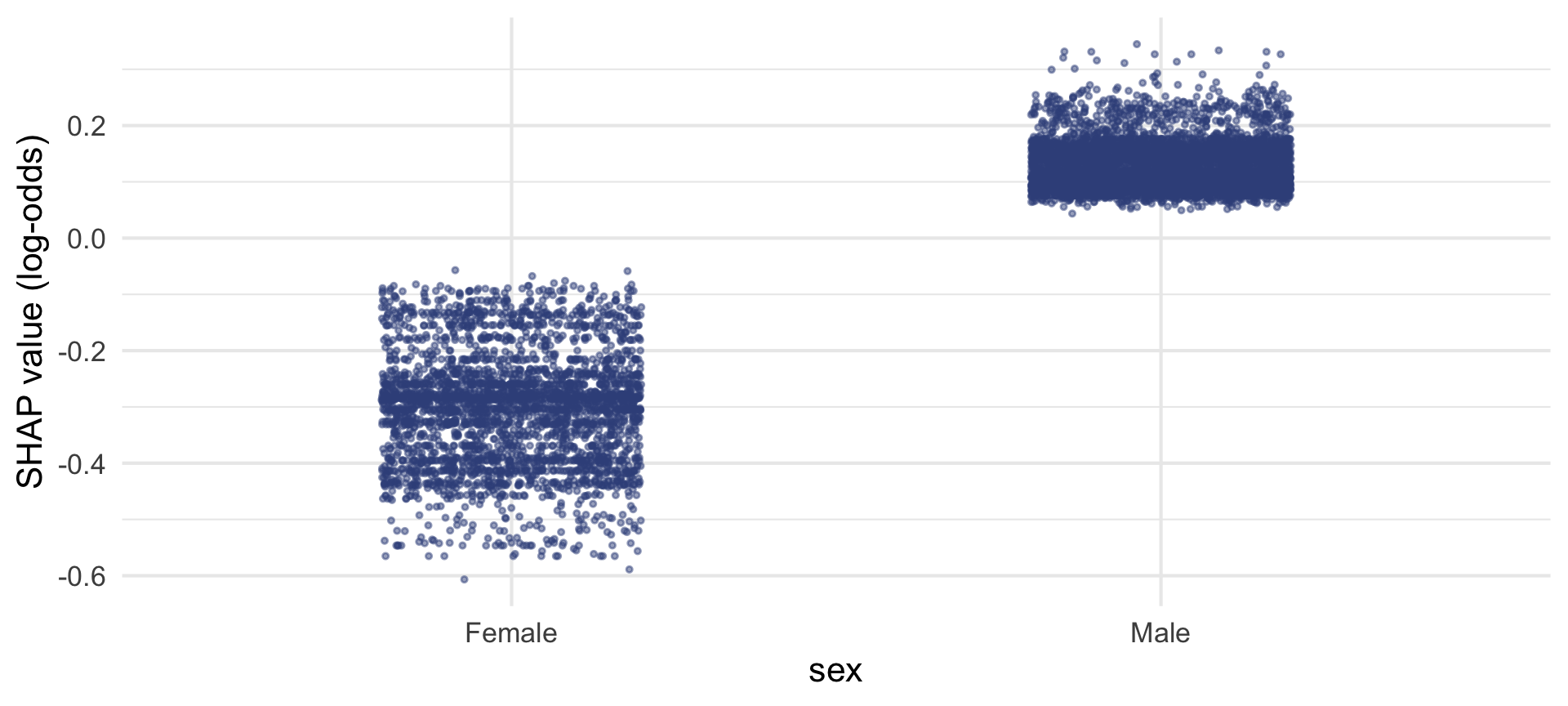
SHAP value against value, one point per observation. Within each column, the points are spread out: something else is at play.

Coloured by relationship: the effect depends on it, an interaction.

relationship also encodes sex (Husband, Wife): part of this pattern is correlation, not only interaction. TreeSHAP works on the log-odds scale, not probabilities: why. Other pairs: app, tab shapviz, Dependence.

Reading a TreeSHAP waterfall
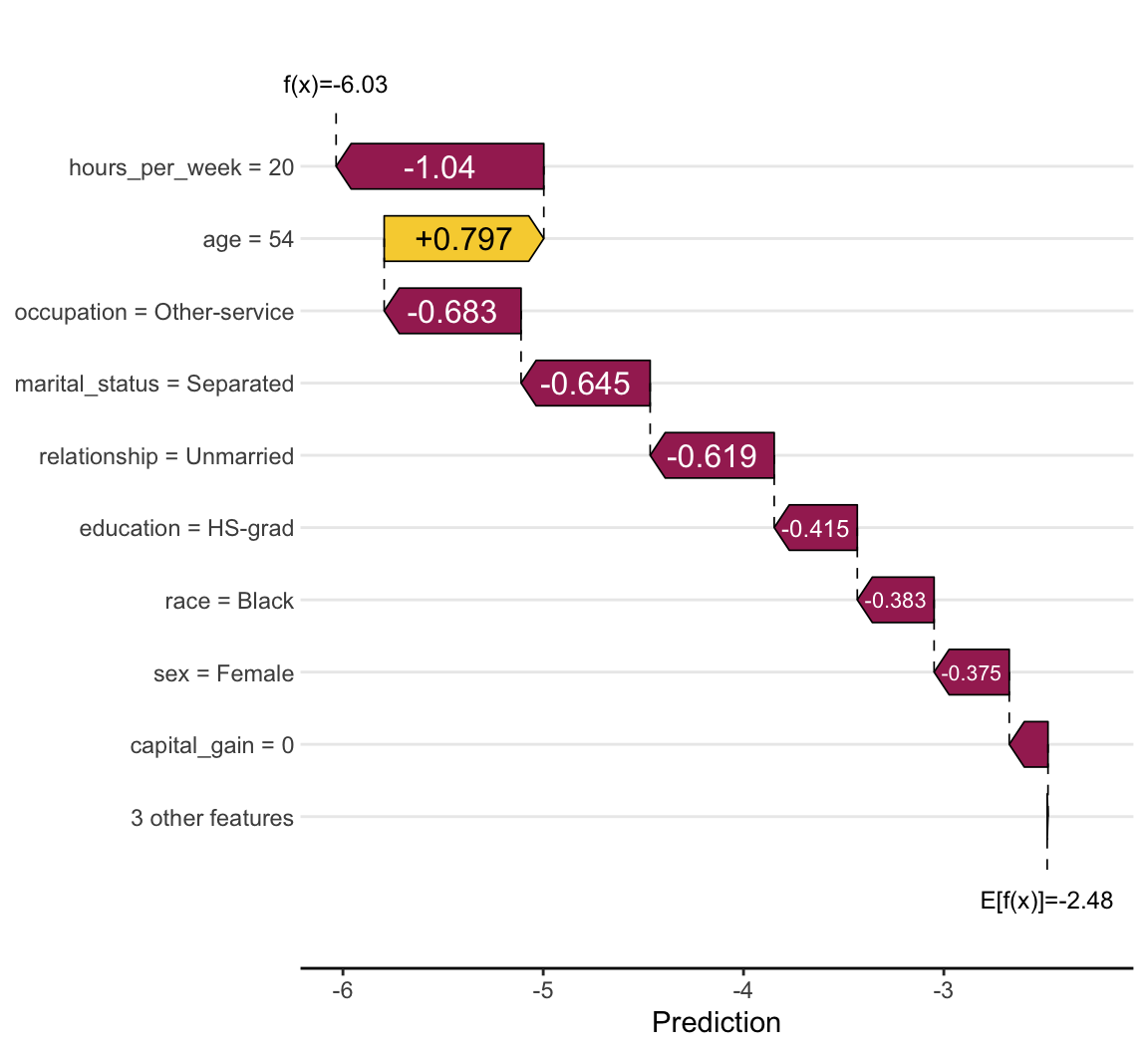
Read it from the bottom up:

Start: E[f(x)], the baseline

Each bar: one SHAP value (purple: down, gold: up)

End: f(x), the prediction

Unlike DALEX: log-odds, no boxes (exact, no orders), the smallest variables grouped.

6. Limits and takeaways

Correlated variables, causality, responsible use

Correlated variables

DALEX fills in a missing variable with values from the reference data, as if variables were independent.

With correlated variables (sex and relationship): unrealistic combinations. Be upfront about it, and never read one variable in isolation.

Causality and responsible use

  • A high SHAP value: the model relies on a variable, it does not mean the variable causes the outcome (capital_gain)
  • Contributions depend on the model and the reference data
  • SHAP shows that the model uses sex or race, not whether it treats groups fairly (see fairmodels)

SHAP suits scoring and prediction, not causal analysis or policy advice.

Key takeaways

From break-down (one observation, one order) to SHAP waterfall (one observation, averaged over orders) to summary plot (many observations)

  • Fair, additive, order-independent contributions
  • DALEX (any model, probabilities) or TreeSHAP via shapviz (trees, fast, log-odds)
  • Limits: correlated variables, no causality

SHAP does not replace model validation, but it makes a model’s decisions auditable, one prediction at a time.

Keep going on your own

More depth and all the code in the course notes.

Thank you!