Opening the Black Box
Interpreting Machine Learning Models with SHAP Values in R
NoteAbout these notes
The reference notes behind the live tutorial: read them before the session for a head start, or after to review at your own pace. They go into more depth than the slides. All the R code is real and runs on the adult dataset (the model comes from R/01_train_model.R). The slowest SHAP computations were run beforehand, and the code is shown in the notes.
1 Introduction
When building machine learning models, the focus is usually on predictive performance: how accurate are the predictions? But understanding how a model reaches its decisions is just as important, for several reasons:
- trust and validation: making sure the model has learned genuine patterns rather than spurious correlations;
- debugging: spotting biases, errors, or unexpected behaviour before they cause harm;
- regulatory compliance: in several domains it is already mandatory to explain automated decisions (finance, healthcare, justice); in official statistics, similar expectations apply whenever a model-derived result is published or used to inform a decision;
- model improvement: understanding a model’s limitations helps guide feature engineering or additional data collection.
Some models are intrinsically interpretable: their decision mechanism is transparent by construction. A linear regression such as
\[\text{Income} = 20000 + 1500 \times \text{Years of experience}\]
immediately tells you that one additional year of experience increases predicted income by 1500€. A shallow decision tree exposes its rules just as directly.
By contrast, complex models (random forests, gradient boosting, neural networks) are black boxes: they can reach excellent predictive performance, but their internal mechanics are opaque. A random forest with 1000 trees of depth 10 encodes millions of nested decisions, which is far too many to inspect by hand.
The solution is post-hoc explanation techniques: most of them probe an already-trained model from the outside, without access to its internals, so they are model-agnostic: the same method applies to any model. TreeSHAP, seen at the end, is an exception: it uses the structure of the trees.1
1 Some authors argue that for high-stakes decisions one should prefer intrinsically interpretable models over post-hoc explanations (Rudin 2019).
1.1 Why this matters specifically for official statistics
Machine learning is increasingly used in official statistics (imputation, seasonal adjustment, record linkage, automated coding, anomaly detection, editing priorities), often with models that are not intrinsically interpretable. This creates a recurring need: explaining one individual decision (why was this record imputed with this value, flagged as an outlier, assigned this code?) to a data producer, a reviewer or a data subject. Aggregate diagnostics cannot answer that.
WarningRed thread of the tutorial
Every method either explains the model on average (global) or one prediction (local). Only the second answers “why did the model do this, for this case?”, often exactly what a statistical office must answer.
We will explore these ideas hands-on using a gradient boosting model trained on the adult dataset (income prediction: is income above or below 50K?), covering both global explanations (how does the model behave overall?) and local explanations (why this specific prediction?).
2 The technical stack
Everything you need to know about the dataset, the model and the R packages, so that every example is self-contained and reproducible.
2.1 The dataset
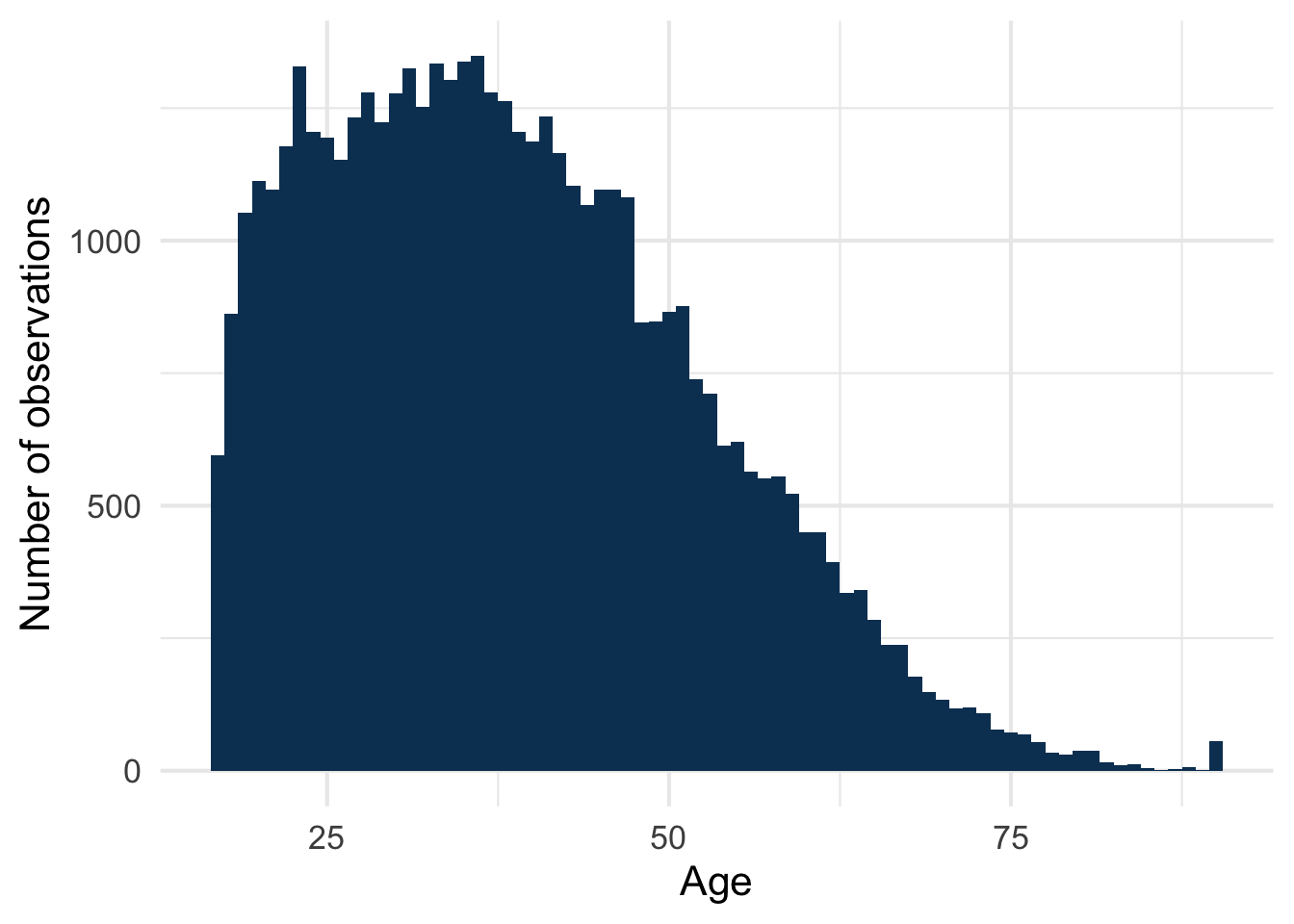
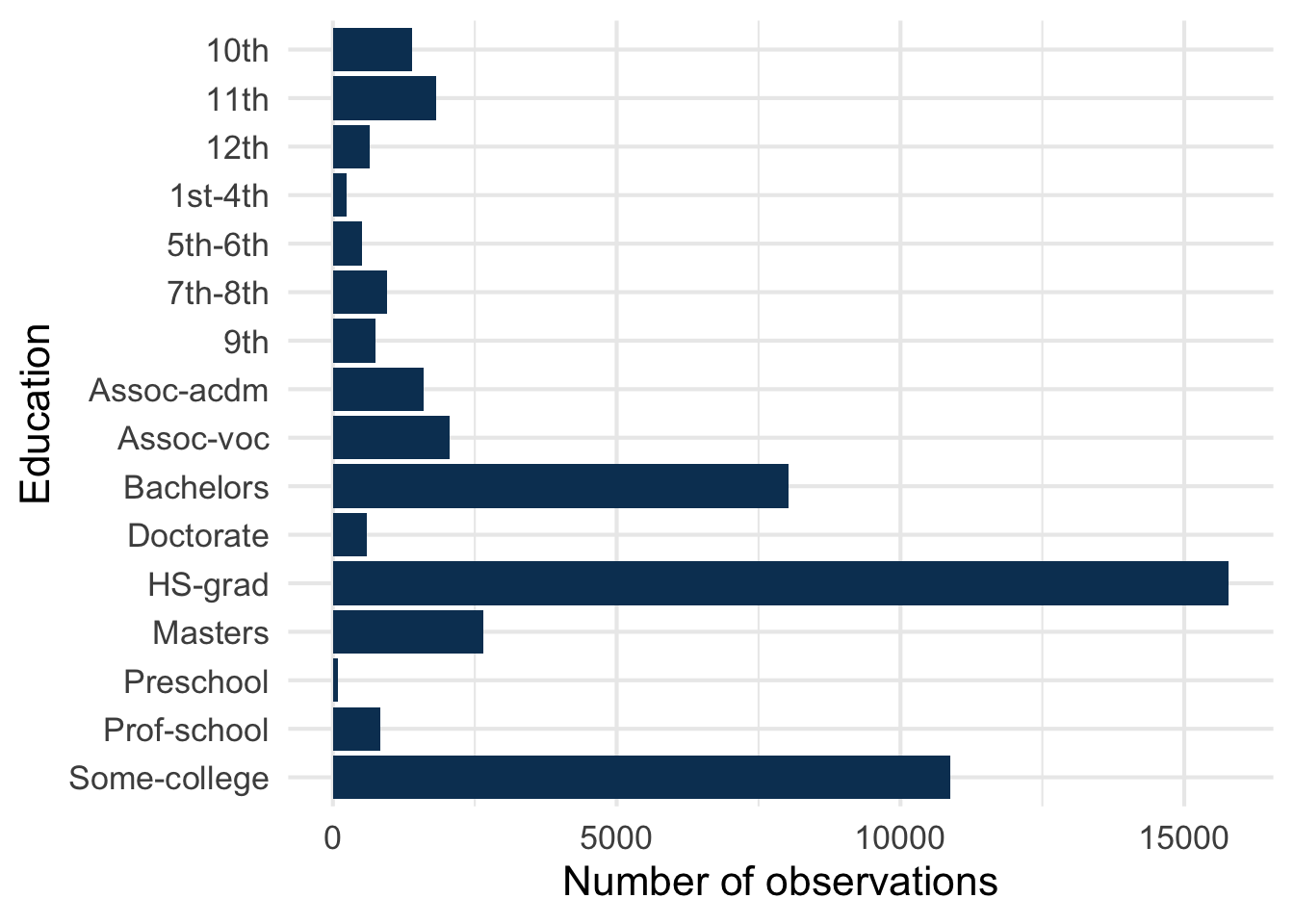
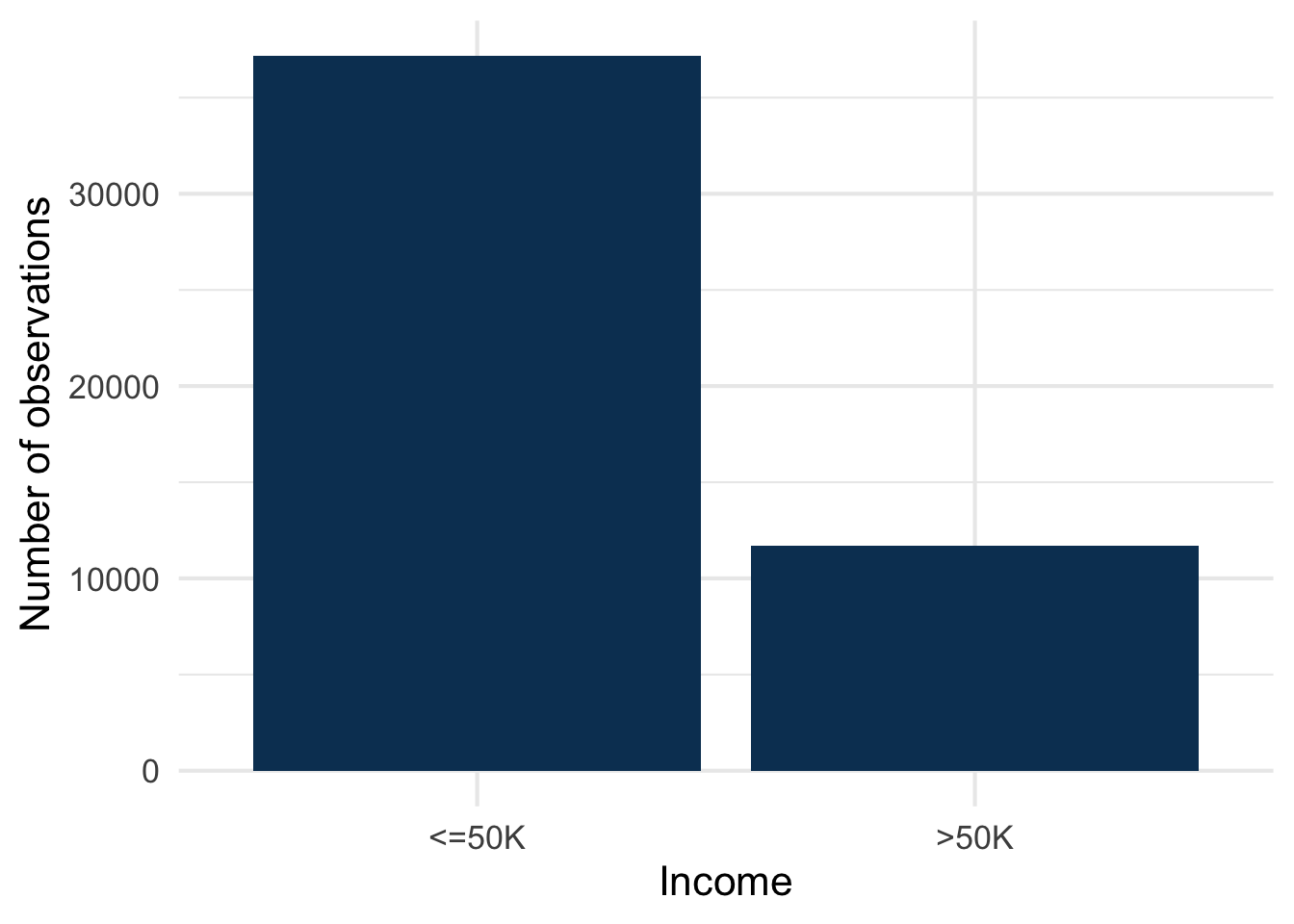
We use the classic Adult dataset (Becker and Kohavi 1996) (also known as “Census Income”): about 48,000 individuals from the 1994 US Census, with demographic and employment variables (age, education, occupation, hours_per_week, capital_gain, marital_status, and others, Figure 1), and a binary target, income, indicating whether that individual’s income is above or below $50K/year (Figure 2). A standard benchmark: small enough to train quickly, rich enough to have interpretable structure.
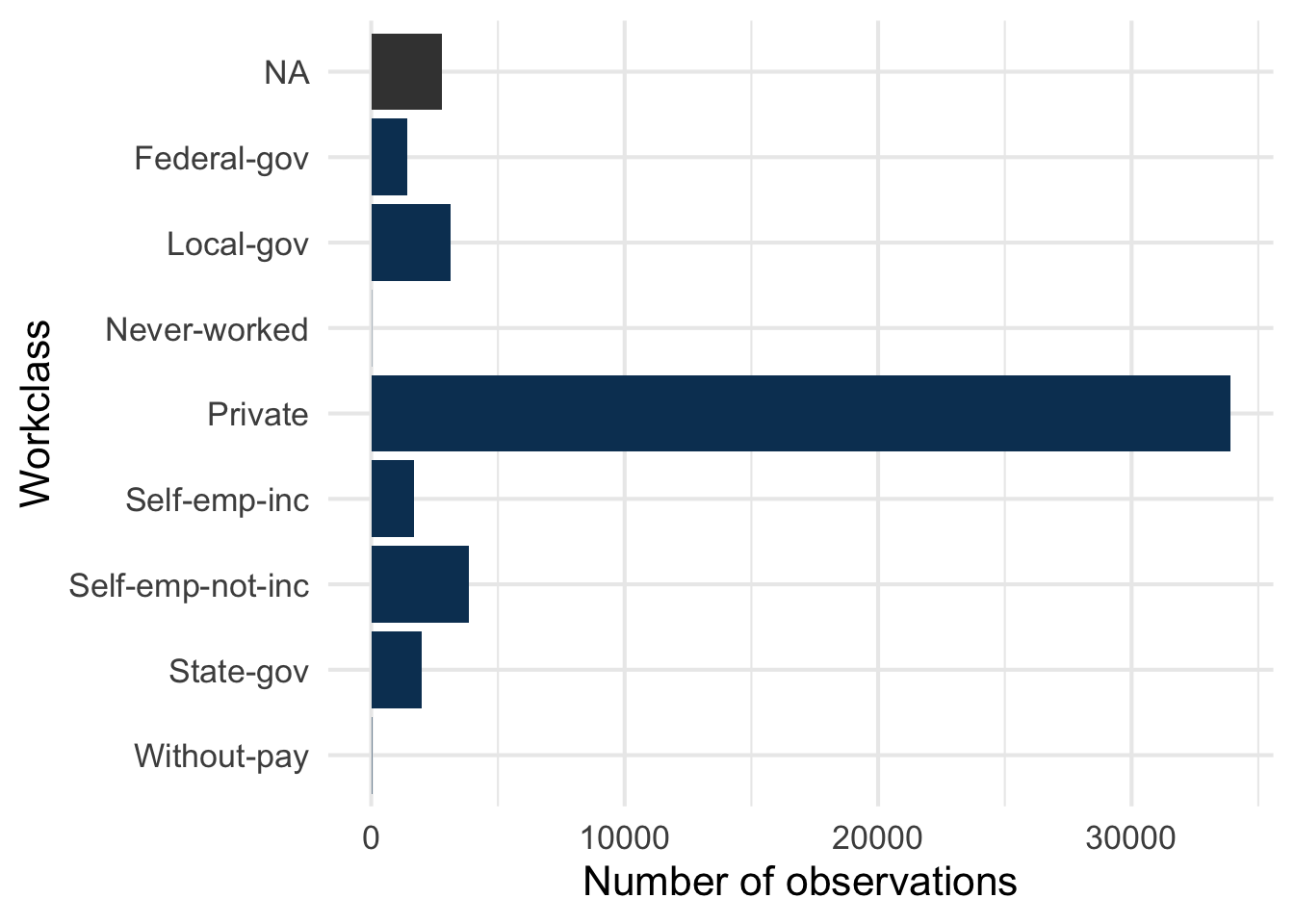
Type of employer or employment status of the person’s main job.
Category definitions
Private: employee of a private company (wage or salary worker in private industry)Self-emp-not-inc: self-employed, in an unincorporated business: the business has no legal existence of its own, owner and business are the same legal person (for instance a sole trader)Self-emp-inc: self-employed, in an incorporated business: the business is a company, a separate legal entity, and the owner is technically its employeeFederal-gov,State-gov,Local-gov: employee of the federal, state or local governmentWithout-pay: unpaid worker in a family business or farmNever-worked: has never had a job (very few observations)
Category definitions
Levels are ordered from the lowest to the highest (US education system).
Preschool,1st-4th,5th-6th,7th-8th: elementary and middle school grades9th,10th,11th,12th: high school grades, without a diplomaHS-grad: high school graduate (diploma)Some-college: attended college without obtaining a degreeAssoc-voc: associate degree, vocational (2 years, career-oriented)Assoc-acdm: associate degree, academic (2 years, can lead to a bachelor’s)Bachelors: bachelor’s degree (typically 4 years)Masters: master’s degreeProf-school: professional school degree (for instance law or medicine)Doctorate: PhD or equivalent
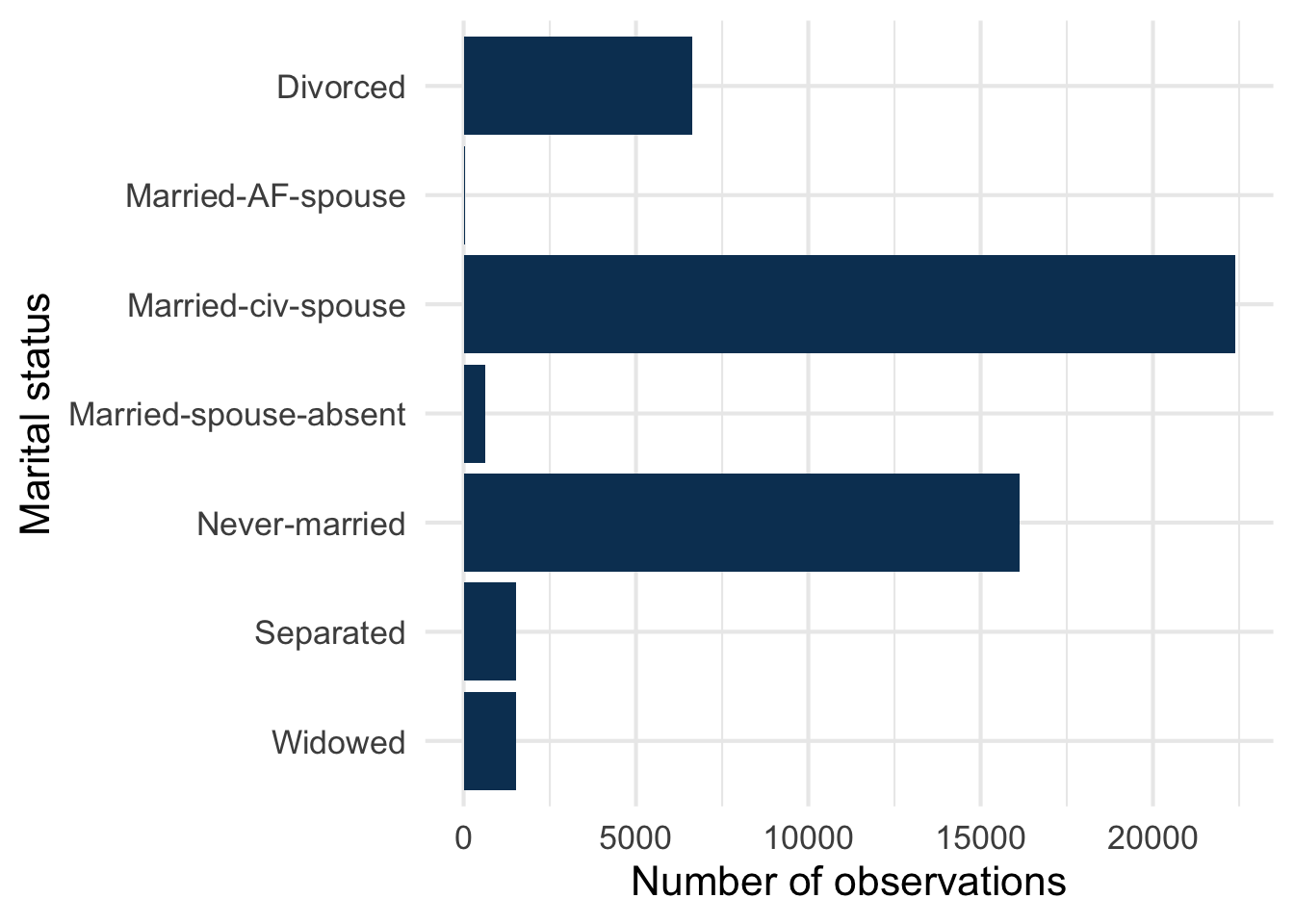
Pitfall: Married-civ-spouse carries almost the same information as Husband and Wife in relationship: the two variables are strongly correlated (see Correlated variables).
Category definitions
Never-marriedMarried-civ-spouse: married, with the (civilian) spouse living in the householdMarried-AF-spouse: married, with a spouse serving in the armed forces (very few observations)Married-spouse-absent: married but living apart, for instance because one spouse works far from homeSeparated: legally separated, or living apart with the intention of divorcingDivorcedWidowed
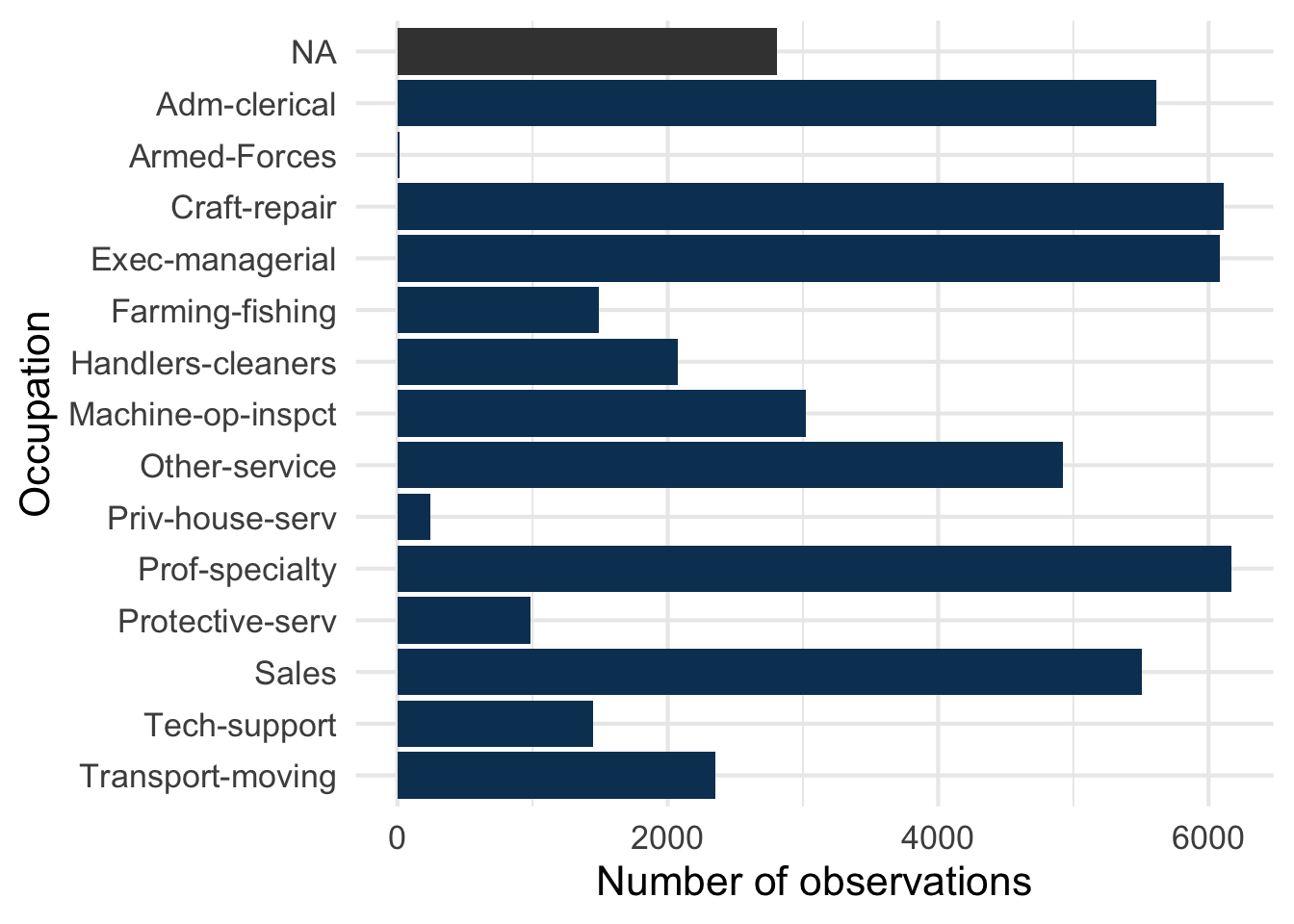
Category definitions
Broad groups of the US Census occupation classification. The dataset documentation gives no definitions, so the descriptions below are our reading.
Exec-managerial: executives and managersProf-specialty: professionals requiring a specialised degree (engineers, teachers, doctors, lawyers…)Tech-support: technical support staffSales: sales workersAdm-clerical: administrative and clerical staffCraft-repair: skilled trades and repair (mechanics, carpenters, electricians…)Machine-op-inspct: machine operators and inspectorsTransport-moving: drivers and other transport workersHandlers-cleaners: handlers, equipment cleaners, helpers and labourersFarming-fishing: agriculture, forestry and fishingProtective-serv: protective services (police, firefighters, security guards)Priv-house-serv: private household services (domestic workers)Other-service: other service occupations (for instance food service, personal care, cleaning)Armed-Forces: armed forces (very few observations)
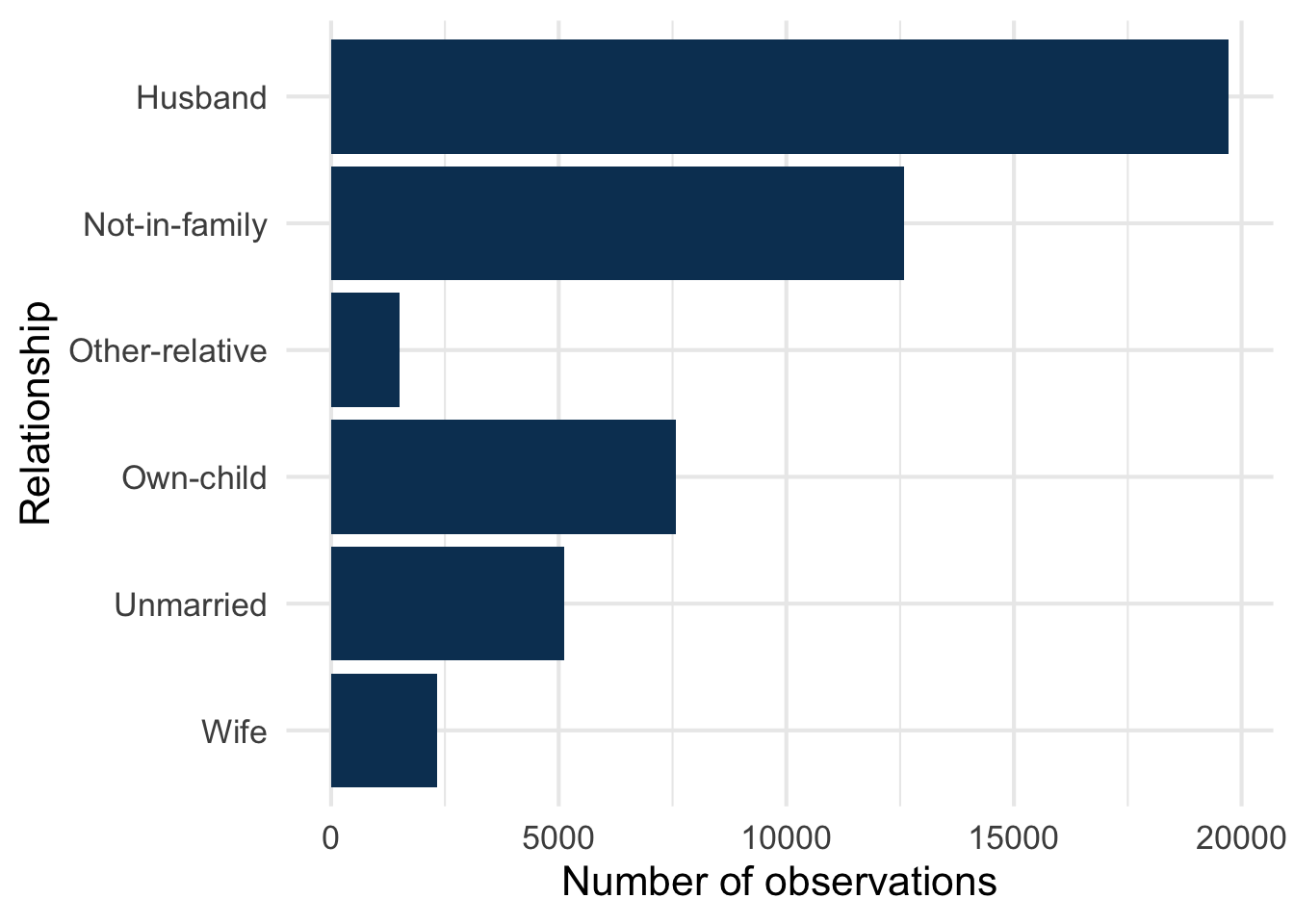
Pitfall: a Husband is a married man and a Wife a married woman (the category describes the person, not their partner), so these two categories also encode sex and marital status. This matters when reading SHAP values: relationship, sex and marital_status share information (see Correlated variables).
Category definitions
The Census describes each household from one person, the reference person: the person in whose name the home is owned or rented. The other categories say how a person is related to them.
Husband,Wife: married man, married womanOwn-child: child of the reference personOther-relative: relative of the reference person who is neither spouse nor child (for instance a sibling, a parent or a grandchild)Not-in-family: not a member of a family, meaning not related by birth, marriage or adoption to the rest of the household: living alone, or with flatmates, boarders or other unrelated peopleUnmarried: not documented. The closest Census concept is “unmarried partner” (an unrelated adult sharing the home as a couple), but this is our reading, not a definition from the dataset
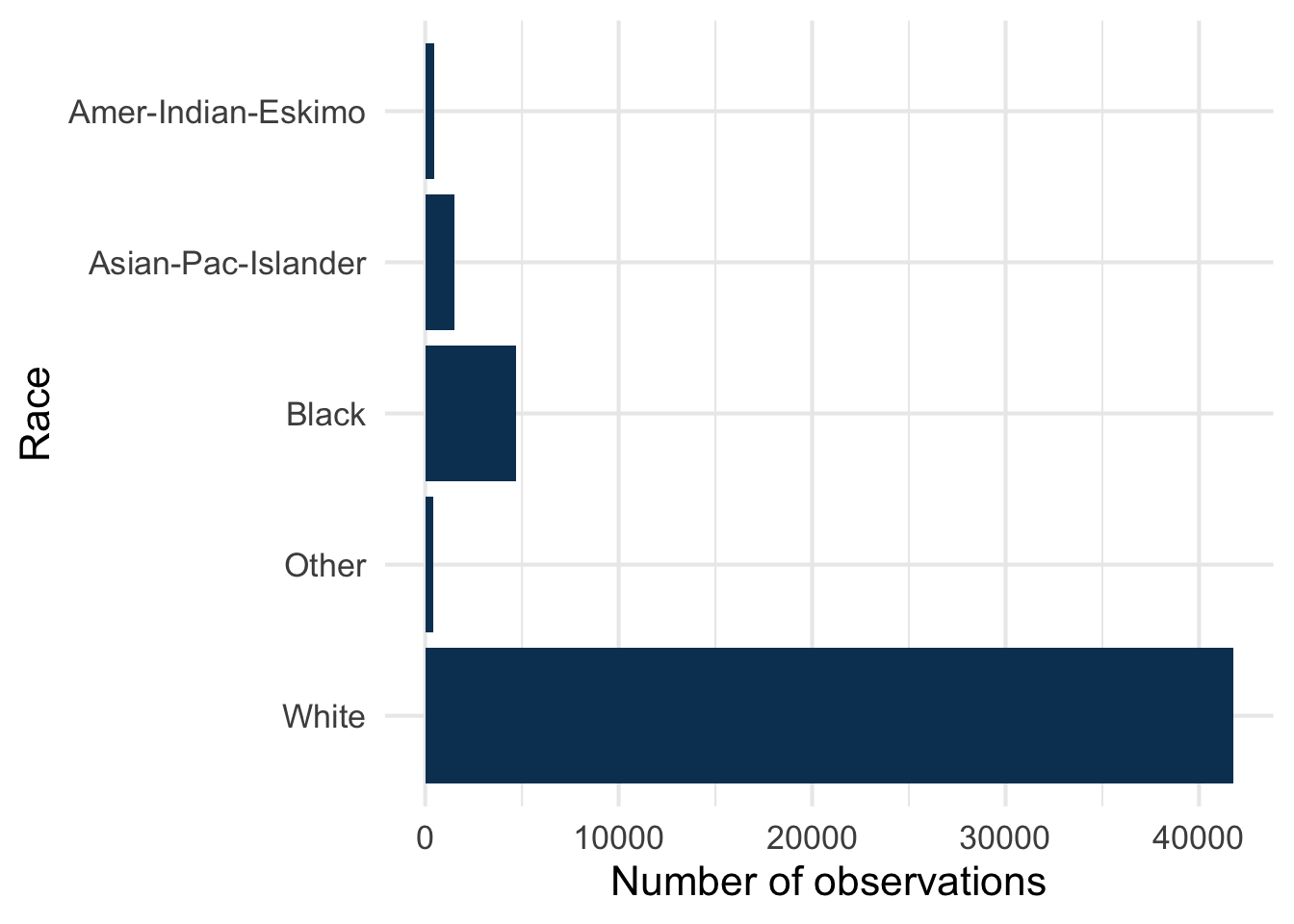
race and sex are kept as in the original 1994 Census data, to show what SHAP reveals about a model’s use of sensitive variables (see Responsible interpretation). The categories are those of the dataset.
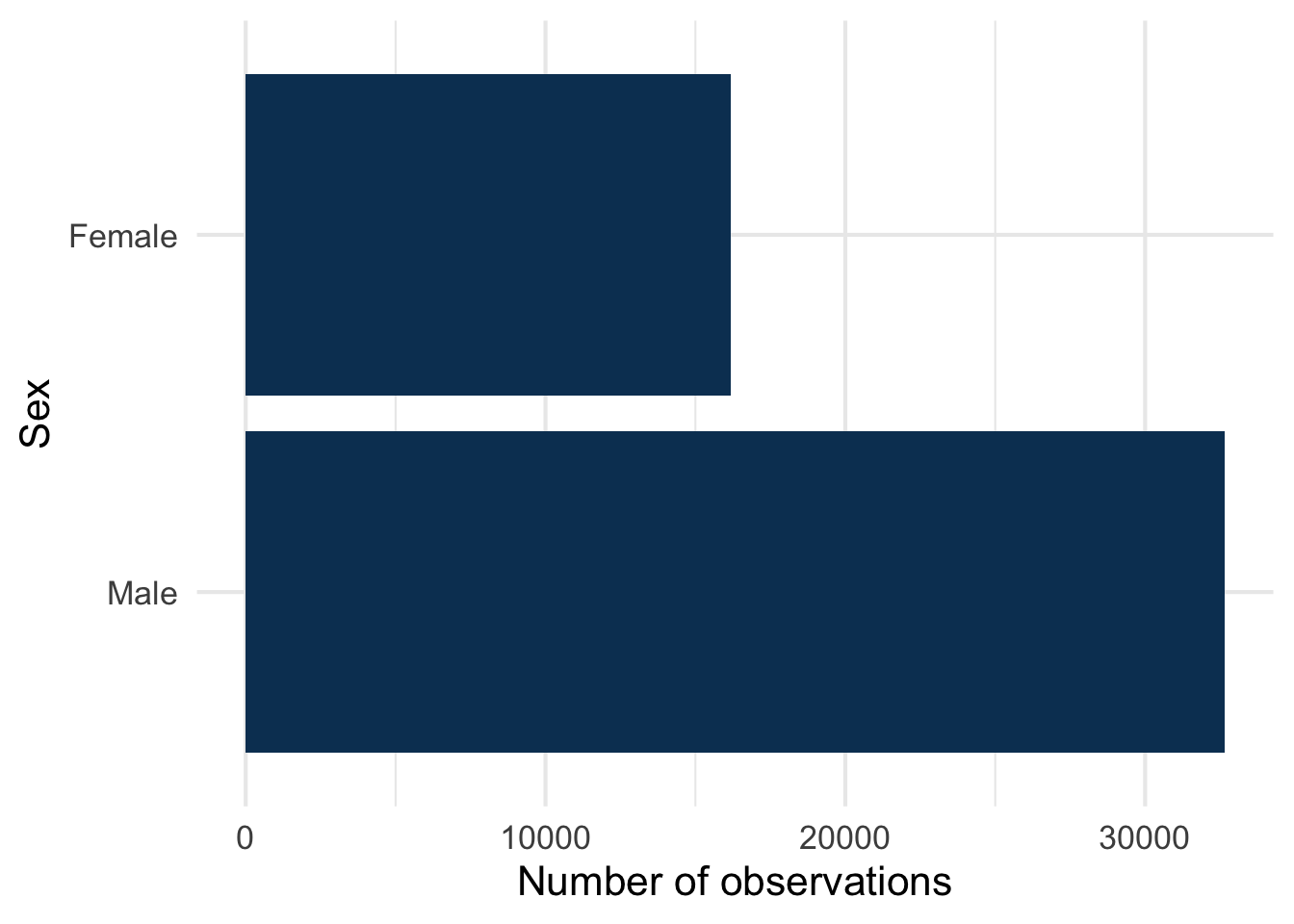
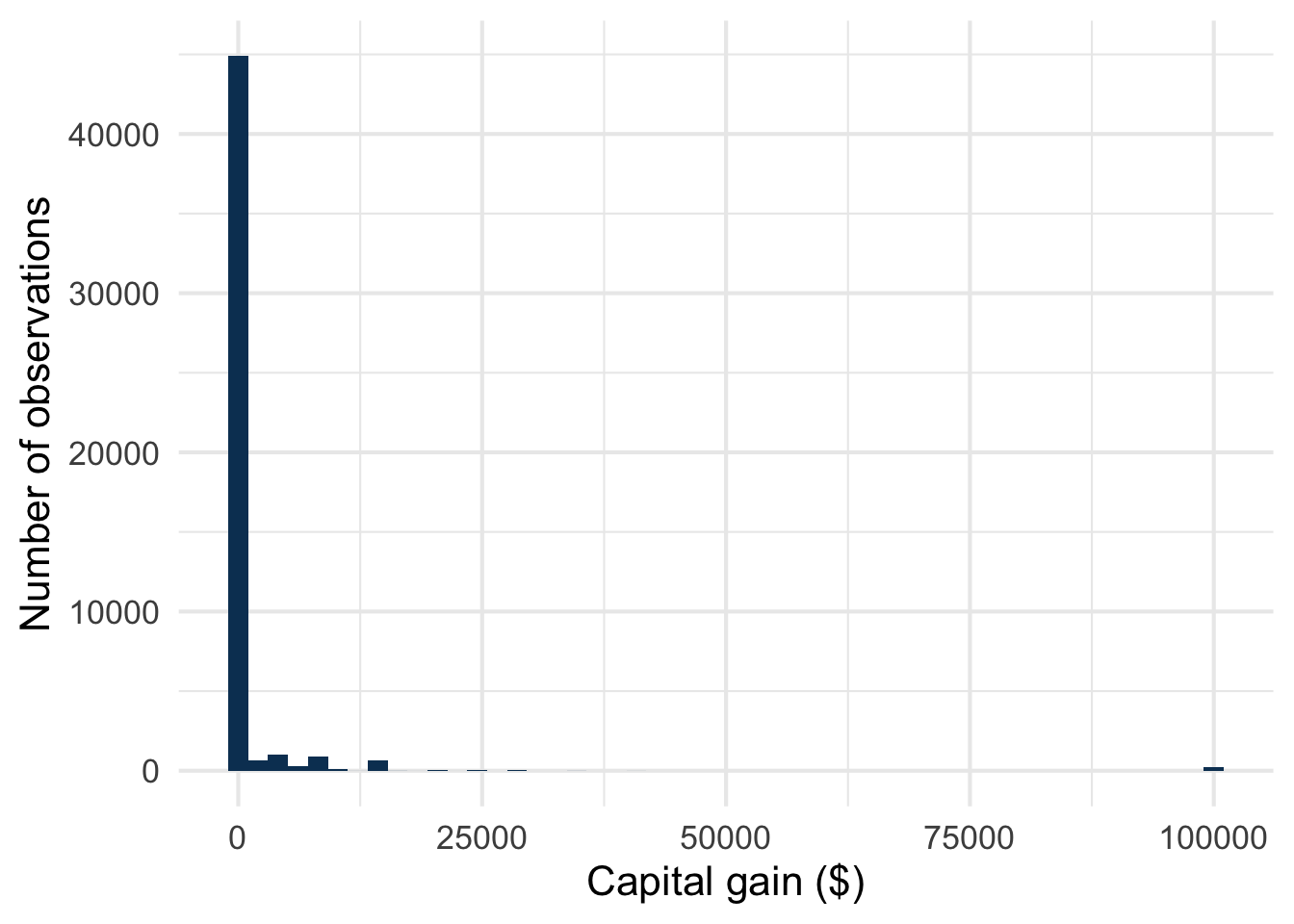
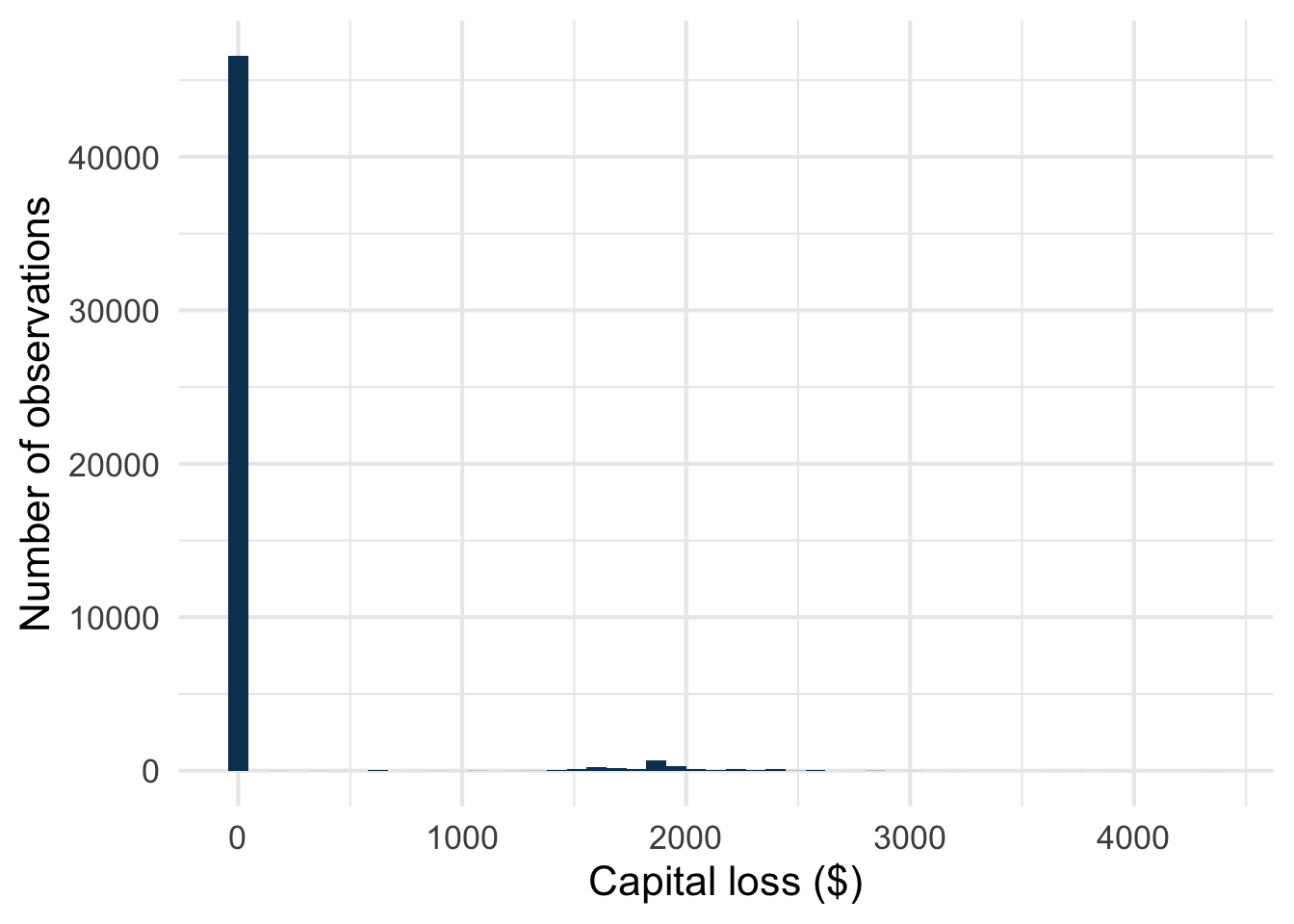
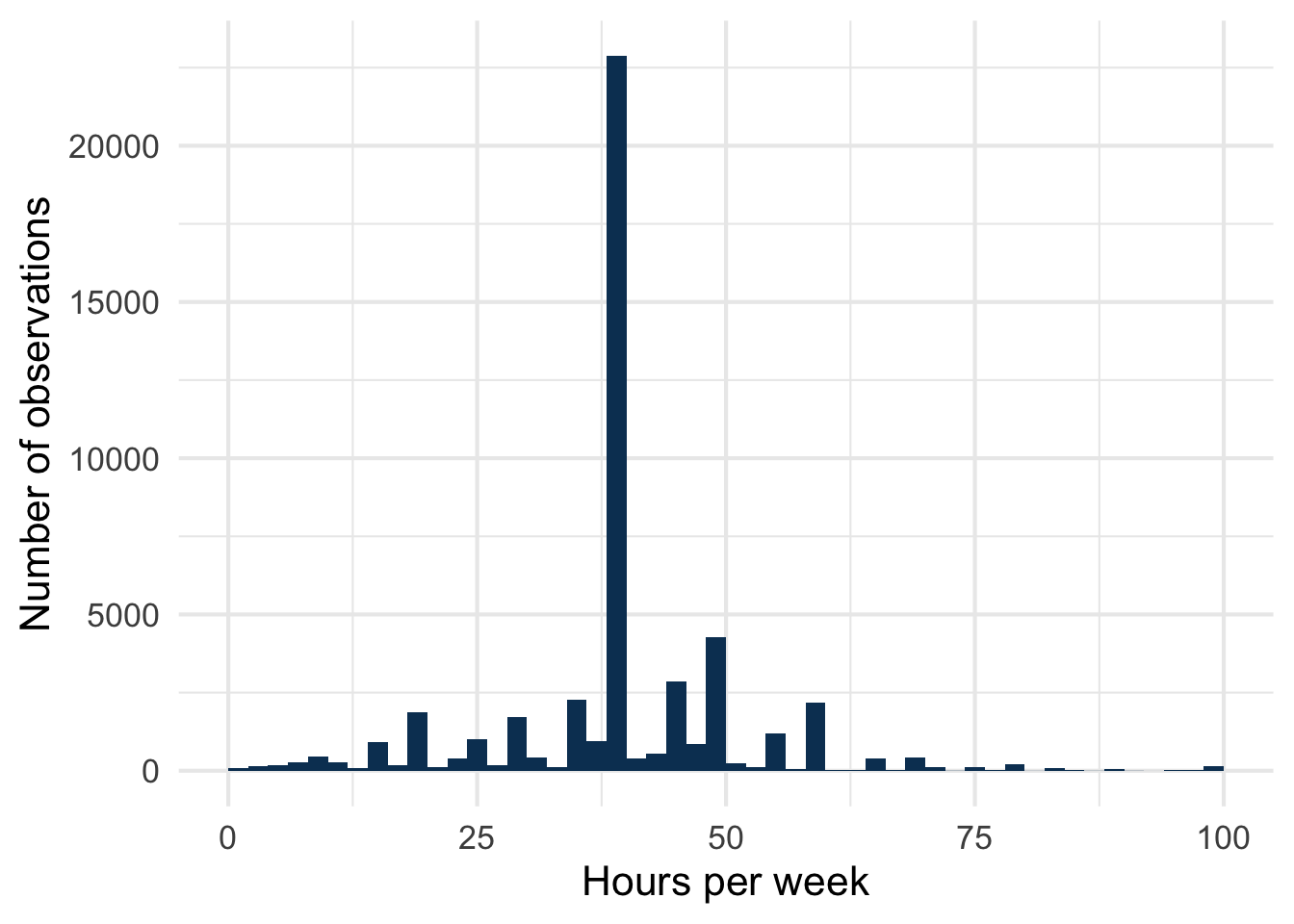
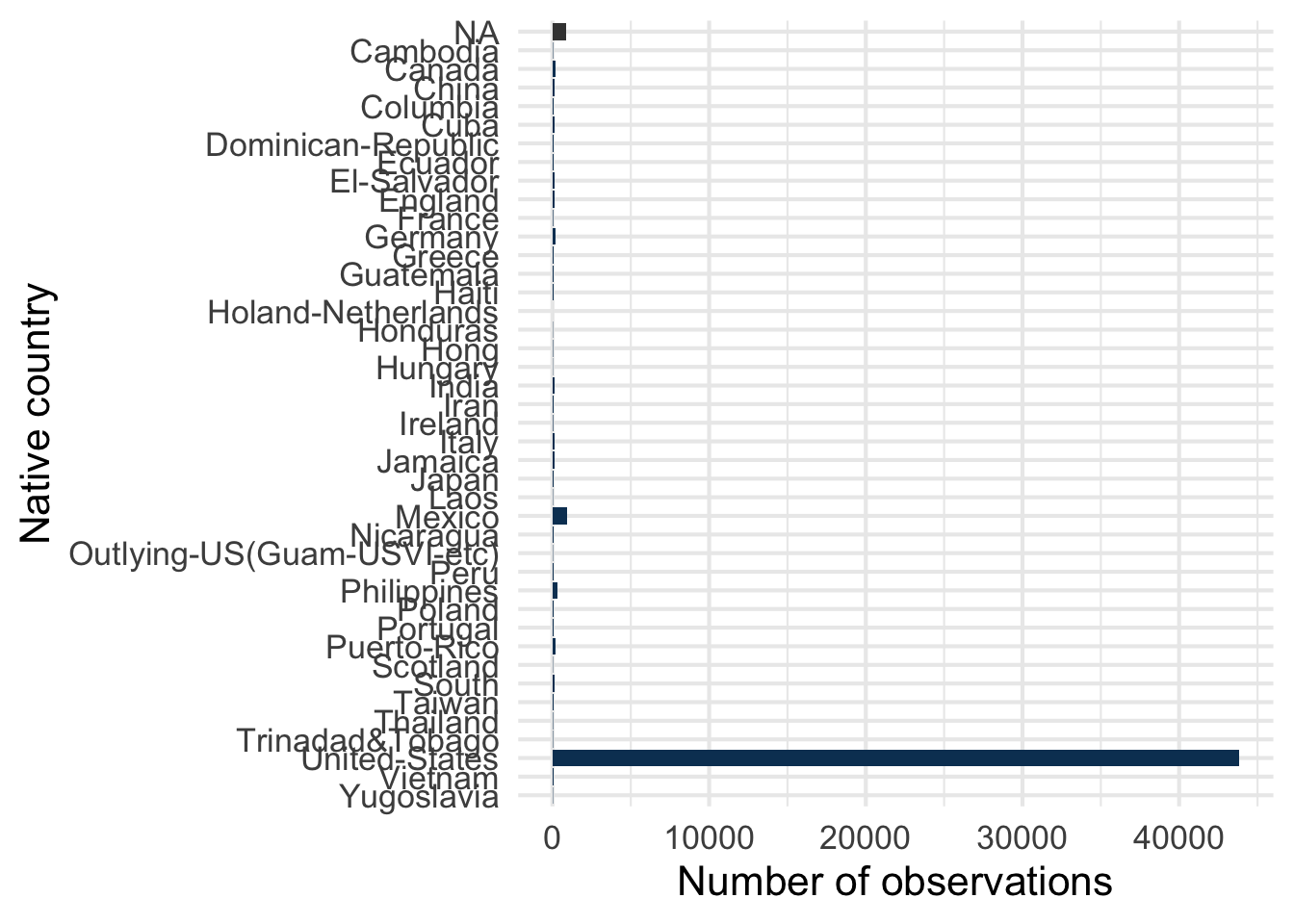
adult dataset.
The UCI repository lists the variables and their category labels but gives no definitions. The definitions in the tabs above come from the US Census Bureau’s subject definitions and from IPUMS CPS; the few we could not source are flagged.
Rather than reading a raw CSV, we load it from datapyranhia2, an R data package maintained by Pyranhia that bundles the datasets used across our training materials, ready to use:
library(datapyranhia)
data(adult, package = "datapyranhia")
2.2 The model
We trained a gradient boosting model (Friedman 2001) with the LightGBM engine (Ke et al. 2017; Shi et al. 2026), via tidymodels’ boost_tree() and the bonsai package (Falbel et al. 2026), which registers LightGBM as a parsnip engine. Gradient boosting is a strong default for tabular classification and, importantly here, it is tree-based, which is what makes the exact, fast SHAP computation possible (Section 8).
The model predicts income (>50K vs. <=50K) from the other variables, after a standard train/test split. Hyperparameters were tuned by grid search with cross-validation on the training set (full pipeline in R/01_train_model.R).
2.3 R packages
- tidymodels / bonsai: model specification, training workflow and LightGBM engine (Kuhn and Wickham 2020; Kuhn and Silge 2022),
- DALEX / DALEXtra: the
explain_tidymodels()explainer used for every method here, in the practice sections and in the Shiny app: feature importance, partial dependence plots, break-down and SHAP viapredict_parts(type = "shap")(Biecek 2018; Maksymiuk et al. 2020), - shapviz: the exact, fast TreeSHAP alternative, covered separately in Section 8,
- datapyranhia3: the
adultdataset.
3 Only required if you wish to retrain the model
NoteWhy
DALEX rather than shapviz?
Every plot here, in the practice sections and in the app relies on one explain_tidymodels() explainer, so all plots stay in the same predicted-probability units and break-down and SHAP remain comparable for the same observation.
It is not the fastest way to compute SHAP values (about 15 seconds per observation, even with a reduced reference set), but it exposes the intermediate steps that build the intuition, the priority for a tutorial. Once you have seen the plots and written your own code, Section 8 explains why it is slow and covers faster methods, in particular TreeSHAP with shapviz, which is what you would use in practice.
2.4 Environment
The packages are pinned with renv, so everyone runs the same versions: see Getting Set Up to clone the repository and restore the environment.
3 Setup: load the model, build the explainer
3.1 Load the model and dataset
We simulate the situation where you trained the model yourself with R/01_train_model.R. That script split the data into a training set and a test set, fitted the model, and saved all three in the repository. You can therefore load them directly:
gbm_fit <- readRDS(here("models", "gbm_adult.rds"))
adult_train <- readRDS(here("data", "processed", "adult_train.rds"))
adult_test <- readRDS(here("data", "processed", "adult_test.rds"))
The explainer is not loaded: you build it yourself, just below. The precomputed SHAP values, which take hours to compute, are loaded later, in the summary section.
TipBut what is a DALEX explainer?
A DALEX explainer wraps a fitted model and a reference dataset in one object, built once with explain_tidymodels() (or DALEX::explain() for other models). Every interpretation function (model_parts(), model_profile(), predict_parts()) takes it, whatever the model type.
It can also hold the true outcome (y), but only a tool that compares predictions with reality needs it: permutation importance (model_parts()). Break-down, SHAP and PDP only need the model and the reference data, so your explainer has no y.
The reference dataset is what the tools use to simulate “removing” a variable. The cost of break-down and SHAP grows with its number of rows, so your explainer uses a random sample of 500 rows: about 15 seconds per observation instead of about 4 minutes with the whole test set.
Because the sample is random, your numbers will differ slightly from those in these notes and from your neighbours’: this is expected, not a bug. SHAP values computed by sampling are estimates.
If you prefer, you can run R/01_train_model.R yourself instead of loading the fitted model: it prepares the data, tunes and fits the model, and saves the same three files. Note that it includes the grid search, so it takes a while, and a retrained model may give slightly different numbers from the ones shown in these notes.
3.2 How good is the model?
Before explaining a model, it is worth checking that it is good enough to be worth explaining. The usual classification metrics, on the test set, for the >50K class (the one we want to detect):
| Metric | Value | What it measures |
|---|---|---|
| Accuracy | 0.87 | Share of correct predictions |
| Precision | 0.77 | Among people predicted >50K, share who really are |
| Recall | 0.65 | Among people who really are >50K, share the model finds |
The accuracy has to be read against a trivial benchmark: always predicting <=50K would already be right 76% of the time, because only about 24% of individuals are in the high class. The other two metrics are more telling: with a recall of 0.65, the model misses about 35% of the people who really earn more than 50K.
This is a decent model, not a perfect one, and that is the point: its mistakes and its reasoning are exactly what we want to be able to inspect. The question is no longer how well it predicts but why it predicts what it predicts.
3.3 Build your explainer
ScriptYour turn to code!
Open R/02_shap_exercises.R: Part 0 already loads the model and the test set, and leaves a slot for your explainer. It then asks you to pick two contrasted observations (one low, one high predicted probability) that you will explain all along.
Build explainer once, from the fitted model and the test set, with explain_tidymodels() (arguments model and data). The data must not contain the target. Use a random sample of 500 rows as reference data.
HintHint
data is adult_test without the income column (select(-income)), then slice_sample(n = 500). No y here, see the callout above.
# a) Build the DALEX explainer with explain_tidymodels(): the model and the
#    test set without the target, a random sample of 500 rows as reference
#    data to keep the computation fast (your numbers will differ slightly
#    from your neighbour's: the sample is random)

# Explainer: the model, and 500 random rows of adult_test without income
# <Your code here>
ReponseSolution
explainer <- explain_tidymodels(
  model = gbm_fit,
  data = adult_test |> slice_sample(n = 500) |> select(-income)
)
Preparation of a new explainer is initiated
-> model label : workflow ( default )
-> data : 500 rows 12 cols
-> data : tibble converted into a data.frame
-> target variable : not specified! ( WARNING )
-> predict function : yhat.workflow will be used ( default )
-> predicted values : No value for predict function target column. ( default )
-> model_info : package tidymodels , ver. 1.5.0 , task classification ( default )
-> model_info : Model info detected classification task but 'y' is a NULL . ( WARNING )
-> model_info : By deafult classification tasks supports only numercical 'y' parameter.
-> model_info : Consider changing to numerical vector with 0 and 1 values.
-> model_info : Otherwise I will not be able to calculate residuals or loss function.
-> predicted values : numerical, min = 1.266326e-05 , mean = 0.2482171 , max = 0.999925
-> residual function : difference between y and yhat ( default )
A new explainer has been created! explainerModel label: workflow
Model class: workflow
Data head :
age workclass education marital_status occupation relationship
1 43 Private HS-grad Married-civ-spouse Adm-clerical Wife
2 32 Private HS-grad Married-civ-spouse Handlers-cleaners Husband
race sex capital_gain capital_loss hours_per_week native_country
1 White Female 0 0 40 United-States
2 White Male 0 0 30 United-States3.4 Pick two contrasted observations
ScriptYour turn to code!
Open R/02_shap_exercises.R and work through Part 0 (b, c): pick the two people you will explain all along.
Predict the probability of income >50K for the first 30 rows of adult_test, and keep the row number of one person with a low probability and one with a high probability. Compare them with the average prediction on the reference data.
HintHint
predict() takes the explainer and new data (adult_test |> slice(1:30)). Put the result in a tibble with the row numbers. The average prediction: mean() of predict() on explainer$data.
# b) Predict the probability of income >50K for the first 30 rows of the test
#    set, and keep the row number of one person with a LOW probability and
#    one with a HIGH probability

# Predicted probabilities of the first 30 rows, with their row number
# <Your code here>

# Row numbers of your two people
low_id <- NA # <- the row number of your LOW person
high_id <- NA # <- the row number of your HIGH person

# Given: your two people, used in all the following parts
my_low <- adult_test |> slice(low_id)
my_high <- adult_test |> slice(high_id)

# Their predicted probabilities
# <Your code here>

# c) Average prediction on the reference data: where do your two people
#    stand?
# <Your code here>
ReponseSolution
preds_30 <- tibble(
  row = 1:30,
  prob = predict(explainer, adult_test |> slice(1:30))
)
print(preds_30, n = 30)
# A tibble: 30 × 2
row prob
<int> <dbl>
1 1 0.999
2 2 0.00239
3 3 0.0298
4 4 0.0351
5 5 0.302
6 6 0.00436
7 7 0.806
8 8 0.988
9 9 0.411
10 10 0.418
11 11 0.0324
12 12 0.000367
13 13 0.0108
14 14 0.00981
15 15 1.000
16 16 0.997
17 17 0.00273
18 18 0.198
19 19 0.0136
20 20 0.0225
21 21 0.834
22 22 0.838
23 23 0.401
24 24 0.0201
25 25 0.0580
26 26 0.0697
27 27 0.000112
28 28 0.197
29 29 0.649
30 30 0.460 # Row 2 has a low probability, row 1 a high one
low_id <- 2
high_id <- 1
my_low <- adult_test |> slice(low_id)
my_high <- adult_test |> slice(high_id)
predict(explainer, my_low) >50K
0.002389884 predict(explainer, my_high) >50K
0.9989846 mean(predict(explainer, explainer$data))[1] 0.2482171
InterpretationInterpretation
In these notes we keep row 2 (low probability) and row 1 (high probability): they are used throughout, as my_low and my_high. You may have picked others: your plots will differ from those shown here, but they read the same way. Row 2 has a predicted probability of about 0.002 and row 1 about 0.999, against an average prediction of about 0.25 on the reference data: one far below the average, the other far above. Their explanations will go in opposite directions.
4 Quick overview: feature importance and PDP
Two simpler, widely-used tools are worth covering before SHAP: not because they are wrong, but because seeing their limitations first makes it clearer why SHAP was developed.
4.1 Global feature importance
The first question about a complex model is usually: which variables drive its predictions the most? Two common measures:
- MDI (Mean Decrease in Impurity): specific to tree-based models. The impurity reduction (Gini, entropy) of every split is credited to the splitting variable and aggregated over all trees and splits. Essentially free (it falls out of training), available in R through
vip(Greenwell and Boehmke 2020). It is known to be biased toward variables with many levels or many distinct values (Strobl et al. 2007). - Permutation importance: model-agnostic (Fisher et al. 2019). Shuffle one variable’s values (breaking its link with the outcome, keeping its marginal distribution), recompute the performance metric and record the drop; repeat several times. The larger the drop, the more important the variable. More expensive (many re-scorings) but more reliable, since it measures actual predictive impact rather than a training artefact. In R:
DALEX::model_parts().
Importance and PDP are cheap, so we use a second explainer, explainer_full, built on the whole test set for better precision. It also holds the true outcome y (as.numeric(adult_test$income == ">50K"), 1 for >50K, 0 otherwise), which permutation importance needs.
set.seed(456)
importance_perm <- model_parts(
  explainer = explainer_full,
  B = 10
)
plot(importance_perm, max_vars = 10)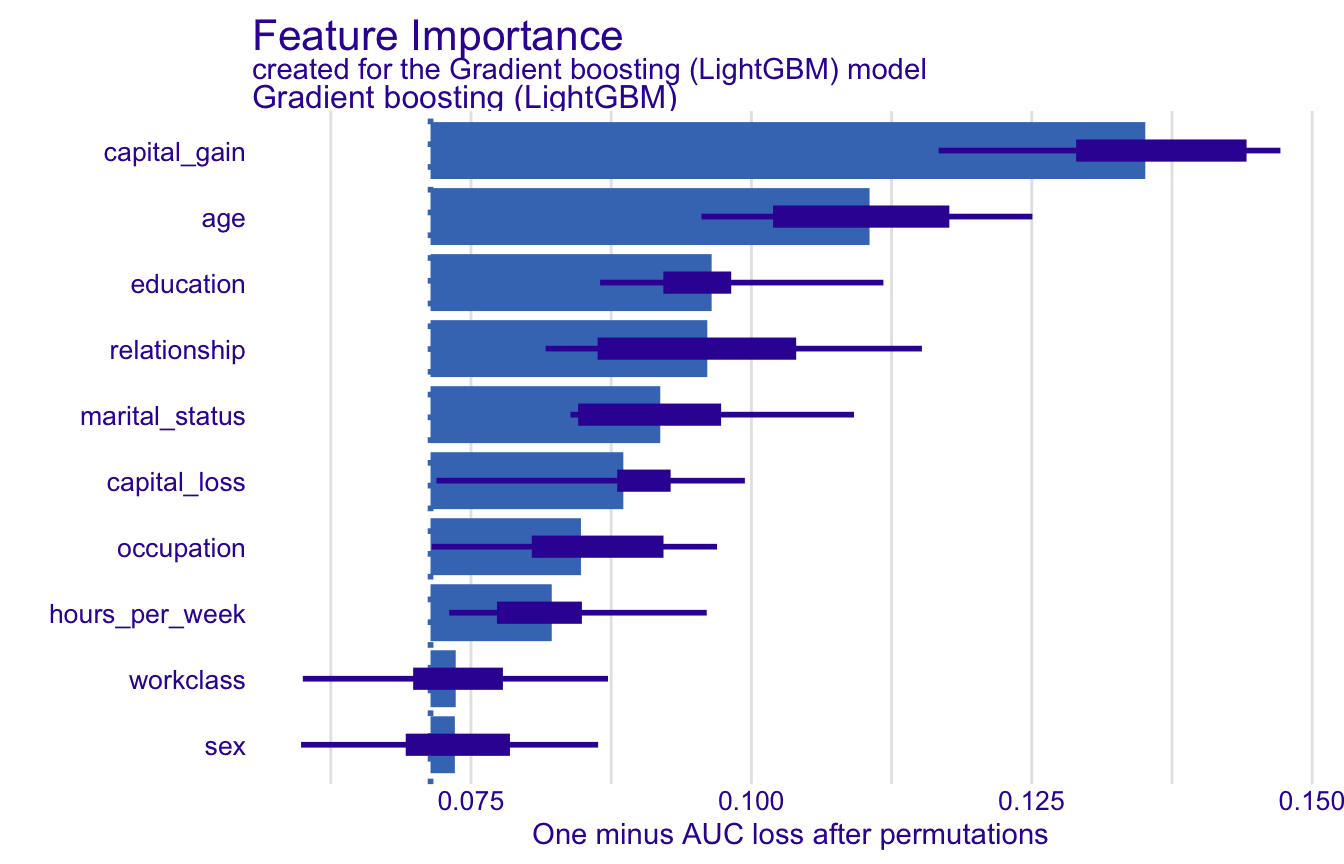
The loss measured here is 1 - AUC (the default of model_parts() for a classification model; the loss_function argument changes it): the better the model separates the two classes, the lower the loss. The reference point is the loss of the full model, before any shuffling: a variable matters when shuffling it pushes the loss well above that reference. Because the shuffling is random, each variable gets 10 values (B = 10): the thick bar shows their mean and the thin box and whiskers show how much they vary from one shuffle to another, a measure of the uncertainty due to the random permutations (not a confidence interval).
On this model, capital_gain comes out as the strongest predictor, typically followed by age, education and relationship. MDI (via vip for tree-based tidymodels fits) tends to give more weight to many-level variables, for the reason given above.
WarningA caution about
capital_gain
The strongest predictor, but the relationship is partly circular: high earners have more capital to invest (and to lose), so capital_gain is as much a consequence as a cause of high income. On top of that, we do not know whether the target income includes capital gains and losses: the documentation of adult does not say (more on this in Why does a capital loss push the prediction up?). For causal analysis or policy, one would likely drop capital_gain and capital_loss to focus on more structural drivers (education, age, occupation). We keep them here because they give interesting SHAP results, and we come back to this in SHAP and causality.
4.2 Partial Dependence Plots (PDP)
A PDP shows how the model’s average predicted probability changes as one variable varies (Friedman 2001). For each value on a grid, that variable is overwritten with this value for every observation, predictions are recomputed and averaged. An increasing curve means the variable pushes predictions up, a flat curve that it barely matters on average. In DALEX: model_profile() with type = "partial":
pdp_age <- model_profile(
  explainer_full,
  variables = "age",
  type = "partial"
)
pdp_education <- model_profile(
  explainer_full,
  variables = "education",
  type = "partial"
)
pdp_hours <- model_profile(
  explainer_full,
  variables = "hours_per_week",
  type = "partial"
)

library(patchwork)
p1 <- plot(pdp_age) +
  labs(title = "Effect of age", y = "P(income > 50K)")
p2 <- plot(pdp_education) +
  labs(title = "Effect of education", y = "P(income > 50K)") +
  theme(axis.text.x = element_text(angle = 45, hjust = 1))
p3 <- plot(pdp_hours) +
  labs(title = "Effect of hours worked", y = "P(income > 50K)")
p1 / p2 / p3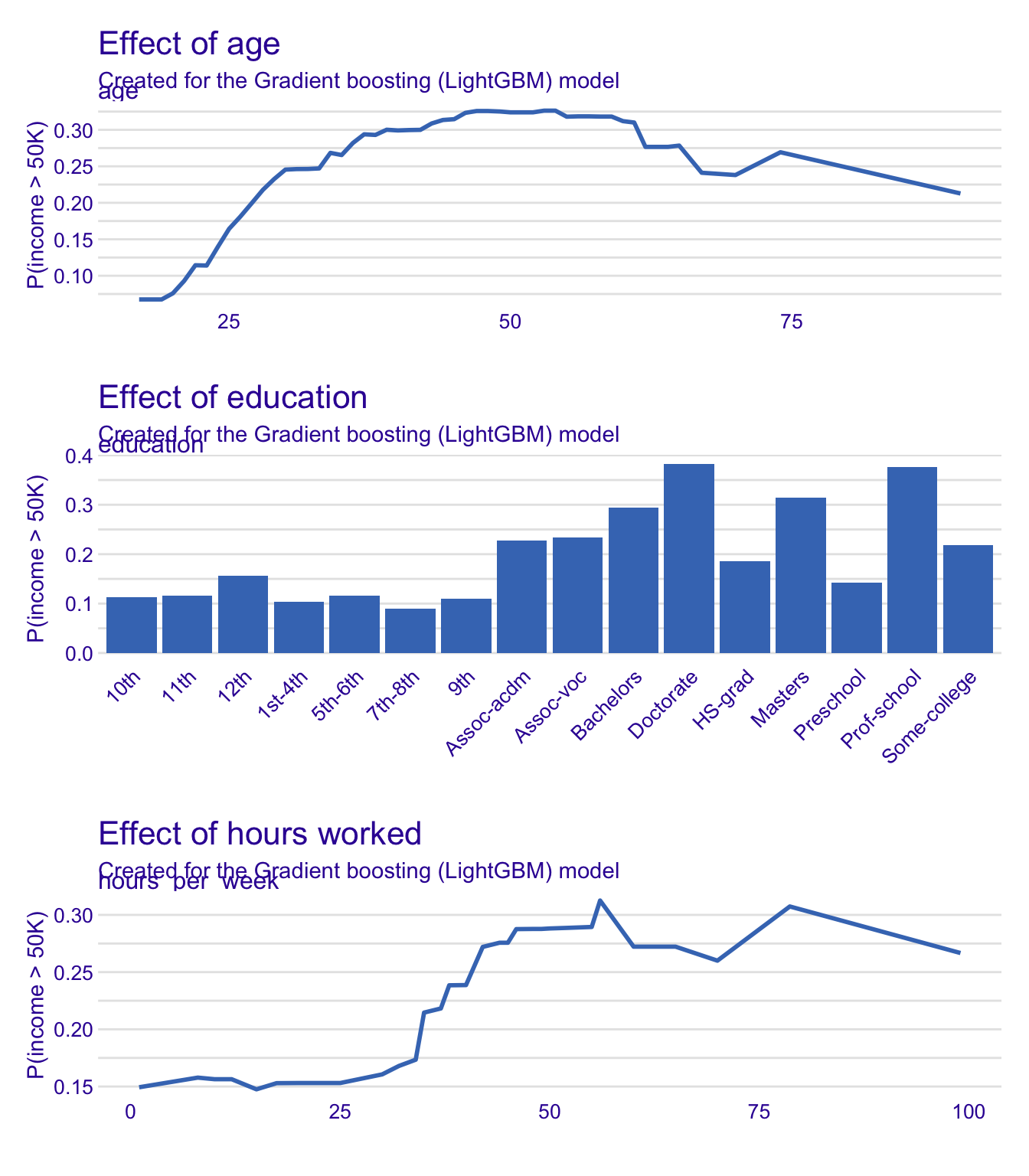
Typically:
age: the probability of high income rises fairly steadily up to about 45-50 years, then flattens and dips slightly (career progression, then a possible retirement effect)education:DoctorateandProf-schoolhave the highest average probabilities, followed byMastersandBachelors; levels below a university degree stay noticeably lowerhours_per_week: generally positive, with a plateau
The Y axis is the average predicted probability across the dataset, not the probability of any individual. Only about a quarter of individuals earn more than 50K, so values sit in a low range: what matters is how the average moves, not its level.
Behind a PDP are individual profiles (also called ceteris paribus or ICE curves): one curve per observation, obtained by varying only age for that observation, everything else being kept fixed, and recomputing its prediction. The PDP is simply their average. Drawing them as thin grey lines, with the average on top, shows what the average hides:
cp_age <- pdp_age$cp_profiles |>
  as_tibble() |>
  filter(`_vname_` == "age")
pdp_age_avg <- pdp_age$agr_profiles |> as_tibble()

ggplot() +
  geom_line(
    data = cp_age,
    aes(x = age, y = `_yhat_`, group = `_ids_`),
    alpha = 0.1,
    color = "gray50"
  ) +
  geom_line(
    data = pdp_age_avg,
    aes(x = `_x_`, y = `_yhat_`),
    color = "#0A3D62",
    linewidth = 1
  ) +
  labs(x = "Age", y = "P(income > 50K)")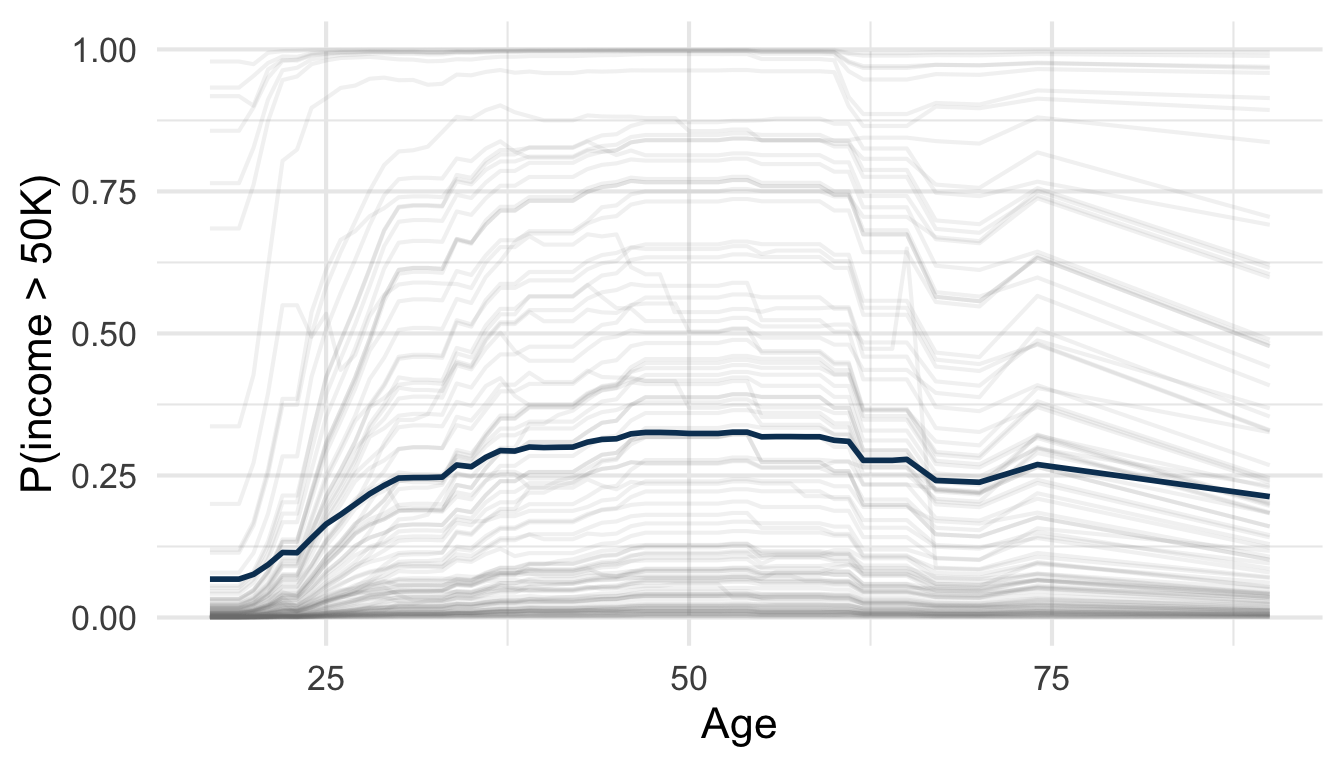
Where the grey curves differ from the blue one, the average hides differences between individuals: a first hint that the average effect does not tell the whole story, which the SHAP values of the next sections make explicit, observation by observation.
4.3 Limits of feature importance and PDP
Two limitations matter before moving on:
PDP assumes independence: it overwrites one variable as if variables were independent. Fixing
hours_per_weekat 80 hours for the whole dataset, retired profiles included, creates impossible combinations the model never saw, and the PDP averages over them anyway, which can distort the curve.4Both tools are aggregate: they answer which variables matter? and what is the average effect?, never why did the model make this prediction, for this individual? This is precisely the gap SHAP values fill.
4 Accumulated Local Effects (ALE) plots were proposed to reduce this problem with correlated variables (Apley and Zhu 2020). In DALEX, same call as the PDP with type = "accumulated": model_profile(explainer_full, variables = "age", type = "accumulated").
5 The intuition behind SHAP values
Shapley values (Shapley 1953), from cooperative game theory, split a “reward” fairly among the “players” who produced it: each player gets its average marginal contribution across every possible coalition of players. SHAP (SHapley Additive exPlanations) (Lundberg and Lee 2017) applies this to machine learning: the reward is a model’s prediction for one observation, the players are the input variables.5
5 Shapley values had been proposed earlier to explain individual predictions by Štrumbelj and Kononenko (2014).
TipWhat is a coalition?
A coalition is any subset of the variables: the ones whose values we reveal to the model for this individual. With age, education, and hours_per_week, {age, education} is one coalition, and {} (nothing revealed) is another, the empty coalition. A model with \(p\) variables has \(2^p\) possible coalitions, since each variable is either in or out.
But a model cannot predict with missing values: it needs a value for every variable. So the variables outside the coalition take the values of an “average” individual, drawn from the reference dataset. In practice, for each row of the reference dataset, the coalition’s variables are set to the individual’s values, the other variables keep the values of that row, and the model predicts; the predictions are then averaged. The result answers: “what does the model predict, on average, when all it knows about this person is the coalition?” With the empty coalition, this is the average prediction on the reference dataset, the baseline.
With \(p\) variables there are \(2^p\) coalitions to evaluate, a number that explodes quickly: this is why efficient approximations exist in practice.
5.1 A toy example of a cooperative game
Before the real data, here are the mechanics on something simpler: three colleagues splitting a bonus. Four short widgets walk through it one step at a time. The first two come now: the payoffs of every possible coalition, and a member’s marginal contribution. The last two, where the Shapley weights come from and each member’s Shapley value, come back later, once break-downs have shown the same problem on a real model.
Work through them in order: each one builds on the previous one, and the short text before each widget tells you what to do and what to look for.
Step 1: the payoffs. The bonus a group earns depends on who is in it. Read the payoff rule shown in the widget, try to work out the payoff of each group yourself, then click on the group to check. Look at how the payoffs of the larger groups compare with the sum of their members’ individual payoffs.
InterpretationInterpretation
Each colleague alone earns 4 (A), 3 (B) and 2 (C), but a group earns more than the sum of its members: A and B together earn 9, not 7, and the full team 15, not 9. The colleagues work better together, which is exactly why sharing the bonus fairly is not trivial.
Step 2: what does one colleague add? All eight payoffs are now known. Pick a member, for instance A (the designer; B is the developer and C sales), and compare every pair of groups that differ only by A’s presence: the gap is A’s marginal contribution in that context. Is it the same in every context? So which one should be used to reward A?
InterpretationInterpretation
The gap is not the same in every context. For A, it is 4 when A joins an empty group, 6 when A joins B alone or C alone, and 8 when A joins B and C. No single number is “A’s contribution”: which one to use has no obvious answer yet.
Keep this question in mind: the same problem shows up with a real model, and Shapley’s answer comes right after.
Let’s now move to the real model and data!
6 Individual level: break-down plot and SHAP waterfall
Recall the setup: a gradient boosting model (LightGBM via tidymodels) trained on adult to predict whether income exceeds 50K, wrapped once in a DALEX explainer (training pipeline in R/01_train_model.R). We explain the two contrasted observations picked in the setup: one where the model is near-certain of income ≤50K, one where it is near-certain of >50K.
bind_rows(
  my_low |> mutate(profile = "low probability", .before = 1),
  my_high |> mutate(profile = "high probability", .before = 1)
) |>
  select(
    profile,
    age,
    education,
    occupation,
    hours_per_week,
    capital_gain,
    marital_status
  )
# A tibble: 2 × 7
profile age education occupation hours_per_week capital_gain marital_status
<chr> <dbl> <chr> <chr> <dbl> <dbl> <chr>
1 low pro… 54 HS-grad Other-ser… 20 0 Separated
2 high pr… 31 Masters Prof-spec… 50 14084 Never-married 6.1 Break-down plot
The break-down plot (Staniak and Biecek 2018; Biecek and Burzykowski 2021) decomposes one prediction step by step: starting from the baseline (average) prediction, variables are added one at a time and the change in prediction is tracked at each step, in an order chosen by DALEX based on the absolute size of each contribution.
6.1.1 Compute a break-down
ScriptYour turn to code!
Open R/02_shap_exercises.R and work through Part 1 (a): compute the break-down of your two observations.
Compute the break-down of my_low and my_high with predict_parts() and plot them.
HintHint
predict_parts() takes the explainer, the observation (new_observation) and type = "break_down". Then call plot() on the result.
# a) Compute and plot the break-down of my_low and my_high

# Break-down of my_low
# <Your code here>

# Plot it
# <Your code here>

# Same for my_high
# <Your code here>
ReponseSolution
bd_low <- predict_parts(
  explainer,
  my_low,
  type = "break_down"
)
plot(bd_low)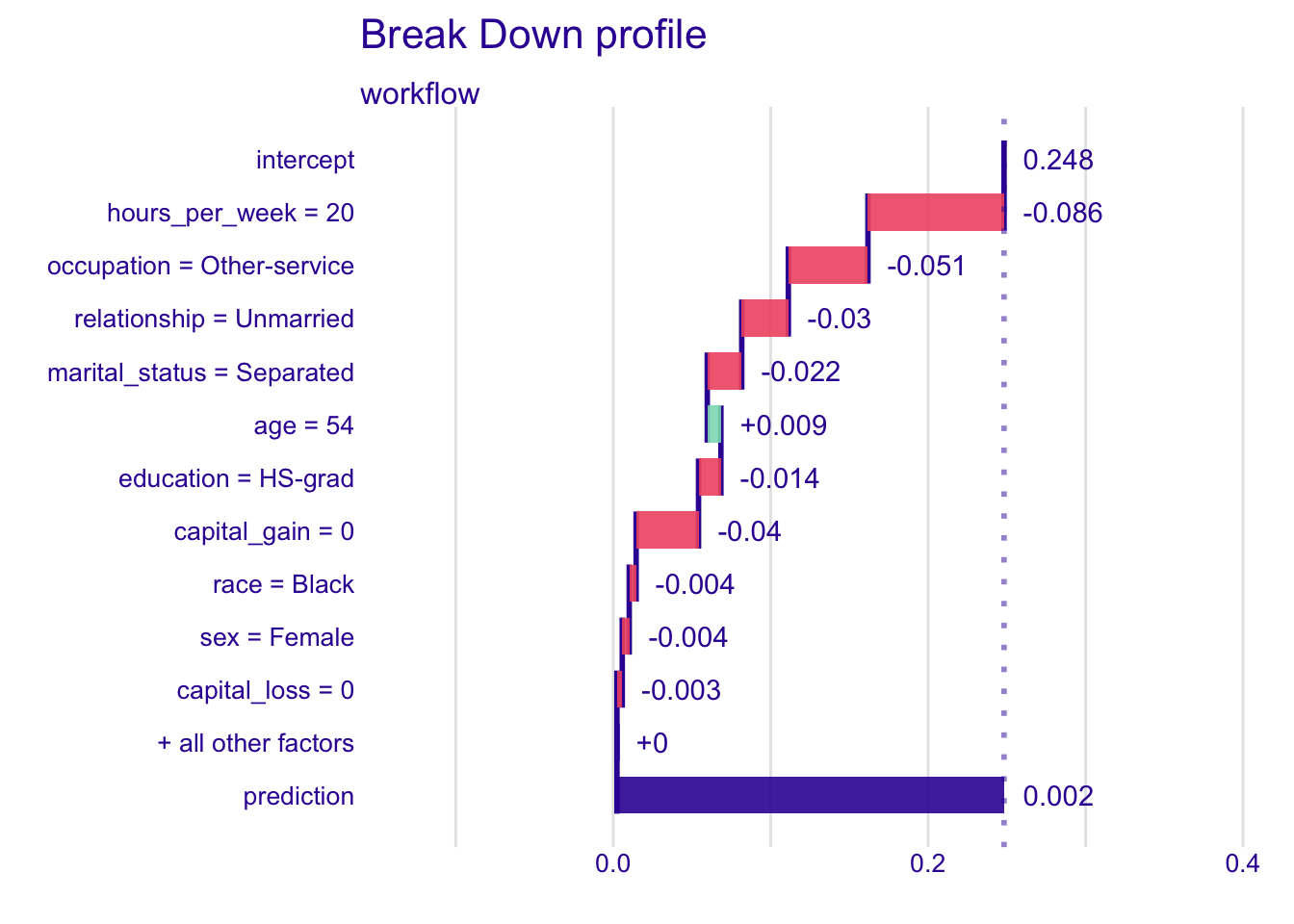
bd_high <- predict_parts(
  explainer,
  my_high,
  type = "break_down"
)
plot(bd_high)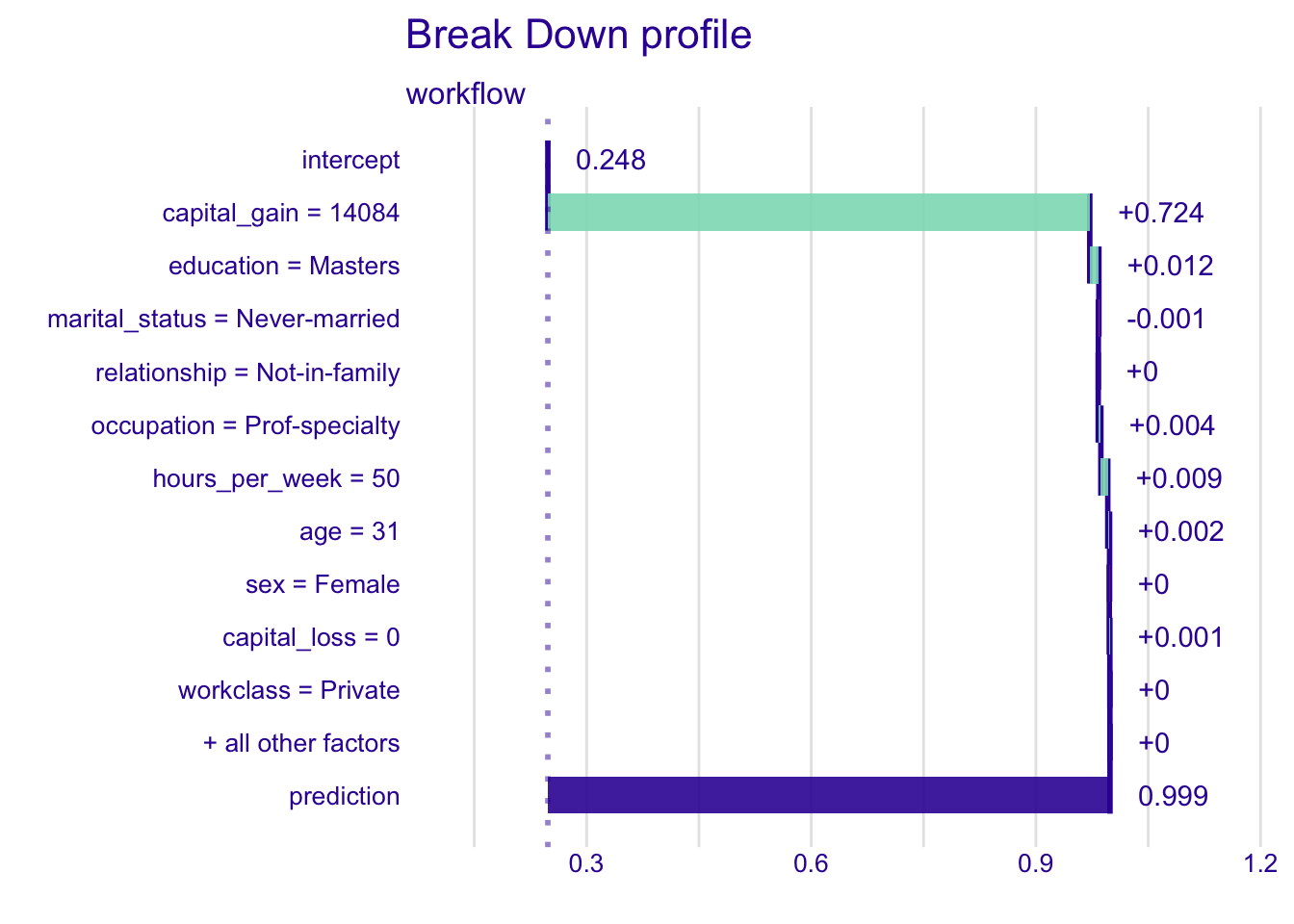
InterpretationInterpretation
- low-probability profile (from 0.25 down to 0.002): almost every variable pushes the prediction down. The largest negative contributions come from
hours_per_week = 20(about -0.09),occupation = Other-service(-0.05),capital_gain = 0(-0.04) andrelationship = Unmarried(-0.03). Onlyage = 54pushes it up, slightly (+0.01). - high-probability profile (from 0.25 up to 0.999):
capital_gain = 14084alone brings +0.72. Once the prediction is close to 1, the other variables have almost no room left:education = Mastersandhours_per_week = 50add about +0.01, the rest about 0.
As expected from the permutation importance and the PDP: few hours, a low-skilled occupation and no capital gain go with low incomes, a large capital gain with high incomes.
Warning
The order of variables is fixed by DALEX according to contribution size: these are break-down contributions, not yet SHAP values.6
6 The plots in this document are the default DALEX plots; those in the app are custom made.
TipExplore it yourself
The demo Shiny app shows the break-down of 12 pre-selected test-set observations, no code needed. Change the order of variables to see its effect on the plot.
On the RStudio Server, open it at shiny-uros2026.pyranhia.eu (available during the session only). If you work locally, or after the session, open app/shiny_demo/app.R and click Run App.
6.2 From break-down to SHAP: the problem of order
The break-down plots picked one ordering, chosen by contribution size. But any other ordering is just as valid and, because variables interact in the model, can give a different contribution to the same variable: there is no single correct break-down.7
7 DALEX also offers a break-down that looks for pairwise interactions and shows them as a single bar: predict_parts(type = "break_down_interactions").
6.2.1 Shuffle the order
ScriptYour turn to code!
Open R/02_shap_exercises.R and work through Part 1 (b): the same break-down, in a random order.
Compute the break-down of my_low with the variables added in a random order, and plot it. Run it twice: do the contributions change?
HintHint
Same call as above, plus order = sample(vars), where vars holds the names of the 12 predictors.
# b) The same break-down of my_low, with the variables added in a random
#    order. Run it twice: do the contributions change?
vars <- setdiff(names(adult_test), "income") # given: the 12 predictors

# Break-down of my_low, with the variables in a random order
# <Your code here>

# Plot it
# <Your code here>
ReponseSolution
vars <- setdiff(names(adult_test), "income") # the 12 predictors

bd_low_random <- predict_parts(
  explainer,
  my_low,
  type = "break_down",
  order = sample(vars)
)
plot(bd_low_random)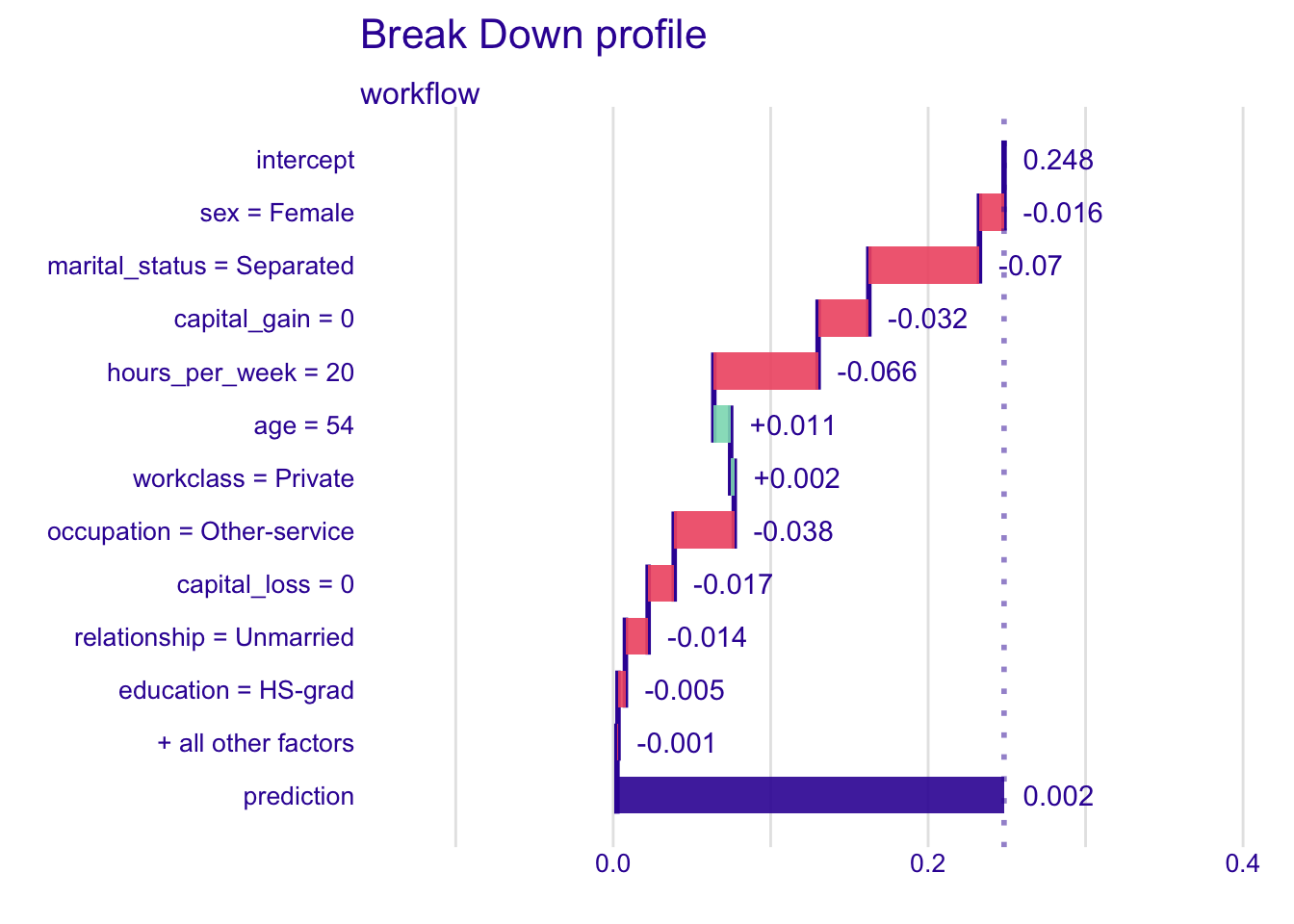
InterpretationInterpretation
Same observation, same model, same prediction, but different contributions. In the run shown here, hours_per_week goes from -0.09 to -0.07 and marital_status from -0.02 to -0.07, only because the variables were added in another order. Which order is the right one? None.
6.2.2 Back to the bonus: Shapley’s answer
The three colleagues had exactly this problem: what A adds depends on who is already in the room. Shapley’s answer comes in the last two widgets.
Step 3: weighting the contexts. No single context is the right one, so we take an average, but not a plain one. Imagine the three colleagues entering the room one by one in a random order: there are 6 possible orders. Pick a member and see who is already in the room right before they arrive: how often does each context occur?
InterpretationInterpretation
For A, the empty group comes right before A in 2 orders out of 6 (A arrives first), B alone in 1, C alone in 1, and B and C together in 2 (A arrives last). These frequencies, 1/3, 1/6, 1/6 and 1/3, are the weights of the contexts.
Step 4: putting it together. Multiply each marginal contribution of step 2 by the weight of its context from step 3, and add everything up: the result is the Shapley value. Pick each member in turn and follow the computation. Do the three Shapley values add up to the bonus?
InterpretationInterpretation
For A, the Shapley value is 4 × 1/3 + 6 × 1/6 + 6 × 1/6 + 8 × 1/3 = 6. With the numbers of the widgets, each colleague alone brings 4 (designer), 3 (developer) and 2 (sales), and every pair that works together earns 2 more, so the full team earns 15. The Shapley values are 6 for the designer, 5 for the developer and 4 for sales, and they add up to 6 + 5 + 4 = 15: the full bonus, nothing more and nothing less.
This efficiency property is the one that becomes additivity for a model’s prediction, as we will see below.
6.2.3 The same with variables: three variables, eight coalitions
The same logic now applies directly to a toy prediction, with age, education, and hours_per_week standing in for the three colleagues above. We use a fictional individual with the following properties: age = 45, education = Bachelors, hours_per_week = 50.
age, education and hours_per_week for one fictional individual.
InterpretationInterpretation
In this toy example, the average prediction is 40 (k$ per year) and the prediction for this individual is 52. The SHAP values are +4 for age, +6 for education and +2 for hours_per_week: 40 + 4 + 6 + 2 = 52. Stacking the shares one after the other is only a way to show the sum: the running totals (44 after age, 50 after education) are not model predictions. With only age known, the model predicts 43, not 44, because the SHAP value of age is an average over all the orders, not the gain of adding age first (+3).
I want more detail
To make this concrete in writing as well, with \(p = 3\), there are \(2^3 = 8\) possible coalitions; small enough to write out in full:
| Coalition |
|---|
| {} (empty) |
| {age} |
| {education} |
| {hours_per_week} |
| {age, education} |
| {age, hours_per_week} |
| {education, hours_per_week} |
| {age, education, hours_per_week} |
The marginal contribution of age to a given coalition is the change in predicted output when age is added to that coalition. For example, the marginal contribution of age when added to the empty coalition is: prediction with only age known, minus the baseline prediction with no variable known. Its marginal contribution when added last (to the coalition {education, hours_per_week}) is: prediction with all three variables known, minus prediction with only education and hours_per_week known.
Crucially, age’s marginal contribution is not the same in every coalition it can be added to, because it depends on which variables are already “in the room”. Adding age first vs. adding it last can change how much it appears to contribute, because of interactions with the other variables. The Shapley value for age is the average of its marginal contribution across all coalitions it could be added to, using a specific weighting scheme.
That weighting scheme is worth unpacking, because it isn’t a simple uniform average. Concretely, for a coalition \(S\) not containing age, out of a total of \(p\) variables, the weight applied to age’s marginal contribution when added to \(S\) is:
\[w(S) = \frac{|S|! \, (p - |S| - 1)!}{p!}\]
This can be read as: the probability that, if all \(p\) variables arrived in a uniformly random order, coalition \(S\) is exactly the set of variables that arrived beforeage. Coalitions of certain sizes are simply more or less likely to occur right before a given player in a random ordering, and the Shapley value accounts for that. The third bonus widget (Figure 5) makes this concrete by explicitly counting, out of all 6 possible arrival orders of 3 players, how often each coalition appears right before a given player: that frequency is the weight.
Back to break-downs: SHAP values sidestep the problem of order by averaging each variable’s marginal contribution over every possible ordering (equivalently, every coalition). The result is a stable, order-independent decomposition, at the cost of the \(2^p\) computation discussed earlier.
TipTerminology
Three related terms, easy to conflate:
- Shapley value: the general game-theory concept, a player’s fair share of a payoff averaged over every arrival order (the coalition widget above uses this framing)
- SHAP values: Shapley values applied to a machine learning prediction (payoff = prediction, players = variables)
- Break-down: one fixed ordering instead of an average, a good stepping stone for intuition but not SHAP values
6.2.4 SHAP values by hand
Averaging over orderings is something you can do yourself, with nothing more than break-downs: draw a few random orders, compute one break-down per order, and average the contribution of each variable. DALEX does exactly this when type = "shap", with 25 random orders. Sampling is unavoidable: with 12 variables there are 12! = 479 million orders.
ScriptYour turn to code!
Open R/02_shap_exercises.R and work through Part 2: compute the SHAP values of your low-probability observation by hand, over 10 random orders (a skeleton is provided).
Compute the break-down of my_low for 10 random orders of the variables, stack the results, and average the contribution of each variable.
HintHint
- one random order: the break-down call above, plus
order = sample(vars), wherevarsholds the names of the 12 predictors map(1:10, \(i) ...)returns a list of break-downs, converted withas_tibble();list_rbind()stacks them
# a) Complete the skeleton: 10 break-downs of my_low, each with a random
#    order, stacked in one data frame
bd_10_orders <- map(1:10, \(i) {
  predict_parts(
    explainer = explainer,
    new_observation = NULL, # <Your code here>
    type = "break_down",
    order = NULL # <Your code here>
  ) |>
    as_tibble()
}) |>
  list_rbind()
ReponseSolution
bd_10_orders <- map(1:10, \(i) {
  predict_parts(
    explainer = explainer,
    new_observation = my_low,
    type = "break_down",
    order = sample(vars)
  ) |>
    as_tibble()
}) |>
  list_rbind()
Then average the contribution of each variable over the 10 orders: these are the SHAP values, computed by hand.
HintHint
Drop the rows whose variable_name is "intercept" or "" (the baseline and the prediction), then group_by(variable_name) and summarise() with mean(contribution).
# b) Average the contribution of each variable over the 10 orders: your SHAP
#    values, computed by hand. Name the result shap_by_hand (Part 3 uses it)

# Keep the variables only: drop the rows whose variable_name is "intercept"
# or "" (the baseline and the prediction), then average the contribution of
# each variable
# <Your code here>

# Print the result
# <Your code here>
ReponseSolution
shap_by_hand <- bd_10_orders |>
  filter(!variable_name %in% c("intercept", "")) |> # keep the variables only
  group_by(variable_name) |>
  summarise(shap_by_hand = mean(contribution))

shap_by_hand
# A tibble: 12 × 2
variable_name shap_by_hand
<chr> <dbl>
1 age 0.0170
2 capital_gain -0.0328
3 capital_loss -0.00966
4 education -0.0288
5 hours_per_week -0.0582
6 marital_status -0.0414
7 native_country 0.000393
8 occupation -0.0248
9 race -0.0138
10 relationship -0.0414
11 sex -0.0133
12 workclass 0.00103
InterpretationInterpretation
Almost every variable pulls the prediction of my_low down: hours_per_week the most (about -0.06), then marital_status and relationship (about -0.04). age is the only clear positive contribution (about +0.02). The values are close to, but not exactly, those of the waterfall below: both are averages over a few random orders, 10 here and 25 for DALEX. Run it again and the numbers move slightly; set.seed() makes them reproducible.
6.3 SHAP waterfall plot
Same visual logic as the break-down plot, but the contributions are SHAP values, averaged over many orderings instead of one: the order no longer decides. Same call as before, DALEX::predict_parts(), with type = "shap" instead of "break_down" (same explainer).
How to read a waterfall: each bar is the SHAP value of a variable, averaged over the sampled orderings (25 random orders by default). The box and whiskers show how much its contribution changes with the order in which variables are added: the wider the box, the more order-dependent the contribution. Unlike the break-down, the plot shows no baseline or prediction: the bars start at 0.
6.3.1 Compute a SHAP waterfall
ScriptYour turn to code!
Open R/02_shap_exercises.R and work through Part 3 (a): compute the SHAP waterfalls of your two observations and compare them with their break-downs.
Compute the SHAP values of my_low and my_high with the same function, and plot their waterfalls (max_features = 10). It takes about 15 seconds per observation (8-CPU, 16 GB laptop). Compare them with the break-downs above.
HintHint
Same call as for the break-down, with type = "shap" instead of "break_down".
# a) Compute the SHAP values of my_low and my_high (about 15 seconds each)
#    and plot their waterfalls, with max_features = 10

# SHAP values of my_low
# <Your code here>

# Waterfall of the 10 most important variables
# <Your code here>

# Same for my_high
# <Your code here>
ReponseSolution
shap_low <- predict_parts(
  explainer,
  my_low,
  type = "shap"
)
plot(shap_low, max_features = 10)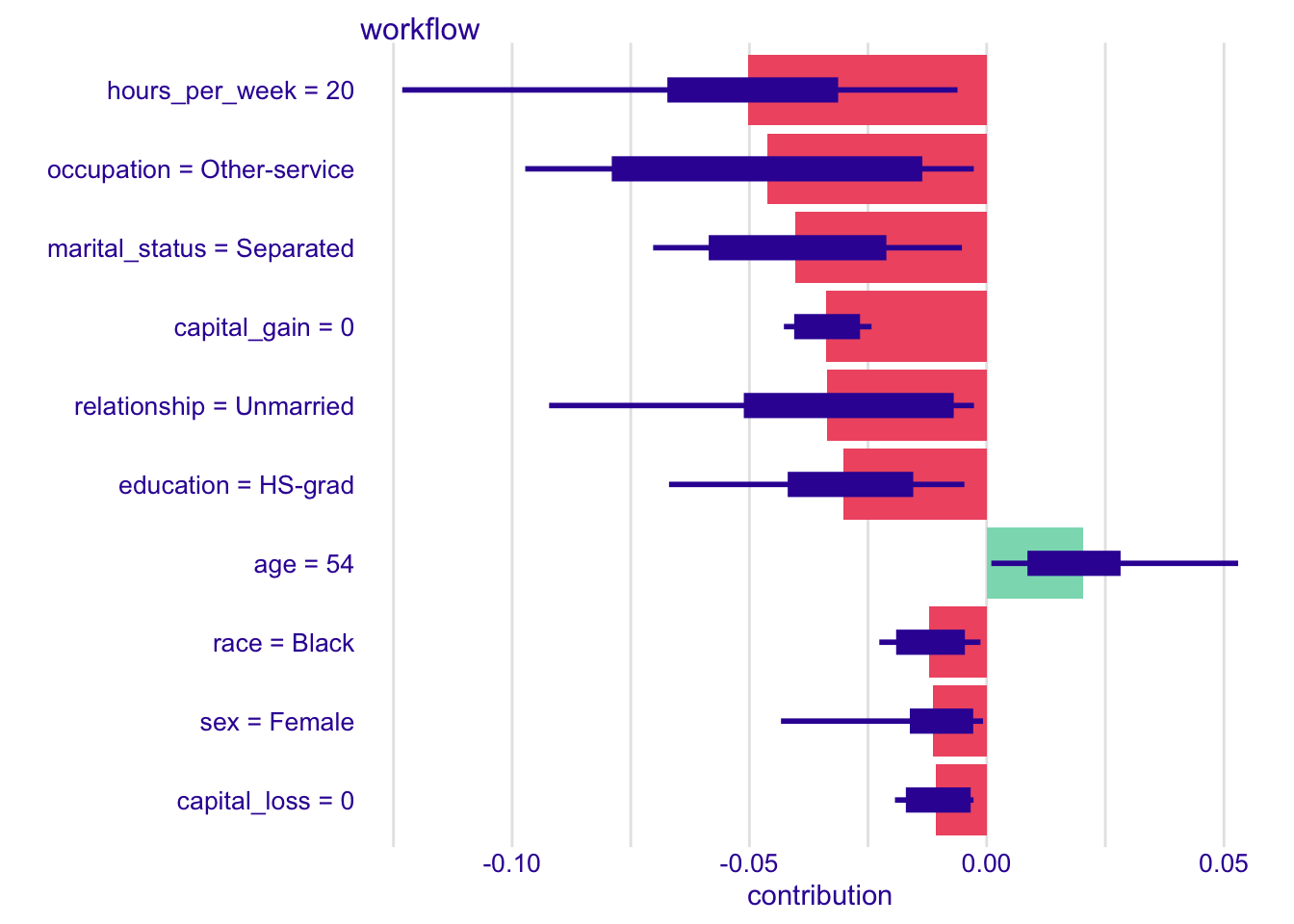
shap_high <- predict_parts(
  explainer,
  my_high,
  type = "shap"
)
plot(shap_high, max_features = 10)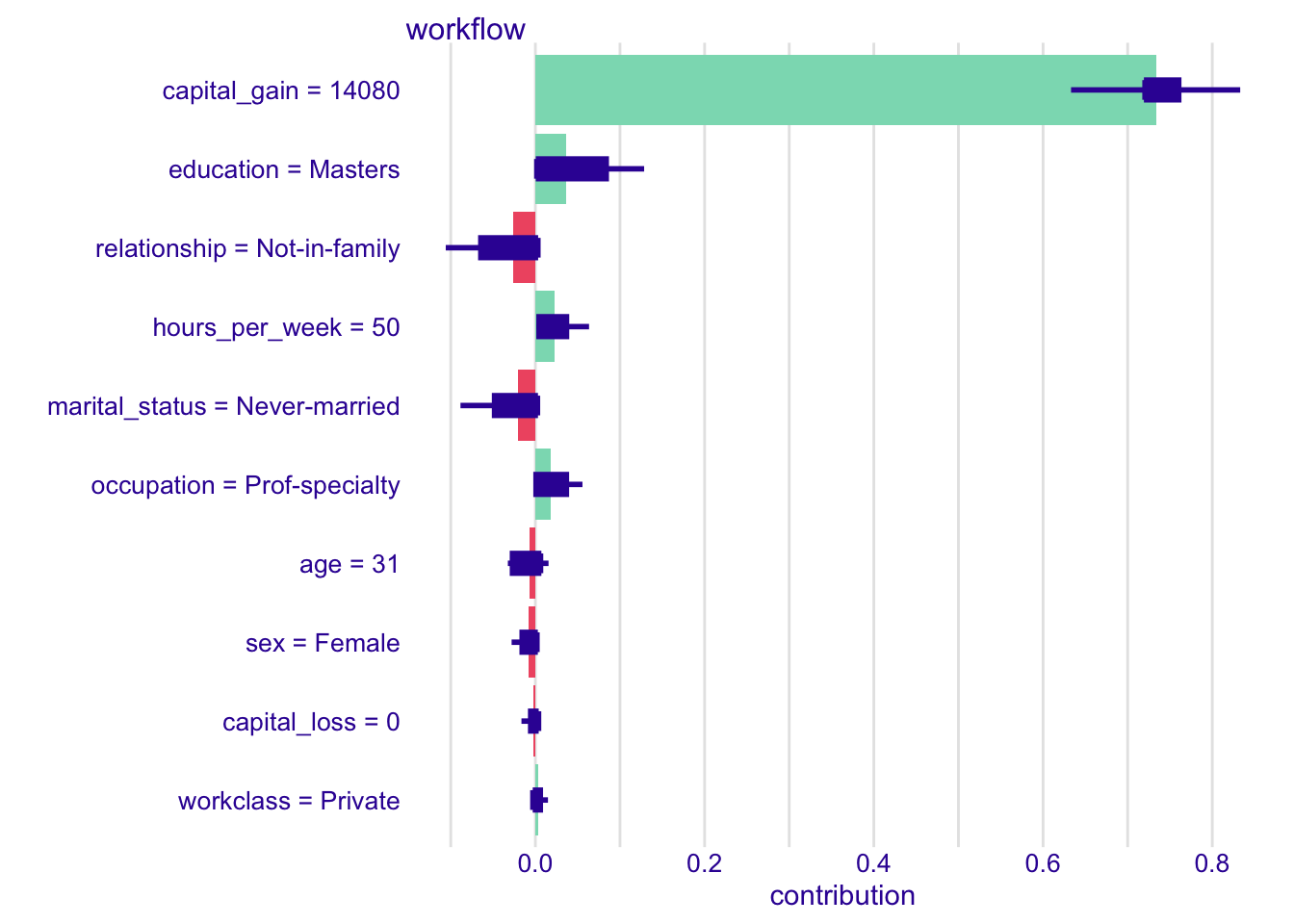
InterpretationInterpretation
For the low-probability profile, the SHAP contributions tell largely the same story as the break-down, with slightly different numbers: same direction, close but not identical contributions (hours_per_week about -0.05 instead of -0.09, marital_status about -0.04 instead of -0.02). This shows why order matters: the break-down picked one ordering, the waterfall averages over all of them.
The high-probability profile shows it even more clearly. In the break-down, once capital_gain has pushed the prediction to about 0.97, the remaining variables have almost no room left (marital_status about 0, education about +0.01). Averaged over all orderings, SHAP recovers what the fixed order hid: education around +0.04, relationship and marital_status around -0.02 (exact values vary slightly from run to run, since the orderings are sampled).
6.3.2 Compare with your values by hand
ScriptYour turn to code!
Open R/02_shap_exercises.R and work through Part 3 (b): compare the SHAP values computed by DALEX with your values by hand.
Keep the averaged contributions of shap_low, join them with shap_by_hand, and plot one against the other. Close? Why not identical?
HintHint
predict_parts() with type = "shap" returns, for each variable, several rows (one per sampled ordering, column B) plus the average over orderings, stored in the rows with B == 0. Convert the result with as_tibble(), keep these rows with filter(), select() the variable name and the contribution, then left_join() with shap_by_hand. geom_abline() draws the diagonal, ggrepel::geom_text_repel() the variable names.
# b) Compare with your values by hand: close? Why not identical?

# DALEX values: keep the rows with B == 0 (the averages over the orderings),
# and the variable name and contribution, renamed shap_dalex
# <Your code here>

# Join them with shap_by_hand and plot one against the other, with the
# diagonal and the variable names
# <Your code here>
ReponseSolution
shap_dalex <- shap_low |>
  as_tibble() |>
  filter(B == 0) |> # averaged contributions
  select(variable_name, shap_dalex = contribution)

shap_by_hand |>
  left_join(shap_dalex, by = "variable_name") |>
  ggplot(aes(x = shap_dalex, y = shap_by_hand)) +
  geom_abline(slope = 1, intercept = 0) +
  geom_point() +
  ggrepel::geom_text_repel(aes(label = variable_name)) +
  coord_fixed()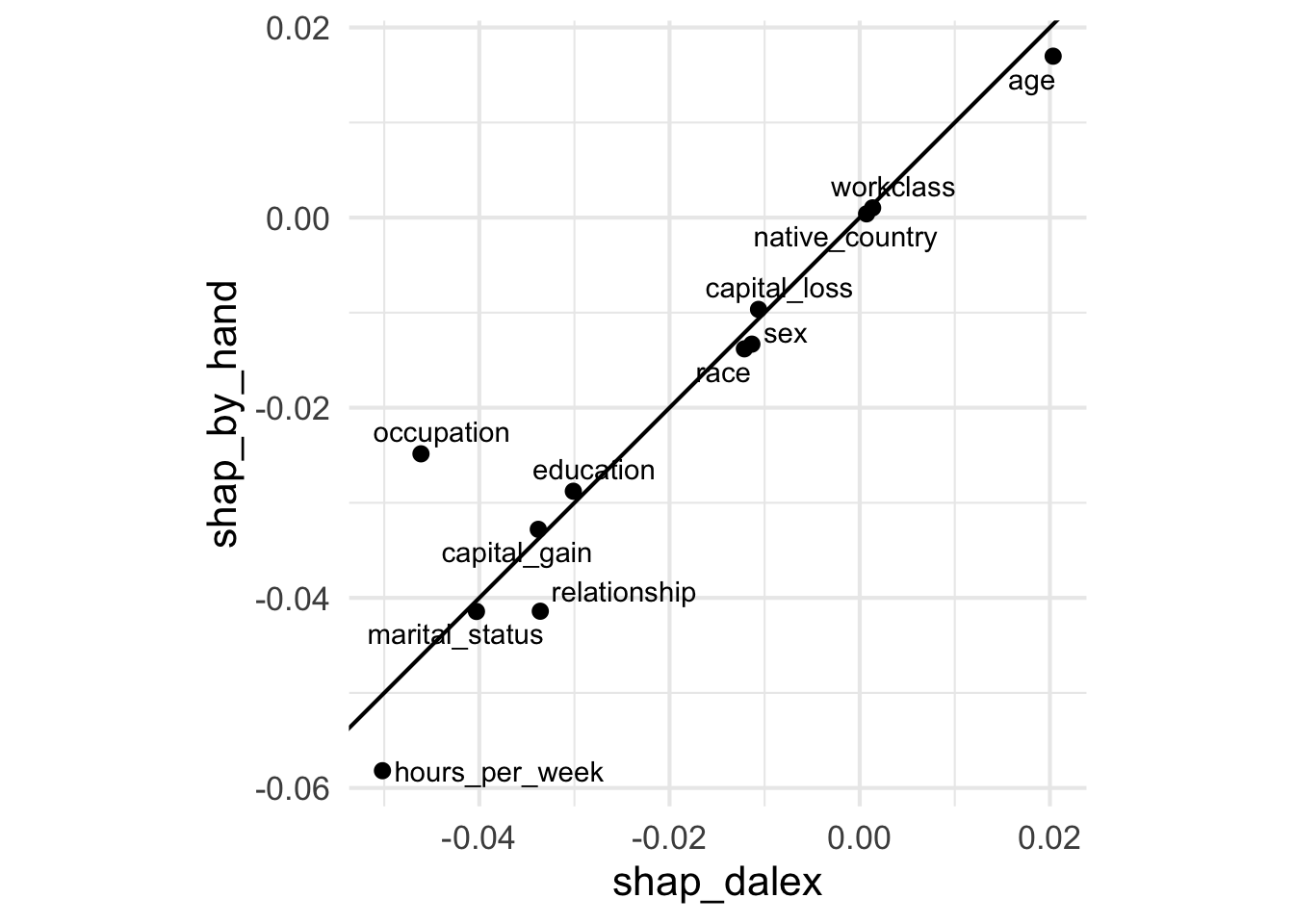
InterpretationInterpretation
The points lie close to the diagonal: same sign, similar size. The largest gap here is occupation (about -0.05 with DALEX, -0.025 by hand). They are not identical because both are estimates: the same algorithm (break-downs in random orders, then an average), on the same observation and with the same explainer, so the same 500 reference rows, but over two different samples of orders: 10 by hand, 25 for DALEX, out of 479 million possible orders. More orders would bring the two closer.
ImportantAdditivity
The sum of all SHAP contributions, plus the baseline, equals the final prediction, exactly. This is one of the defining mathematical properties of SHAP values (alongside consistency and fairness across players) and is what makes the waterfall plot a genuinely complete decomposition of the prediction, not just an approximation.
ScriptYour turn to code!
Bonus: open R/02_shap_exercises.R and work through Part 3 (c): check additivity on my_low.
Add the average prediction on the reference data and the sum of the SHAP values of my_low, and compare with its prediction.
HintHint
The average prediction is the one of Part 0 (c). The SHAP values are in shap_dalex.
# c) Bonus, additivity: average prediction + sum of the SHAP values =
#    prediction of my_low?

# Average prediction + sum of the SHAP values
# <Your code here>

# Prediction of my_low
# <Your code here>
ReponseSolution
mean(predict(explainer, explainer$data)) + sum(shap_dalex$shap_dalex)[1] 0.002389884predict(explainer, my_low) >50K
0.002389884
InterpretationInterpretation
Both lines give the same number (0.002389884): the equality is exact, not approximate. Why? The SHAP values are an average of break-downs. Each break-down, whatever its order, goes exactly from the average prediction to the prediction: its contributions add up to the gap between the two. So their average over the 25 orders, the SHAP values, adds up to the same gap.
TipExplore it yourself
Explore waterfall plots of different observations in the demo Shiny app: shiny-uros2026.pyranhia.eu. Available during the session only; afterwards, run it locally (open app/shiny_demo/app.R and click Run App).
TipNo need for the true outcome
SHAP values never require an observation’s true outcome: the computation only needs the fitted model and a reference dataset (used to simulate “removing” a variable from a coalition), never the label.
So SHAP values can be computed on brand-new, unlabelled data, as they would arrive in production. This is why we explain test set observations: nothing technically prevents using training data, but explaining held-out data matches how SHAP is used in practice, to explain a fresh, unlabelled record.
The baseline and additivity, in a formula
The baseline every explanation starts from is written \(E[f(x)]\): \(f\) is the fitted model, \(x\) one observation’s variables and \(E[\cdot]\) an expectation over \(x\), estimated by an empirical average over a reference dataset, computed once and reused. Here, it is the average predicted probability on the reference set: mean(predict(model, reference_set, type = "prob")$`.pred_>50K`). For one observation \(x^*\):
\[f(x^*) = E[f(x)] + \sum_i \phi_i\]
where \(\phi_i\) is the SHAP contribution of variable \(i\). The bars of a waterfall are the deviation from that anchor, split variable by variable: this is the additivity property seen above. (This describes the DALEX route; TreeSHAP handles the reference differently, see Section 8.)Now that we have seen the use of SHAP values for individual observations, let’s take a step back and have a look at the whole dataset.
7 Dataset level: SHAP summary (beeswarm)
The waterfall explains one prediction. To understand overall behaviour, we aggregate SHAP values over many observations. The summary (beeswarm) plot shows three things at once:
- global importance: which variables matter most overall (vertical ordering, typically by mean absolute SHAP value),
- direction of effects: does a variable tend to push predictions up or down,
- variability: is the effect stable across observations, or highly context-dependent (horizontal spread).
Computing SHAP values for many observations takes time, so they were precomputed offline, with explainer_full. Two different sets are involved:
- the explained observations: a random sample of 1000 test observations, one SHAP decomposition each;
- the reference data: the whole test set, used to simulate the “absence” of a variable. It is more precise than your 500-row sample, but it costs several minutes per observation, hence the precomputation. Your own values will therefore differ slightly from these.
shap_summary has one row per observation and variable: obs_id, variable_name, variable_value and contribution. For one observation, these are the averaged contributions you kept in shap_dalex (the rows with B == 0), plus the value of each variable. The precomputed file stacks them for the 1000 observations, with an obs_id to tell them apart.
How were the 1000 observations computed?
One predict_parts() call per observation, then the results are bound together. Do not run this, and especially not on the RStudio Server: it takes more than 24 hours. The loop could be parallelised (one observation per core); here it simply ran on a laptop over a weekend.
# 1000 test observations, several minutes each (more than 24 hours in total)
set.seed(2026)
sample_ids <- sample.int(nrow(adult_test), 1000)
sample_obs <- adult_test |> slice(sample_ids)

shap_summary <- map(seq_len(nrow(sample_obs)), function(i) {
  predict_parts(
    explainer = explainer_full,
    new_observation = sample_obs |> slice(i),
    type = "shap"
  ) |>
    as.data.frame() |>
    filter(B == 0, !variable_name %in% c("", "intercept")) |>  # averaged contributions only
    mutate(obs_id = i) |>
    select(obs_id, variable_name, variable_value, contribution)
}) |>
list_rbind() # one row per variable per observationfor loop works just as well: fill a list with one data frame per observation, then bind it with list_rbind().
Let’s load the precomputed values:
shap_summary <- readRDS(here(
  "data",
  "processed",
  "shap_values.rds"
))$shap_summary |>
  as_tibble()
Each observation has its own SHAP values. Aggregating them over the 1000 observations gives a view of the whole model, with plain dplyr and ggplot2.
7.1 Global importance
ScriptYour turn to code!
Open R/02_shap_exercises.R and work through Part 4 (a): global importance.
Compute the mean absolute SHAP value of each variable and plot it as a sorted bar chart.
HintHint
group_by(variable_name), then summarise(mean_abs = mean(abs(contribution))). To sort the bars: arrange(mean_abs), then fct_inorder(variable_name); then geom_col().
# a) Global importance: the mean absolute SHAP value of each variable, as a
#    sorted bar chart

# Mean absolute SHAP value of each variable, sorted
# <Your code here>

# Bar chart
# <Your code here>
ReponseSolution
shap_summary |>
  group_by(variable_name) |>
  summarise(mean_abs = mean(abs(contribution))) |>
  arrange(mean_abs) |>
  mutate(variable_name = fct_inorder(variable_name)) |>
  ggplot() +
  geom_col(aes(x = mean_abs, y = variable_name))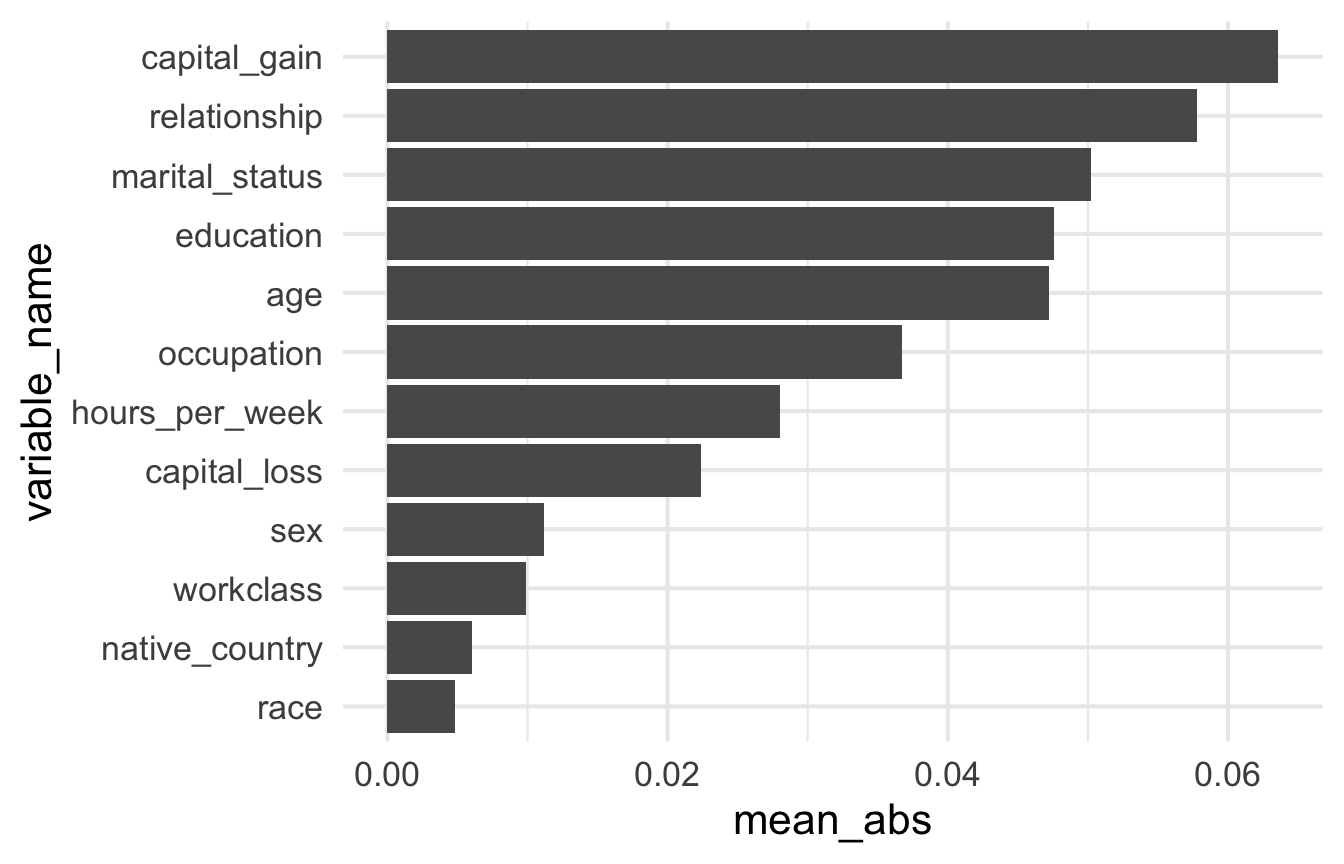
InterpretationInterpretation
capital_gain comes first (about 0.06 on average), as with the permutation importance. But the next ones differ: here relationship and marital_status come second and third, then education and age, almost tied. With permutations, age was second, relationship fourth and marital_status fifth.
The two tools do not measure the same thing. Permutation importance measures the loss of performance when a variable is shuffled. SHAP importance measures the average share of the variable in each prediction.
This explains why relationship and marital_status move up. They carry much of the same information (Husband and Wife imply a married person). When one of them is shuffled, the other still carries that information, so the model loses little performance: permutation importance underrates both. SHAP does not shuffle anything: it splits each prediction between the variables the model actually uses, and the model uses both (see Correlated variables).
7.2 The effect of one variable: dependence plot
Importance says how much a variable matters, not how: does age push predictions up or down, and from what age? The PDP answered this on average. With SHAP values, we can answer it person by person: plot the SHAP value of age against the value of age, one point per observation. This is called a dependence plot. If the effect of age were the same for everyone, the points would form a single curve, close to the PDP; a vertical spread at a given age shows that the effect also depends on the rest of the profile.
ScriptYour turn to code!
Open R/02_shap_exercises.R and work through Part 4 (b): the effect of age.
Plot the SHAP value of age against the value of age, one point per observation, and compare with the PDP of age.
HintHint
filter(variable_name == "age"). variable_value is stored as text: as.numeric() it. Then geom_point(), with some transparency (alpha).
# b) The effect of age: the SHAP value of age against the value of age, one
#    point per observation

# SHAP values of age, with the value of age as a number
# <Your code here>

# One point per observation: SHAP value against age
# <Your code here>
ReponseSolution
shap_summary |>
  filter(variable_name == "age") |>
  mutate(age = as.numeric(variable_value)) |>
  ggplot() +
  geom_point(aes(x = age, y = contribution), alpha = 0.3)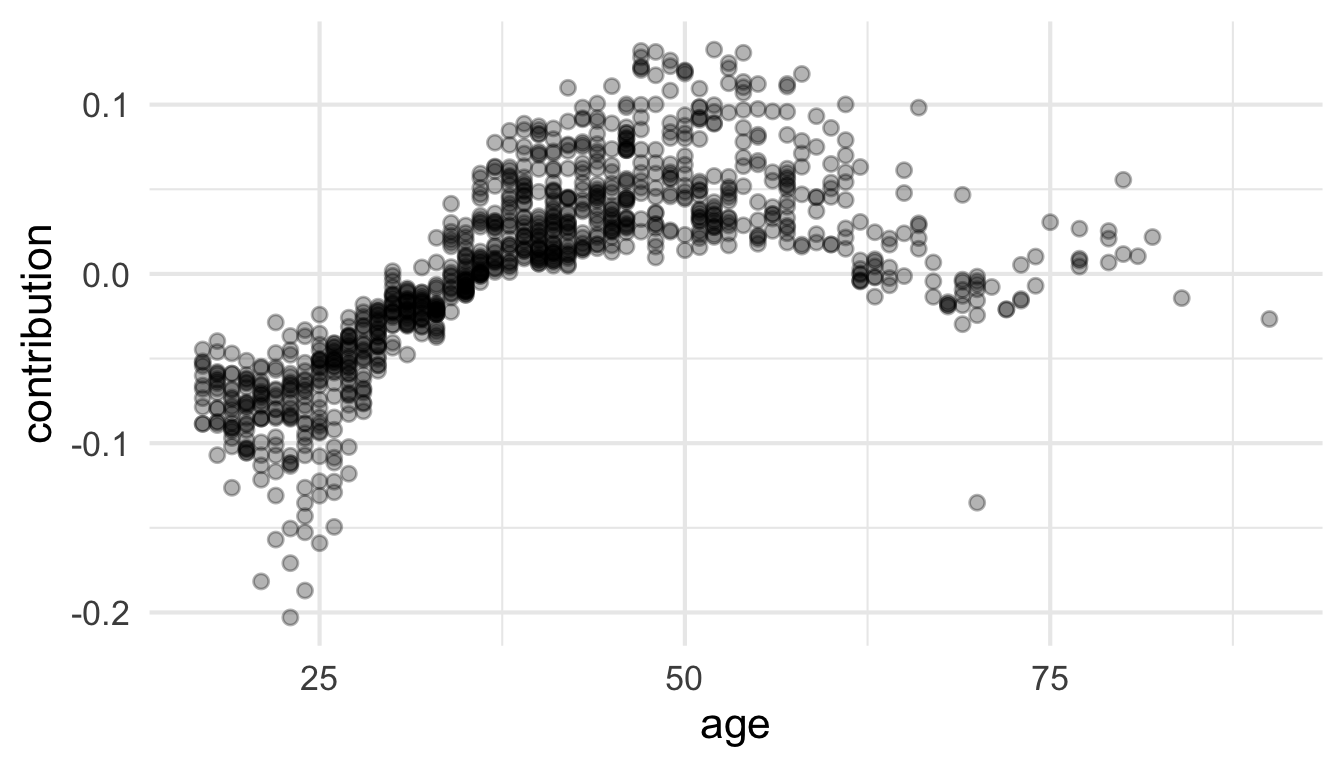
InterpretationInterpretation
Same shape as the PDP: negative for the youngest (about -0.08 on average between 20 and 25), crossing zero around 33 to 35, highest between 45 and 55 (about +0.06 on average), then back close to zero after 65. But unlike the PDP, every person gets their own value: at a given age, the points spread over up to about 0.1. The effect of age also depends on the other characteristics of each person.
7.3 The summary plot
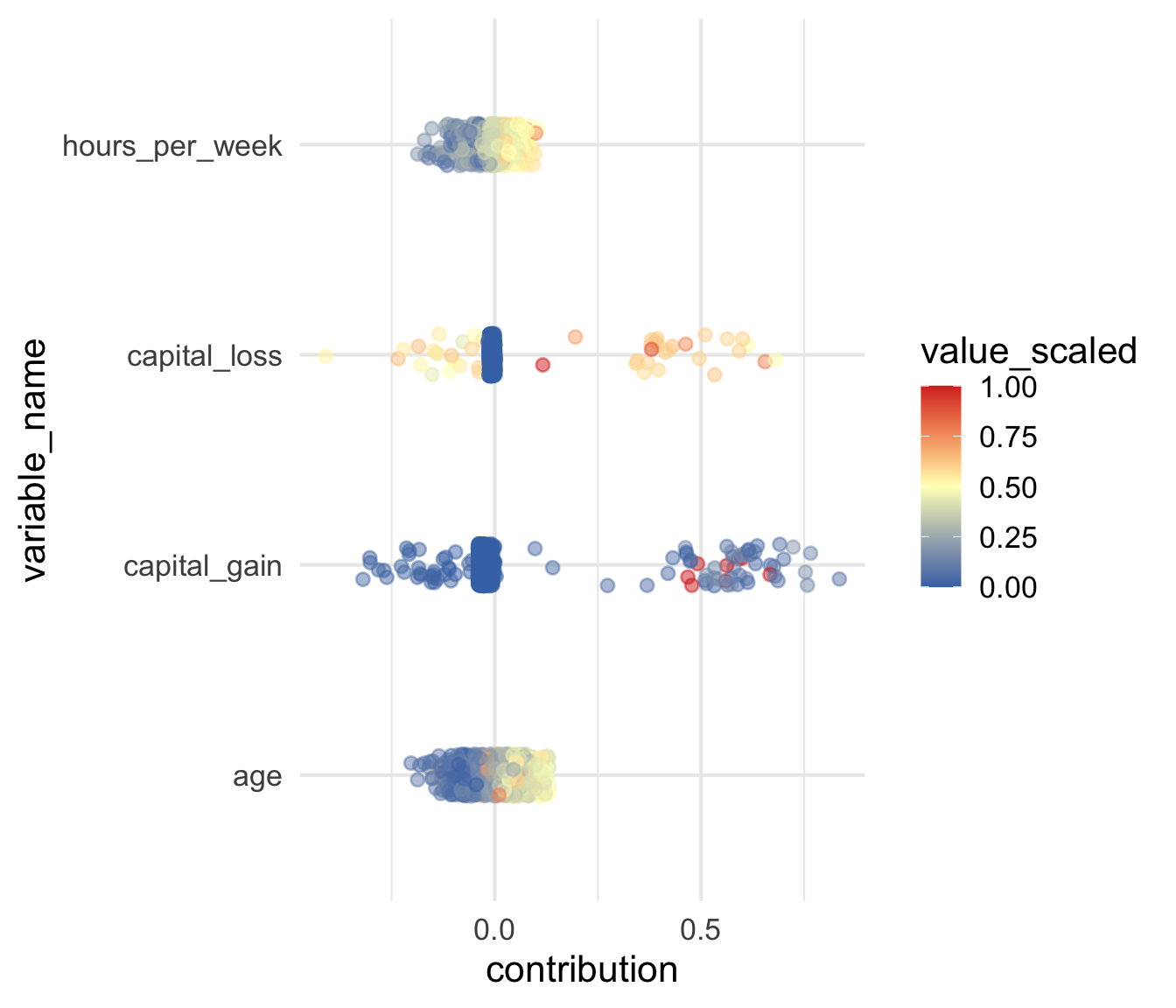
The beeswarm puts both views in one plot: importance (vertical order) and the effect of each value (horizontal position and colour). Part 4 (c) of the script builds it from a skeleton, for the four continuous variables.
How to plot depends on the predictor type. A continuous variable maps to a colour gradient (low to high), showing which values push the prediction up or down. A categorical variable has no ordering to map, so it needs a different plot: a beeswarm for continuous variables (here), a boxplot per category for discrete ones (below). Both are in the same units (predicted probability).8
8 DALEX has no ready-to-use summary plot: we extract the computed values and build the plot manually.
7.3.1 Continuous variables: the beeswarm
ScriptYour turn to code!
Bonus: open R/02_shap_exercises.R and work through Part 4 (c): a beeswarm of the four continuous variables.
Complete the skeleton: keep the four continuous variables (age, capital_gain, capital_loss, hours_per_week), rescale the values of each variable between 0 and 1 so that one colour scale fits all, then draw one jittered point per observation.
HintHint
- step 1:
filter()withvariable_name %in% c(...) - step 2:
variable_valueis stored as text:as.numeric()it, thengroup_by(variable_name)andscales::rescale()the value, andungroup() - step 3:
x = contribution,colour = value_scaled
# c) Bonus, a beeswarm: the four continuous variables on one plot. Complete
#    the skeleton, in three steps
shap_summary |>
  # 1. keep the four continuous variables: age, capital_gain, capital_loss,
  #    hours_per_week
  # <Your code here>
  # 2. rescale the values of each variable between 0 and 1 (value_scaled)
  # <Your code here>
  ggplot() +
  # 3. one jittered point per observation: x = contribution,
  #    colour = value_scaled
  geom_jitter(
    aes(y = variable_name), # <Your code here>
    height = 0.1,
    alpha = 0.5
  ) +
  scale_colour_gradient2(
    low = "#4575b4",
    mid = "#ffffbf",
    high = "#d73027",
    midpoint = 0.5
  )
ReponseSolution
shap_summary |>
  filter(
    variable_name %in%
      c("age", "capital_gain", "capital_loss", "hours_per_week")
  ) |>
  mutate(value = as.numeric(variable_value)) |>
  group_by(variable_name) |>
  mutate(value_scaled = scales::rescale(value)) |>
  ungroup() |>
  ggplot() +
  geom_jitter(
    aes(x = contribution, y = variable_name, colour = value_scaled),
    height = 0.1,
    alpha = 0.5
  ) +
  scale_colour_gradient2(
    low = "#4575b4",
    mid = "#ffffbf",
    high = "#d73027",
    midpoint = 0.5
  )
InterpretationInterpretation
Let’s start with the two easiest variables, age and hours_per_week. As in the PDP, older individuals get positive SHAP values (a higher probability of earning >50K) and younger ones negative values. The age effect peaks around 45 to 55 and fades from 65 onwards. For hours worked, the contribution rises up to 50 to 60 hours per week, then plateaus.
The two capital variables are trickier, and more interesting (hence why we kept them). Most individuals have no gain (91% of the 1000) and no loss (95%): they form the dense cluster just left of zero, with small negative contributions (about -0.03 for capital_gain, -0.01 for capital_loss). The colours cannot show it: the variables are so skewed that almost every point looks blue, whatever its amount. A minority of points lies far from zero, on both sides: the amount decides, and the beeswarm cannot show how.
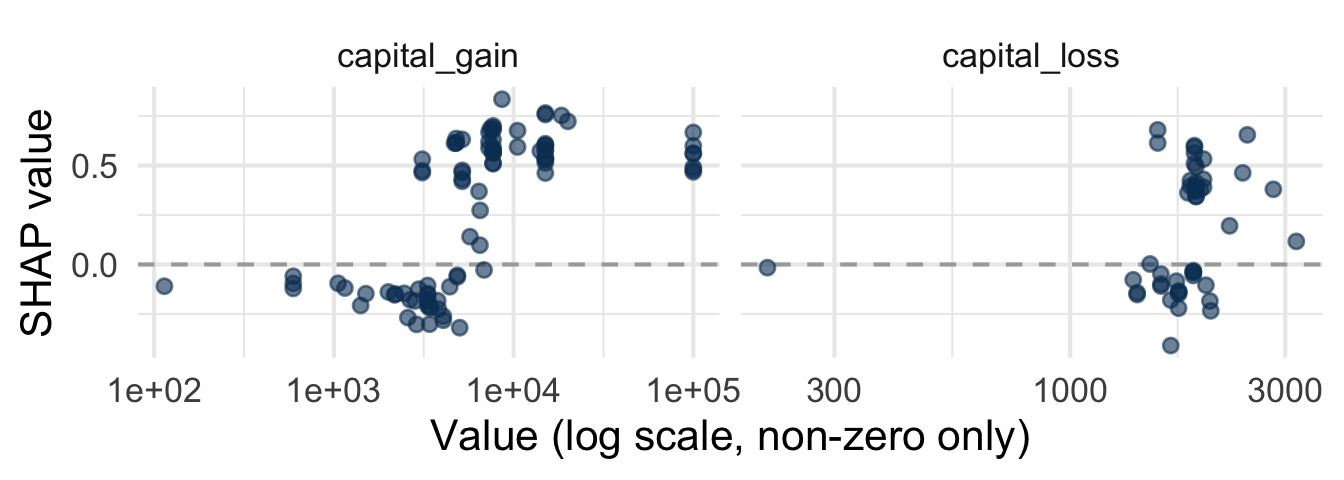
To see how the amount matters, plot the SHAP value against the raw value, as for age: a dependence plot, here for the individuals with a non-zero gain or loss.
shap_summary |>
  filter(variable_name %in% c("capital_gain", "capital_loss")) |>
  mutate(value = as.numeric(variable_value)) |>
  filter(value > 0) |>
  ggplot(aes(x = value, y = contribution)) +
  geom_hline(yintercept = 0, linetype = "dashed", color = "darkgrey") +
  geom_point(color = "#0A3D62", alpha = 0.6) +
  scale_x_log10() +
  facet_wrap(~ variable_name, scales = "free_x") +
  labs(
    x = "Value (log scale, non-zero only)",
    y = "SHAP value"
  )
InterpretationInterpretation
capital_gain: the effect is far from linear. Small gains (below ~3,000) get negative contributions, lower than no gain at all. Above ~7,000, contributions are strongly positive (+0.5 to +0.8, i.e. 50 to 80 percentage points) and plateau: a gain of 10,000 and a gain of 100,000 weigh about the same. In between, similar amounts can get very different contributions, so the rest of the profile decides.capital_loss: only about 5% of individuals have a loss. The contribution broadly increases with the amount, most smaller losses get negative values, most larger ones get large positive values (+0.4 to +0.6), with a few exceptions. With so few individuals, the details should not be over-interpreted.
A caution on both: they are partly circular (see A caution about capital_gain). You need capital to gain or lose any, so these variables reveal who has means, not who was lucky or unlucky.
NoteWhy does a capital loss push the prediction up?
Two kinds of link can tie a variable to income:
- mechanistic: the variable is part of the amount itself. A gain adds to what you earn, a loss takes away from it. On this logic,
capital_gainshould push the prediction up andcapital_losspush it down. - statistical: the variable is a signal of something else. To gain or lose money on investments, you first need capital to invest: both reveal people with means, who also tend to have high incomes.
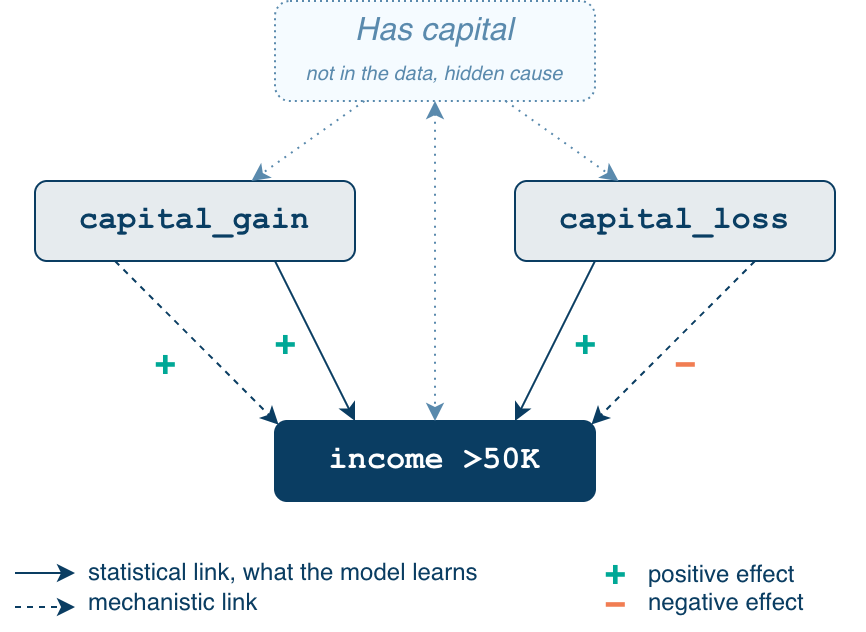
For capital_gain, the two logics agree, so its positive effect looks natural. For capital_loss, they disagree, and the model follows the statistical one: a large loss mostly says “this person has capital”, hence its large positive SHAP values. A model learns associations, not mechanisms: SHAP explains the model, not the world.
Whether the target even includes capital gains is unclear: the Census Bureau’s official income definition excludes them (glossary), but the documentation of adult does not say how its income variable was built.
7.3.2 Discrete variables
A categorical variable has no gradient to colour by, but the question is the same: which categories push the prediction up or down, and how much does that vary? A boxplot per category, one panel per variable, answers it directly:
See the code for the boxplot
continuous_vars <- c("age", "capital_gain", "capital_loss", "hours_per_week")
discrete_vars <- setdiff(unique(shap_summary$variable_name), continuous_vars)

top_vars_disc <- shap_summary |>
  filter(variable_name %in% discrete_vars) |>
  group_by(variable_name) |>
  summarise(mean_abs_shap = mean(abs(contribution)), .groups = "drop") |>
  slice_max(mean_abs_shap, n = 10) |>
  pull(variable_name)

# native_country (many rare levels) is unreadable as a boxplot, so it is left out
boxplot_vars <- setdiff(top_vars_disc, "native_country")

summary_data_disc <- shap_summary |>
  filter(variable_name %in% boxplot_vars) |>
  mutate(variable_name = factor(variable_name, levels = boxplot_vars))

ggplot(summary_data_disc, aes(x = contribution, y = variable_value)) +
  geom_boxplot(outlier.size = 0.8, fill = "#0A3D62", alpha = 0.6) +
  geom_vline(xintercept = 0, linetype = "dashed", color = "darkgrey") +
  facet_wrap(~ variable_name, scales = "free_y", space = "free_y", ncol = 1) +
  labs(x = "SHAP value (impact on predicted probability)", y = NULL) +
  theme_minimal(base_size = 16)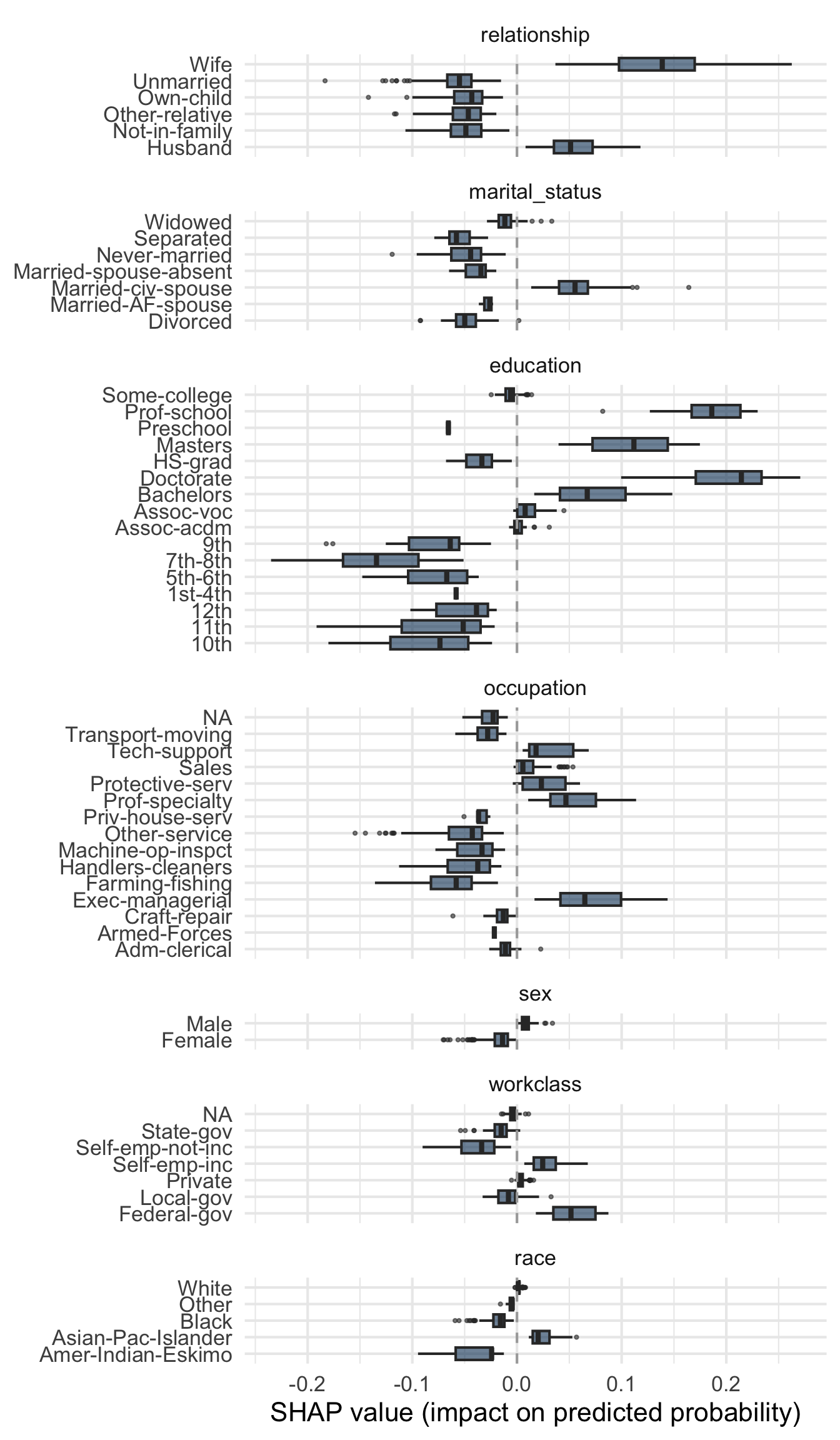
The panels share the same x-axis, so magnitudes are directly comparable.
educationhas the widest range:DoctorateandProf-schoolget the largest positive contributions (about +0.2),MastersandBachelorssmaller positive ones,HS-gradand every lower level are negative, down to about −0.15 for7th-8threlationship:WifeandHusbandare positive (higher forWife), the other categories negativeoccupation:Exec-managerialandProf-specialtyare positive,Farming-fishingandOther-servicethe most negative- the width of a box shows how consistent a category’s effect is: wide for
WifeorExec-managerial, very narrow forMaleandFemale
native_country, with many rare levels, is left out of this plot.
A more compact alternative: one jittered strip per variable (the four most influential), keeping every observation visible, with categories labelled directly on the plot. Labelled categories are coloured, the grey points are all the others:
See the code for the labelled strip plot
library(ggrepel)
library(patchwork)

# the four most influential discrete variables, on one common x-axis
strip_vars <- top_vars_disc[1:4]
x_lim <- shap_summary |>
  filter(variable_name %in% strip_vars) |>
  pull(contribution) |>
  range()

# Okabe-Ito: a colour-blind-safe qualitative palette (yellow dropped, poorly
# visible on white). The same six colours are used in every panel.
okabe_ito <- c("#E69F00", "#56B4E9", "#009E73", "#0072B2", "#D55E00", "#CC79A7")

create_discrete_strip <- function(var_name) {
  data_var <- shap_summary |>
    filter(variable_name == var_name)

  # the six categories contributing most in total are labelled and coloured,
  # from left to right along the x-axis
  label_pos <- data_var |>
    group_by(variable_value) |>
    summarise(
      median_contribution = median(contribution),
      total_abs_contribution = sum(abs(contribution)),
      .groups = "drop"
    ) |>
    slice_max(total_abs_contribution, n = 6) |>
    arrange(median_contribution) |>
    mutate(
      colour = okabe_ito[seq_len(n())],
      tint = scales::alpha(colour, 0.35),                    # light fill: black text stays readable
      side = if_else(row_number() %% 2 == 1, "up", "down")   # neighbours go on opposite sides
    )

  # every other category is grey, drawn first so coloured points stay on top
  data_var <- data_var |>
    left_join(select(label_pos, variable_value, colour), by = "variable_value") |>
    mutate(colour = coalesce(colour, "grey75")) |>
    arrange(colour != "grey75")

  ggplot(data_var, aes(x = contribution, y = 1)) +
    geom_jitter(aes(color = colour), height = 0.3, alpha = 0.5, size = 1.5) +
    geom_vline(xintercept = 0, linetype = "dashed", color = "darkgrey") +
    # labels sit above / below the cloud (not on top of the points) and only
    # move horizontally to avoid each other; lines point to each category's median
    geom_label_repel(
      data = filter(label_pos, side == "up"),
      aes(x = median_contribution, y = 1, label = variable_value, fill = tint),
      nudge_y = 0.6, direction = "x", size = 3.6, color = "black",
      segment.color = "grey40", box.padding = 0.3,
      min.segment.length = 0, max.overlaps = Inf
    ) +
    geom_label_repel(
      data = filter(label_pos, side == "down"),
      aes(x = median_contribution, y = 1, label = variable_value, fill = tint),
      nudge_y = -0.6, direction = "x", size = 3.6, color = "black",
      segment.color = "grey40", box.padding = 0.3,
      min.segment.length = 0, max.overlaps = Inf
    ) +
    scale_color_identity() +
    scale_fill_identity() +
    scale_x_continuous(limits = x_lim) +
    scale_y_continuous(limits = c(0, 2)) +
    labs(title = var_name, x = NULL, y = NULL) +
    theme_minimal() +
    theme(axis.text.y = element_blank(), axis.ticks.y = element_blank())
}

strips <- map(strip_vars, create_discrete_strip)

wrap_plots(strips, ncol = 1) +
  plot_layout(axes = "collect") &
  labs(x = "SHAP value (impact on predicted probability)")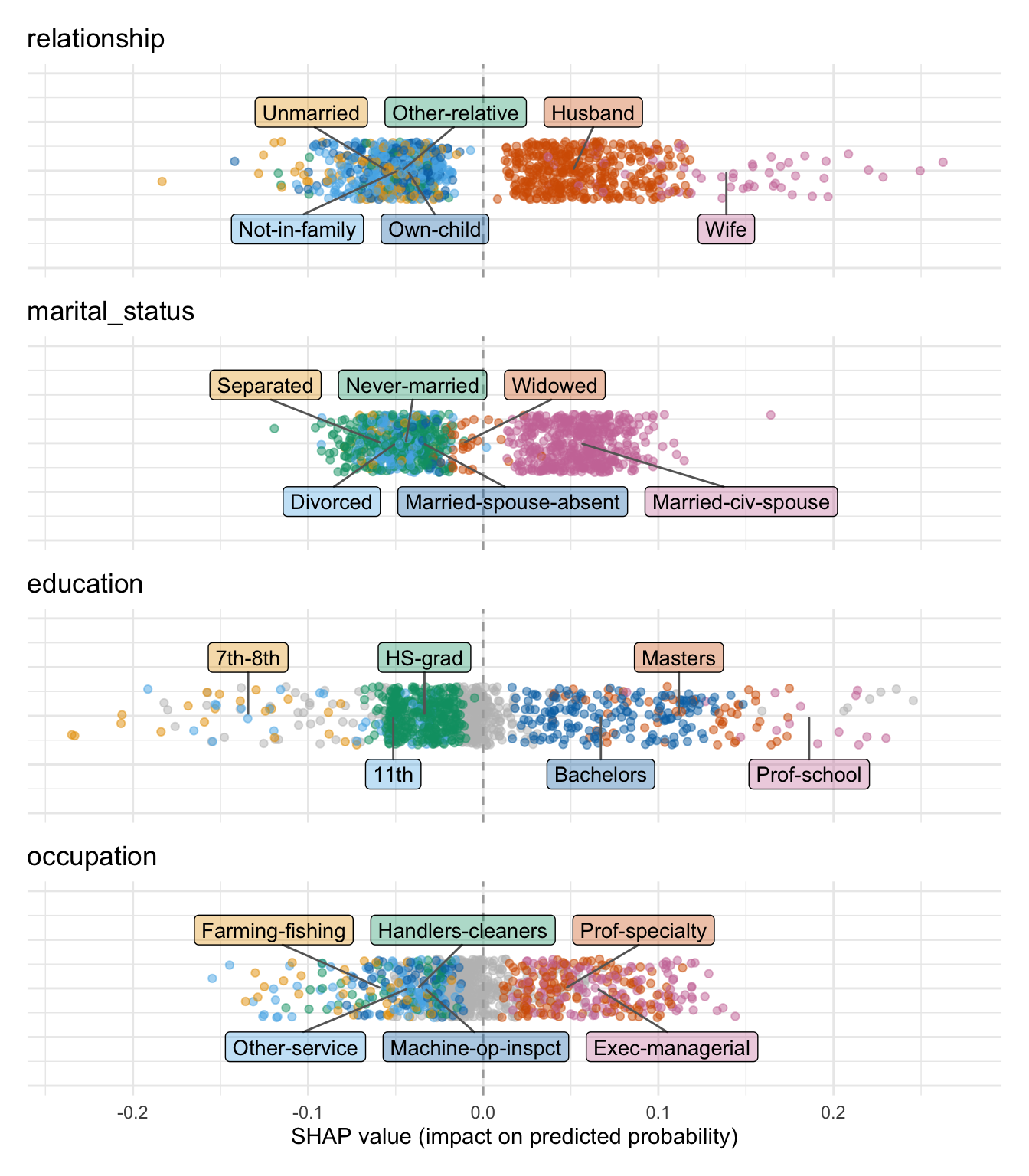
Same information as the boxplot, read differently. All panels share the same x-axis, and each labels the six categories contributing most in total (frequency × size of effect), so the large clusters are named. The other variables are in the boxplot above.
relationshipandmarital_statustell a similar story: married profiles (Husband,Wife,Married-civ-spouse) are pushed up, whileOwn-child,Unmarried,Not-in-family,Never-married,DivorcedandSeparatedare pushed down.education:Masters,BachelorsandProf-schoolare positive,Prof-schoolthe most (up to about +0.2), whereasHS-grad,11thand7th-8thare negative.occupation:Prof-specialtyandExec-managerialare positive;Farming-fishing,Other-service,Handlers-cleanersandMachine-op-inspctare negative.
Individual points, rather than a summarized box, also show how much the observations of a category overlap with those of the next one.
The variables that stand out are largely those flagged by permutation importance earlier: reassuring. What SHAP adds is the direction and shape of each effect, not just its magnitude.
TipExplore it yourself
The SHAP summary tab of the demo Shiny app (shiny-uros2026.pyranhia.eu, available during the session only; afterwards, run it locally with app/shiny_demo/app.R, Run App) uses the same DALEX-based, 1000-observation precomputation, on the same probability scale. All variables (continuous) shows the beeswarm; One variable lets you pick any variable, continuous or categorical, and see its SHAP values: against the raw value for a continuous one, as a labelled strip for a categorical one. All categorical variables stacks the strips of every categorical variable on a common axis.
8 Going faster with shapviz and TreeSHAP
Everything so far uses DALEX::predict_parts(type = "shap"): ideal for a tutorial (one explainer for every method, one unit), but slow. This section explains why, and shows the fast and exact alternative for tree-based models.
8.1 Why is the DALEX route slow?
Exact Shapley values need \(2^p\) model evaluations, so practical methods either approximate or exploit the model structure:
| Method | Principle | Exact? | Speed |
|---|---|---|---|
Sampling of orderings (DALEX, used so far) |
averages break-down contributions over 25 random orderings | approximate (numbers change slightly at each run) | ~15 s per observation with 500 reference rows, several minutes with the whole test set |
KernelSHAP (Lundberg and Lee 2017) (kernelshap) |
weighted linear regression on the coalitions | exact up to 8 variables, partly exact beyond (here, 12 variables) | converges faster than sampling orderings |
TreeSHAP (shapviz) |
tracks coalitions through the trees | exact | near-instantaneous, even for the whole test set (almost 10,000 observations) |
Sampling and KernelSHAP are model-agnostic (they only need predictions). In R, KernelSHAP is available in kernelshap (Mayer et al. 2025), which works with tidymodels workflows, can explain predicted probabilities (type = "prob") and feeds straight into shapviz. The kernelshap package provides permshap(), exact permutation SHAP: the exact version of what DALEX approximates with 25 orders, fast up to about 8 variables; shapr offers variants that account for dependent features (Aas et al. 2021). TreeSHAP is specific to tree-based models (random forests, LightGBM, XGBoost), and shapviz does SHAP only (no break-down, importance or PDP).9
9 We kept DALEX throughout for teaching: the same explainer and the same function go from break-down to SHAP values, in probability units. In practice, for many observations, KernelSHAP (kernelshap) is the faster model-agnostic route.
NoteWhy is TreeSHAP both exact and fast?
Remember what a SHAP value needs: the model’s prediction for every coalition, that is, “what does the model predict when only these variables are known?” (Lundberg et al. 2020). For a single tree, this question has a simple answer, read directly from the tree:
- start at the root and go down;
- at a split on a known variable, follow the branch of the individual’s value, as usual;
- at a split on an unknown variable, follow both branches, each weighted by the share of training observations that went that way (these counts are stored in the tree);
- the prediction is the weighted average of the leaves reached.
No reference dataset is needed: the tree itself “knows” how the training data split at each node. This gives the prediction for one coalition. Doing it for all \(2^p\) coalitions would still be slow, but most coalitions give the same answer: a variable that does not appear on the paths cannot change anything. TreeSHAP’s trick is to walk down each tree once, keeping track of all coalitions at the same time, which gives the exact Shapley values in polynomial time instead of \(2^p\) evaluations.
Boosting then comes for free: the model’s score is the sum of its trees and Shapley values are additive, so the SHAP values of the whole model are the sums of those of each tree.
NoteRule of thumb
- a handful of observations, every method in one consistent unit, speed not an issue:
DALEX - many observations, any model: KernelSHAP with
kernelshap(permshap()with few variables) andtype = "prob", plotted withshapviz - many observations, tree-based model, speed matters:
shapviz+ TreeSHAP, keeping in mind its scale (see the end of this section)
8.2 A quick shapviz demo
TreeSHAP is the algorithm; shapviz is an R package that computes and plots SHAP values. It does not implement TreeSHAP itself: for a LightGBM or XGBoost model, it asks the model’s own library for its TreeSHAP values (LightGBM computes them natively), then stores them and draws the plots. For other models, it takes SHAP values computed elsewhere, for instance by kernelshap.
shapviz needs a small pipeline to build the sv object. You compute it yourself (it takes seconds).
TipBut what is an
sv object?
A shapviz object (here called sv) holds everything the plots need, in one object, built once with shapviz():
- the SHAP values: a matrix with one row per observation and one column per variable;
- the values of the variables for the same observations (
X), used for the x-axes and the colours; - the baseline, the starting point of every explanation.
Every plotting function (sv_importance(), sv_dependence(), sv_waterfall()) takes it, the same way every DALEX function takes the explainer. Unlike the explainer, it already contains the SHAP values: the plots compute nothing.
8.2.1 Build the sv object
ScriptYour turn to code!
Open R/02_shap_exercises.R and run Part 5 (a): the code that builds sv for the whole test set is given, the steps are explained here.
Build sv in four steps:
- prepare the test-set predictors
Xwith the fitted recipe (extract_recipe()thenbake()), so that the factors keep the training levels - encode them as LightGBM saw them at training time with
bonsai:::prepare_df_lgbm(), givingX_pred - extract the fitted LightGBM booster with
extract_fit_engine() - compute the TreeSHAP values of every row in one call with
shapviz(booster, X_pred = X_pred, X = X)
HintHint
bake() takes new_data = adult_test and all_predictors(). prepare_df_lgbm() is internal to bonsai (hence the :::) and could break in a future version.
# a) Given: just run it. TreeSHAP values of every row of the test set, in one
#    call. How long does it take, compared with one DALEX waterfall?
X <- extract_recipe(gbm_fit) |>
  bake(new_data = adult_test, all_predictors())
X_pred <- bonsai:::prepare_df_lgbm(X)
lgb_booster <- extract_fit_engine(gbm_fit)
sv <- shapviz(lgb_booster, X_pred = X_pred, X = X)
InterpretationInterpretation
How long does it take? A few seconds for the whole test set (almost 10,000 observations), against about 15 seconds for one DALEX waterfall.
WarningWhy
bake()? Encode with the training levels
LightGBM does not see category names: it sees integer codes (0 for the first level, 1 for the second…), fixed when the model was trained. The test set must get exactly the same codes. The tempting shortcut, as.factor() on the test set, is not harmless: native_country has one more level in the test set than in the training set, so every country after it alphabetically (including United-States, 90% of the data) gets the wrong integer code and LightGBM silently explains the wrong profiles.
bake() avoids this: it applies the fitted recipe, which remembered the training levels.
What is in the recipe?
The recipe was defined in R/01_train_model.R, with no preprocessing step:
gbm_recipe <- recipe(income ~ ., data = adult_train)extract_recipe(gbm_fit) gets this fitted recipe back, and bake() applies it to new data, with the training levels.
8.2.2 Beeswarm
The whole test set, in one call, in near-zero time (versus 1000 observations and more than 24 hours of computation for the DALEX version).
ScriptYour turn to code!
Open R/02_shap_exercises.R and work through Part 5 (b): beeswarm of the whole test set.
Plot the beeswarm summary of the whole test set with sv_importance(). No sampling and no loop: sv already holds every row.
HintHint
sv_importance() takes the sv object and kind = "beeswarm". Other kinds exist (for instance "bar").
# b) Beeswarm of the whole test set, with sv_importance(): same story as the
#    DALEX beeswarm?
# <Your code here>
ReponseSolution
sv_importance(sv, kind = "beeswarm")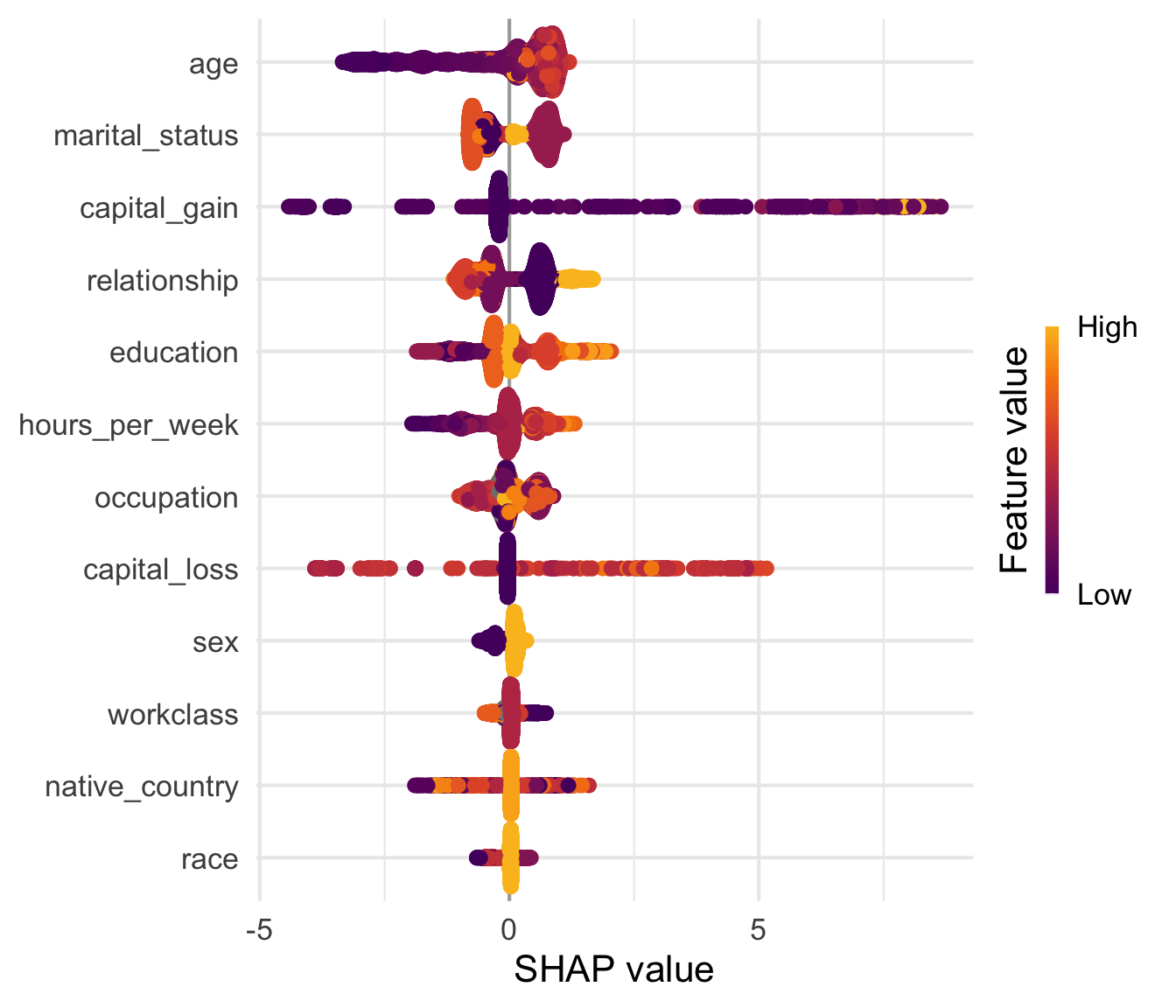
InterpretationInterpretation
The same five variables come out on top (age, marital_status, capital_gain, relationship, education), in a slightly different order than with DALEX.
For the four continuous variables, the story is the same as in the DALEX beeswarm: young ages and few hours push the prediction down, older ages and long hours push it up; most people have no capital gain or loss and sit near zero, with a minority far out on both sides. Only the unit changes (log-odds here, probability there), so the widths of the two plots cannot be compared directly.
capital_gainandcapital_losshave the widest spread (about -4 to +8, and to +5), driven by a minority of observationsworkclass,native_countryandracestay close to zero for almost everyone
WarningColours of categorical variables
For education, marital_status, etc., shapviz colours by the integer code of the level (alphabetical order): the gradient has no meaning there. Use a dependence plot instead.
TipExplore it yourself
The shapviz tab of the demo Shiny app (shiny-uros2026.pyranhia.eu, available during the session only; afterwards, run it locally with app/shiny_demo/app.R, Run App), Importance sub-tab, draws this plot with the same TreeSHAP values (2000 random test observations). Switch between bar, beeswarm and both, change the number of variables shown, and display the numbers. The tab is on the log-odds scale, flagged by a banner.
8.2.3 Dependence plots
You already drew dependence plots by hand with the DALEX values, for age and the capital variables: for one variable, its SHAP value against its value, one point per observation. shapviz draws them in one call, sv_dependence(), for the whole test set. We start with a single variable, without any colour. For a categorical variable, there is one column per level.
sv_dependence(sv, v = "education", color_var = NULL, alpha = 0.5, size = 0.8) +
  theme(axis.text.x = element_text(angle = 45, hjust = 1))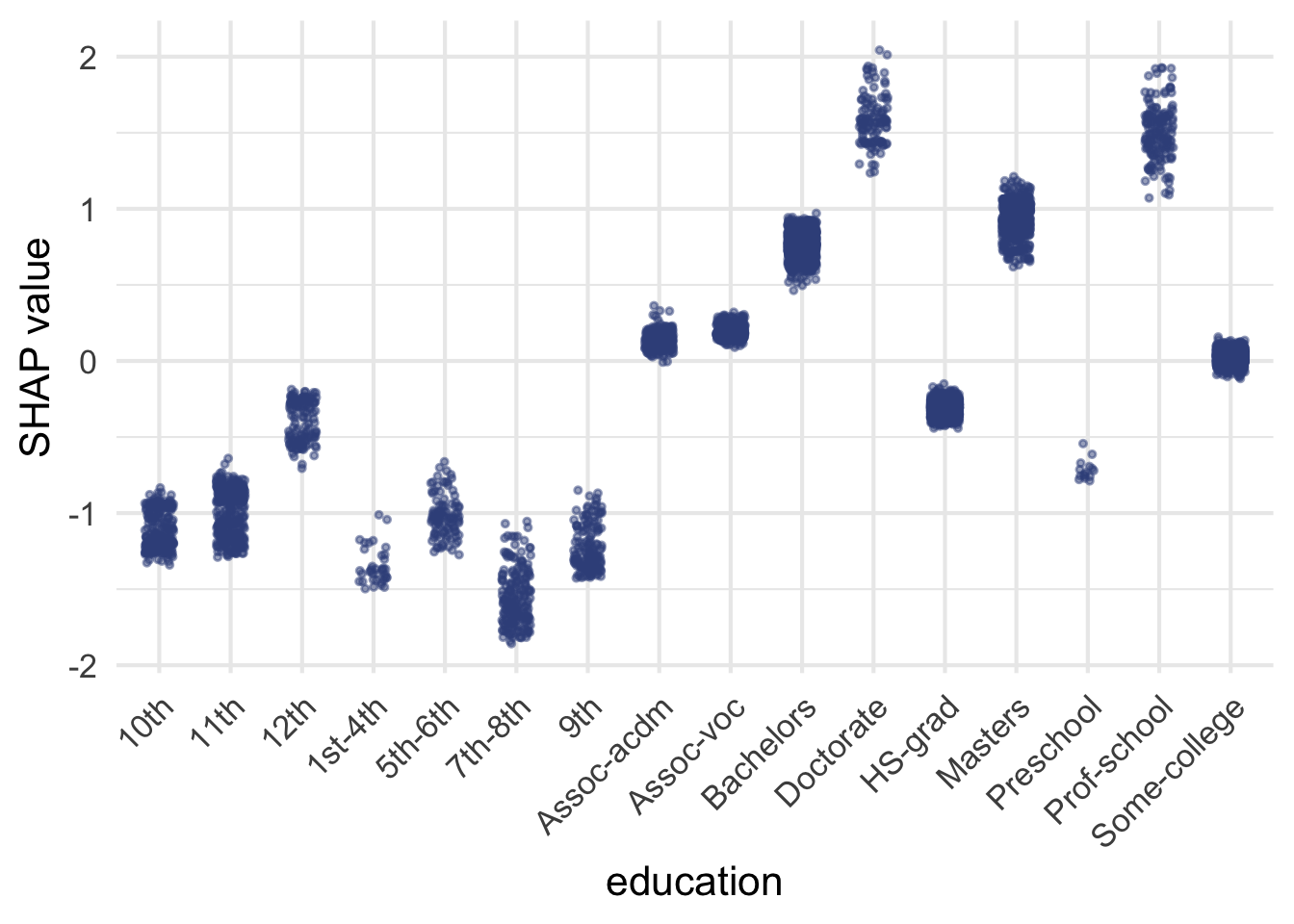
The gradient is the same as in the DALEX results: Doctorate and Prof-school are the highest (about +1.5), then Masters (about +1) and Bachelors (about +0.75), HS-grad is slightly negative (about -0.3) and the lower levels are the most negative (about -1 to -1.5). Columns are tight: for a given level, the SHAP value of education varies little from one observation to another, so the effect of education hardly depends on the other variables.
For a continuous variable, age shows its non-linear effect more clearly than the beeswarm did:
sv_dependence(sv, v = "age", color_var = NULL, alpha = 0.5, size = 0.8) +
    guides(color = guide_legend(override.aes = list(size = 2, alpha = 1)))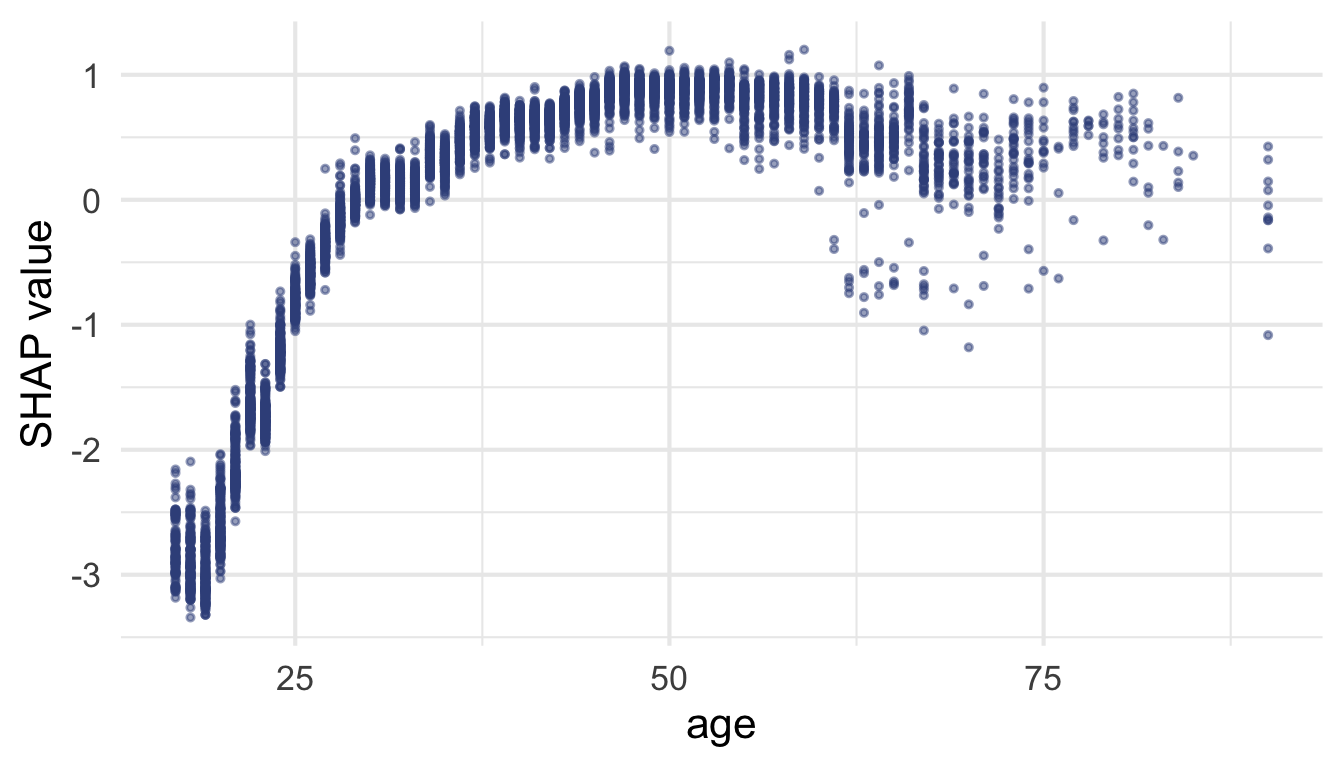
- under 25: strongly negative (below -2 for the youngest)
- peak around 50 (about +0.9), crossing zero around 30
- after 60: declines to roughly +0.3 beyond 70
- narrow band between 30 and 60, which widens after 60: the effect of
ageis more variable there, though still mostly driven byageitself10
10 No colour here on purpose: about 99% of the variance of the SHAP values of age is explained by age alone, so no other variable shows a clear interaction.
11 Interaction: the effect of a variable on the prediction depends on the value of another variable.
For education and age, the variable alone explains almost everything: its own value explains about 99% of the variance of its SHAP values. Careful when comparing plots, though: their vertical axes differ. In absolute terms, the points of age spread at least as much at a given age as those of sex within a column (a few tenths of log-odds). What matters is the spread compared with the size of the effect. For age, it is small next to an effect that goes from -3 to +1; for sex, it is not, as you will see.11
8.2.4 Interactions: the effect of sex
ScriptYour turn to code!
Open R/02_shap_exercises.R and work through Part 5 (c): the dependence plot of sex.
Draw the dependence plot of sex with sv_dependence(), without colour, then with the points coloured by relationship. What do you see?
HintHint
sv_dependence() takes the sv object and the variable name v. color_var = NULL removes the colour, color_var = "relationship" colours by relationship.
# c) Dependence plot of sex, with sv_dependence(), then coloured by
#    relationship: what do you see?
#    Then draw the dependence plot of a variable of your choice

# Dependence plot of sex, without colour
# <Your code here>

# The same, coloured by relationship
# <Your code here>

# Dependence plot of a variable of your choice
# <Your code here>
ReponseSolution
sv_dependence(sv, v = "sex", color_var = NULL, alpha = 0.5, size = 0.8)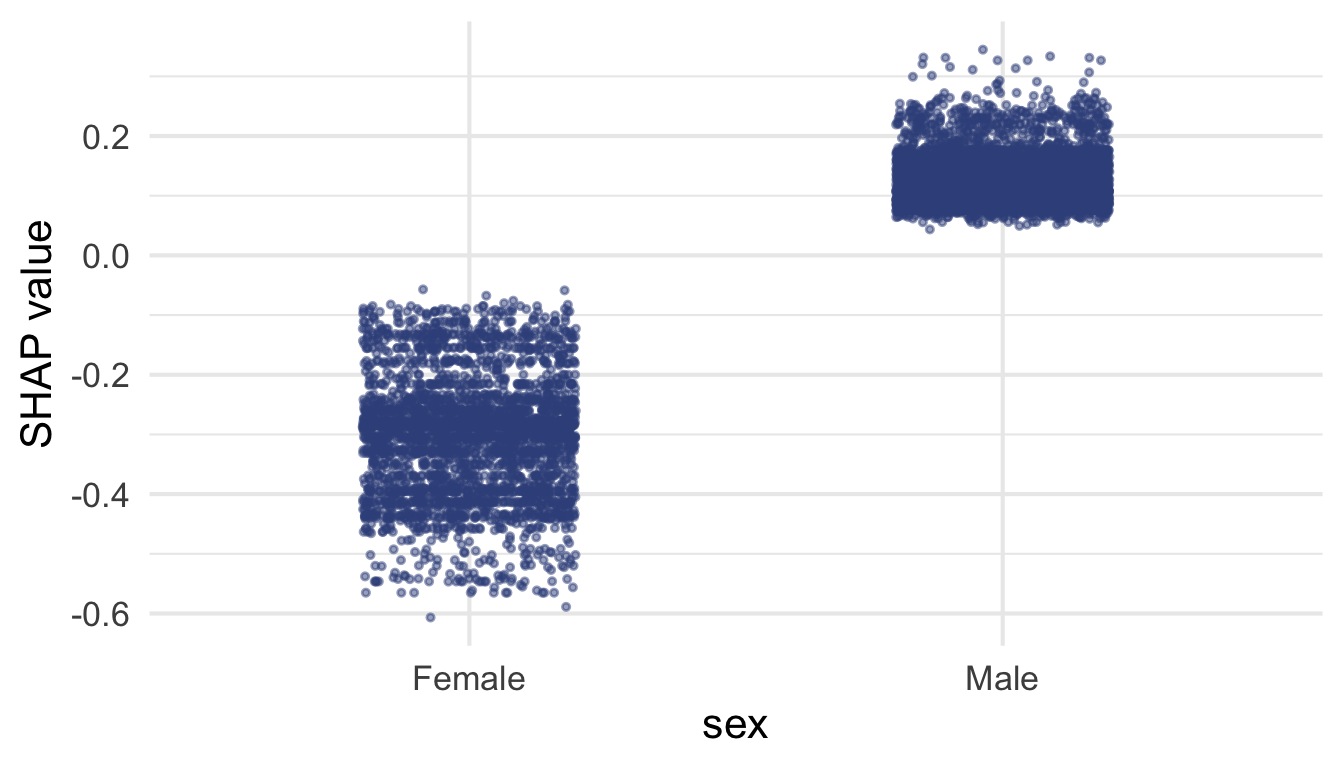
# colour-blind safe palette (Okabe-Ito), rare categories in grey
relationship_colours <- c(
  "Husband" = "#0072B2", "Wife" = "#CC79A7", "Unmarried" = "#D55E00",
  "Not-in-family" = "#009E73", "Own-child" = "#56B4E9", "Other-relative" = "grey60"
)

sv_dependence(sv, v = "sex", color_var = "relationship", alpha = 0.5, size = 0.5) +
  scale_color_manual(values = relationship_colours) +
  guides(color = guide_legend(override.aes = list(size = 2, alpha = 1)))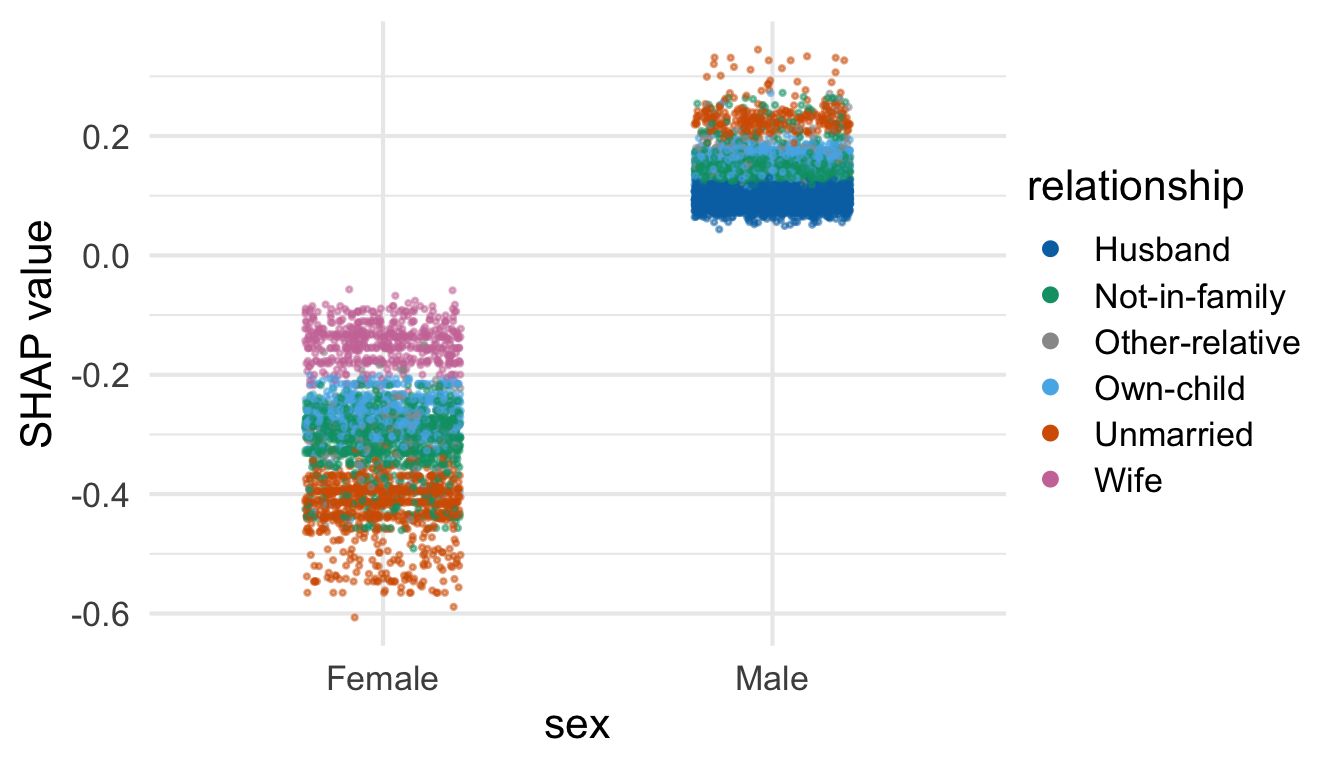
InterpretationInterpretation
Without colour. The two columns are far apart (men positive, women negative), but within each column the points are spread out, compared with the gap between the columns: for the same sex, the SHAP value of sex is not the same from one person to another. The spread is even larger for women (from about -0.05 to -0.6) than for men (about +0.05 to +0.35). So something other than sex itself explains these gaps, between women and between men. This is what an interaction looks like: the effect of a variable depends on the value of another one.
Coloured by relationship. A dependence plot lets us look for this other variable: colour the points by a second variable.
- men: the highest values are
Unmarried(vermilion) and the lowestHusband(blue) - women: from
Wife(pink, top, about -0.1 to -0.2) toUnmarried(vermilion, bottom, about -0.4 to -0.6) - in both columns the value depends on
relationship: forUnmarriedpeople the contribution ofsexis larger in absolute value (more negative for women, more positive for men), while for married people (Wife,Husband) it is smaller. The vertical axis is the SHAP value ofsex, not ofrelationship
WarningCorrelated variables
sex and relationship carry overlapping information (in this dataset, Husband and Wife imply the sex), so the model shares the credit between them: do not read the contribution of sex in isolation. And a non-zero SHAP value means the model uses the variable, not that it causes the outcome (see SHAP and causality).
TipExplore it yourself
In the Dependence sub-tab of the app’s shapviz tab, pick any variable and the variable to colour by (or let shapviz choose the most interacting one). Try sex coloured by relationship, or education coloured by age.
8.2.5 Your own dependence plot
ScriptYour turn to code!
Open R/02_shap_exercises.R and finish Part 5 (c): a variable of your choice.
Draw the dependence plot of a variable of your choice (for instance hours_per_week) and describe what you see: shape of the effect, spread, and the variable shapviz picks for the colour.
HintHint
Same call as for sex, without color_var: shapviz then picks the colour variable itself.
ReponseSolution
sv_dependence(sv, v = "hours_per_week")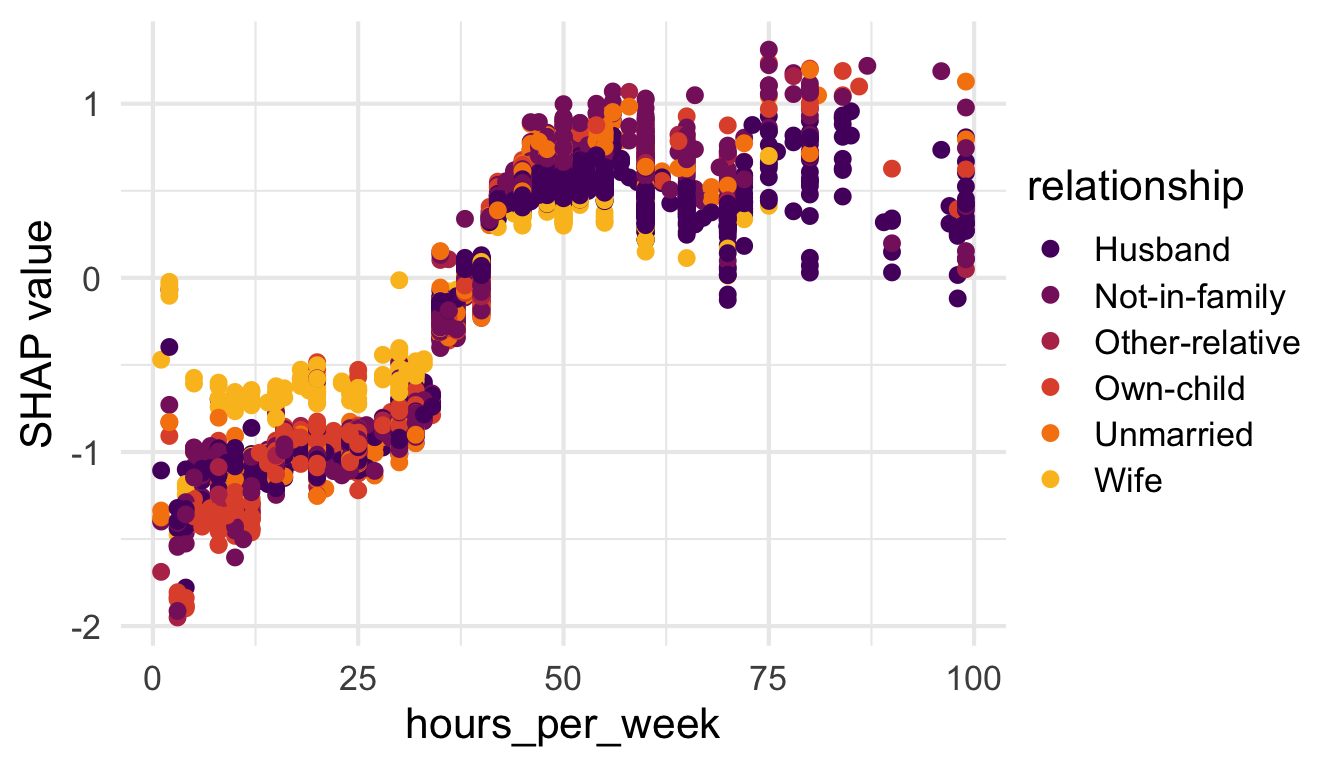
InterpretationInterpretation
- shape: strongly negative below about 35 hours per week (around -1, down to -2 for a few hours), a sharp jump between 35 and 40 hours, then positive and roughly flat beyond 45 hours (about +0.5 to +1): working more than 50 hours adds little
- spread: narrow up to 50 hours, wider beyond 60 hours
- colour:
shapvizpickedrelationship, the variable that seems to interact most withhours_per_week. Below 35 hours, wives (yellow) get a less negative contribution (about -0.7) than the other categories (about -1): working part-time weighs less in their prediction
8.2.6 Bonus: TreeSHAP waterfall
Same logic as the DALEX waterfall, read from the bottom up: it starts at the baseline E[f(x)], each bar adds one SHAP value (purple: negative, gold: positive), and it ends at the prediction f(x). Three differences with DALEX: the values are in log-odds, there are no boxes (TreeSHAP is exact, no orders are sampled), and the smallest contributions are grouped into “N other features”.
ScriptYour turn to code!
Bonus: open R/02_shap_exercises.R and work through Part 5 (d): waterfall of your observation.
Plot the TreeSHAP waterfall of the low-probability observation (row low_id) from your sv object.
HintHint
sv_waterfall() takes the sv object and the row to explain (row_id).
# d) Bonus: the TreeSHAP waterfall of my_low
# <Your code here>
ReponseSolution
sv_waterfall(sv, row_id = low_id)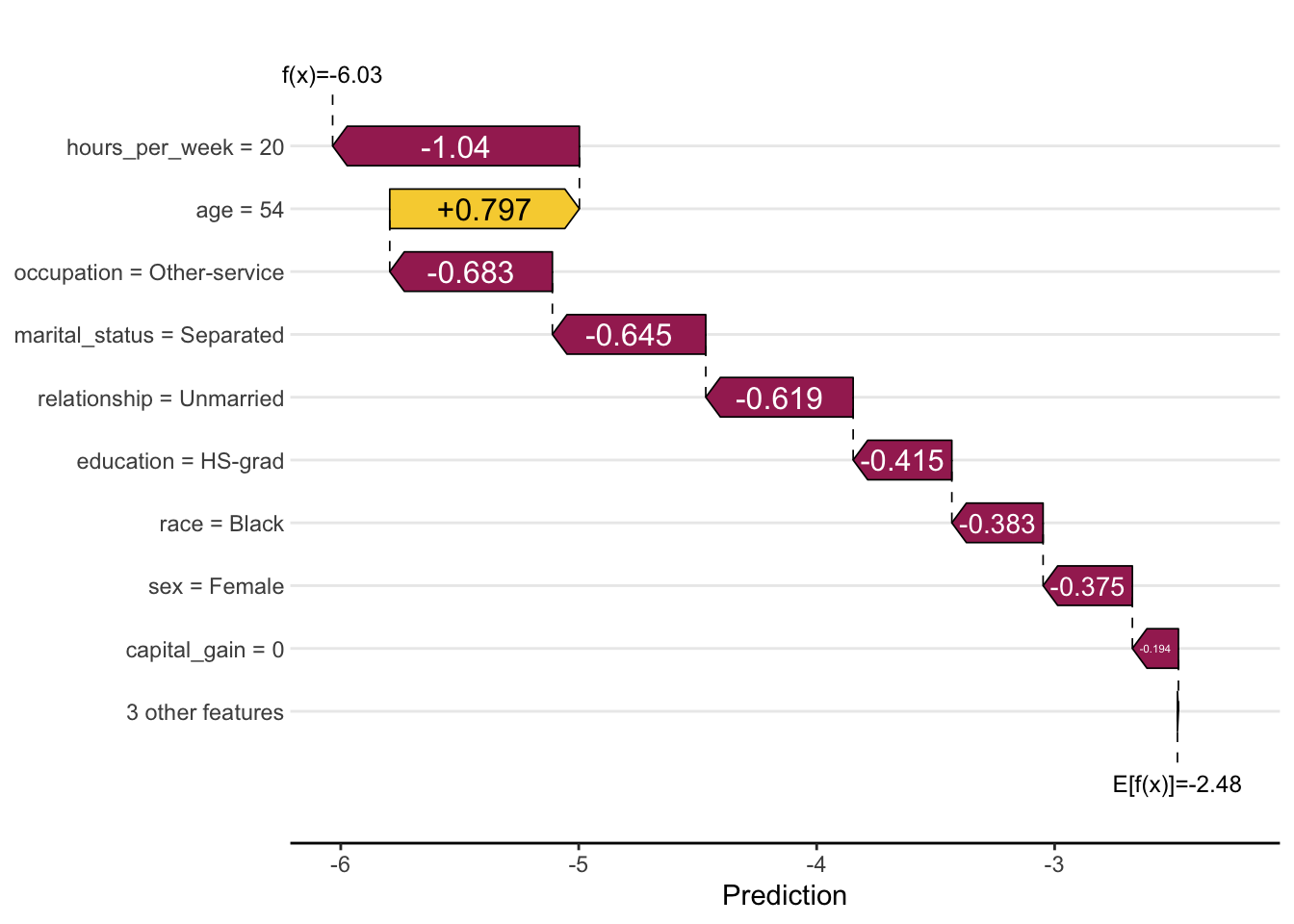
InterpretationInterpretation
Same story as the DALEX waterfall: hours_per_week = 20 is the largest negative contribution (-1.04), followed by occupation, marital_status and relationship (about -0.6 to -0.7), while age = 54 is the only substantial positive one (+0.80). The ranking is not strictly identical, since the two routes differ in method and scale.12
12 education, race and sex each pull the prediction down by about 0.4.
8.3 Probability scale vs. log-odds scale
A boosted model adds up its trees: each tree outputs a number, and their sum (plus an initial score) is a score in log-odds. The probability is the sigmoid of that score, \(p = 1 / (1 + e^{-\text{score}})\). TreeSHAP splits the score, which is why its values are in log-odds. The baseline plus the SHAP values gives the score; the sigmoid, plogis() in R, turns it into the probability predicted by the model. For my_low:

On the whole test set, this gives back the model’s predictions up to about 3e-15, a rounding error: TreeSHAP is exact.
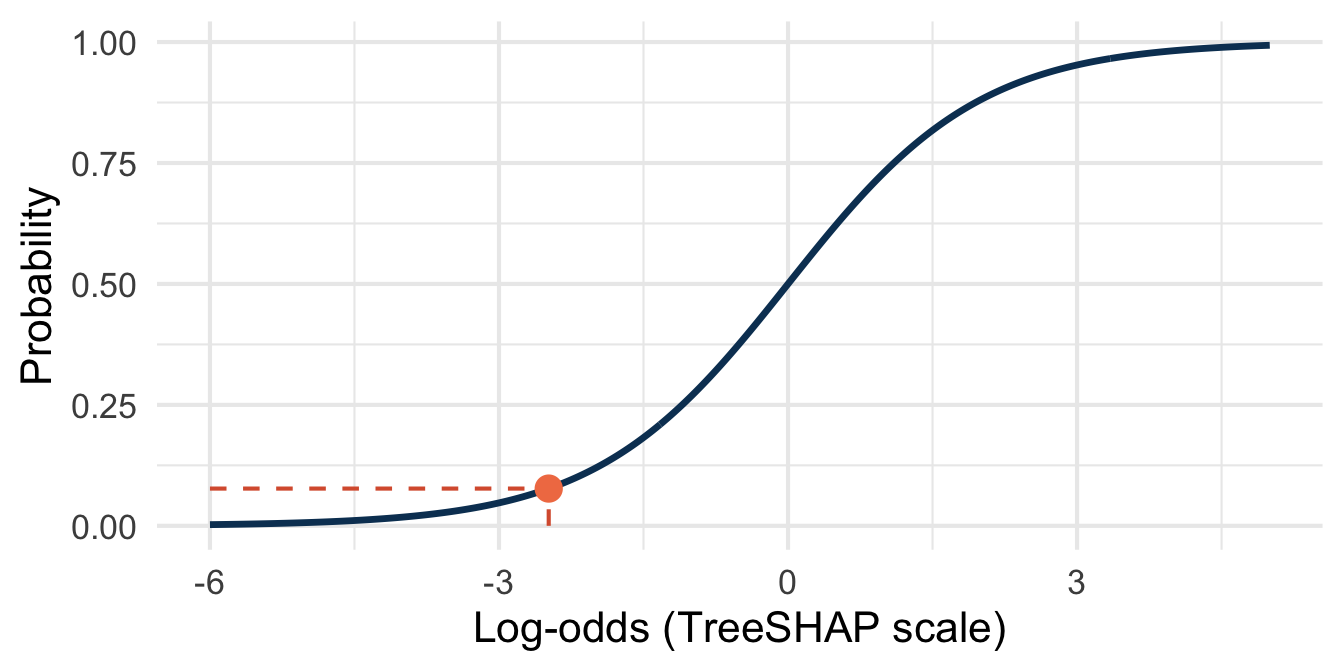
TreeSHAP works on the model’s native additive scale, the log-odds (what LightGBM’s predcontrib returns). The DALEX explainer predicts type = "prob", so all its explanations are in probability units.
| DALEX | TreeSHAP (shapviz) |
|
|---|---|---|
| Unit | probability | log-odds |
| Baseline | about 0.25 with your 500-row explainer, 0.24 with explainer_full, whose reference is the whole test set (mean prediction on the reference data) |
about -2.48, i.e. 0.08 as a probability (reference built into the trees from training node counts) |
The baselines differ because the average of probabilities is not the probability of the average log-odds: the sigmoid is non-linear.
The non-linearity also changes the size of each contribution, and therefore possibly their ranking. The sigmoid is monotone: a higher score always gives a higher probability. But a contribution is a step, and the same step in log-odds does not give the same step in probability everywhere on the curve: large near 0.5, tiny in the tails. Take my_high: once capital_gain has pushed the prediction close to 1, the step brought by education = Masters (about +1 in log-odds) barely moves the probability. In log-odds, education keeps its full +1; in probability, it shrinks to almost nothing. A variable can thus rank high in one explanation and low in the other, for the same observation.
This is why everything else in this document, including the first three tabs of the app, stays in probability units. The app’s shapviz tab is the exception, and says so in a banner.
There is no single correct scale, only one that must match what you compare. Check the units before comparing plots, axis values or rankings between DALEX and shapviz, and label your axes explicitly: the numbers alone do not announce their scale.
9 Limitations and responsible use
9.2 SHAP and causality
Recall capital_gain: the strongest predictor, but partly circular (high earners have more capital to invest, so it is as much a consequence as a cause of high income). The same caution applies to SHAP: a high SHAP value means the model relies heavily on a variable for this prediction, not that the variable causally drives the outcome.
This matters in official statistics: SHAP suits scoring and prediction tasks, whereas causal analysis or policy recommendations need different methods (quasi-experimental designs, causal inference frameworks).14
14 Why feature relevance is a causal problem: (Janzing et al. 2020).
9.3 Responsible interpretation
Four points to keep in mind when SHAP explanations reach a wider audience:
- don’t conflate a large contribution with causation
- contributions are specific to the fitted model and the reference dataset used as baseline: retraining or changing the reference data can shift them, even if overall performance stays the same
- SHAP shows that the model uses sensitive variables such as
sexorrace, not whether it treats the groups fairly:fairmodels(Wiśniewski and Biecek 2022) checks this from the sameDALEXexplainer (fairness metrics between protected groups) - communicating limitations is as important as communicating the explanation itself, arguably more so in a public statistics context, where transparency and accountability toward data providers and users are part of the mandate
10 Key takeaways
- SHAP values decompose a single prediction into fair, additive, individual contributions. Unlike break-down contributions, they don’t depend on the order in which variables are considered.
- This document uses
DALEX::predict_parts(type = "shap")throughout, for coverage (one explainer for importance, PDP, break-down, and SHAP alike) and a single consistent unit (predicted probability); theshapvizsection covers TreeSHAP, the faster, production-oriented alternative. - Waterfall plots (local) and summary/beeswarm plots (global) together give a complete picture, from one individual prediction to overall model behaviour.
- Keep the limitations in view: correlated variables, no causal interpretation, and a responsibility to communicate uncertainty and scope alongside the explanation itself.
SHAP does not replace model validation, but it makes a model’s decisions auditable, one prediction at a time. In an official statistics context, that auditability is arguably the whole point.
11 Going further
DALEXdocumentation: https://modeloriented.github.io/DALEX/: theexplain()-based tools used throughout these notes (feature importance, PDP, break-down and SHAP)DALEXtradocumentation: https://modeloriented.github.io/DALEXtra/: the extension ofDALEXthat providesexplain_tidymodels(), the explainer used fortidymodelsworkflowsshapvizdocumentation: https://modeloriented.github.io/shapviz/: the waterfall, beeswarm and dependence plots used above, with support for several other modelling packages beyond LightGBMkernelshap: https://CRAN.R-project.org/package=kernelshap: KernelSHAP for any model, includingtidymodelsworkflowsmodelStudio(Baniecki and Biecek 2019): https://github.com/ModelOriented/modelStudio: an interactive HTML dashboard (break-down, SHAP, profiles, importance) from aDALEXexplainer, in one function call: a ready-made version of the demo app for your own modelsfairmodels(Wiśniewski and Biecek 2022): https://fairmodels.drwhy.ai/: fairness metrics and bias mitigation, from aDALEXexplainer- Molnar, Interpretable Machine Learning (Molnar 2025): the reference book, with chapters on SHAP, PDP and permutation importance
- Biecek and Burzykowski, Explanatory Model Analysis (Biecek and Burzykowski 2021): the book behind
DALEX(break-down, SHAP, profiles) - Lundberg et al. (Lundberg et al. 2020): TreeSHAP and global understanding of tree models
- Aas et al. (Aas et al. 2021): SHAP with dependent features
12 References
Aas, Kjersti, Martin Jullum, and Anders Løland. 2021. “Explaining Individual Predictions When Features Are Dependent: More Accurate Approximations to Shapley Values.” Artificial Intelligence 298: 103502. https://doi.org/10.1016/j.artint.2021.103502.
Apley, Daniel W., and Jingyu Zhu. 2020. “Visualizing the Effects of Predictor Variables in Black Box Supervised Learning Models.” Journal of the Royal Statistical Society: Series B (Statistical Methodology) 82 (4): 1059–86. https://doi.org/10.1111/rssb.12377.
Baniecki, Hubert, and Przemysław Biecek. 2019. “modelStudio: Interactive Studio with Explanations for ML Predictive Models.” Journal of Open Source Software 4 (43): 1798. https://doi.org/10.21105/joss.01798.
Becker, Barry, and Ronny Kohavi. 1996. Adult. UCI Machine Learning Repository.
Biecek, Przemyslaw. 2018. “DALEX: Explainers for Complex Predictive Models in r.” Journal of Machine Learning Research 19 (84): 1–5. https://jmlr.org/papers/v19/18-416.html.
Biecek, Przemyslaw, and Tomasz Burzykowski. 2021. Explanatory Model Analysis. Chapman; Hall/CRC. https://ema.drwhy.ai/.
Falbel, Daniel, Athos Damiani, Roel M. Hogervorst, Max Kuhn, Simon Couch, and Emil Hvitfeldt. 2026. Bonsai: Model Wrappers for Tree-Based Models. https://bonsai.tidymodels.org/.
Fisher, Aaron, Cynthia Rudin, and Francesca Dominici. 2019. “All Models Are Wrong, but Many Are Useful: Learning a Variable’s Importance by Studying an Entire Class of Prediction Models Simultaneously.” Journal of Machine Learning Research 20 (177): 1–81. https://jmlr.org/papers/v20/18-760.html.
Friedman, Jerome H. 2001. “Greedy Function Approximation: A Gradient Boosting Machine.” The Annals of Statistics 29 (5): 1189–232. https://doi.org/10.1214/aos/1013203451.
Greenwell, Brandon M., and Bradley C. Boehmke. 2020. “Variable Importance Plots—an Introduction to the Vip Package.” The R Journal 12 (1): 343–66. https://doi.org/10.32614/RJ-2020-013.
Janzing, Dominik, Lenon Minorics, and Patrick Blöbaum. 2020. “Feature Relevance Quantification in Explainable AI: A Causal Problem.” Proceedings of the 23rd International Conference on Artificial Intelligence and Statistics, Proceedings of machine learning research, vol. 108. https://proceedings.mlr.press/v108/janzing20a.html.
Ke, Guolin, Qi Meng, Thomas Finley, et al. 2017. “LightGBM: A Highly Efficient Gradient Boosting Decision Tree.” Advances in Neural Information Processing Systems 30.
Kuhn, Max, and Julia Silge. 2022. Tidy Modeling with R: A Framework for Modeling in the Tidyverse. " O’Reilly Media, Inc."
Kuhn, Max, and Hadley Wickham. 2020. Tidymodels: A Collection of Packages for Modeling and Machine Learning Using Tidyverse Principles. Manual. https://www.tidymodels.org.
Kumar, I. Elizabeth, Suresh Venkatasubramanian, Carlos Scheidegger, and Sorelle Friedler. 2020. “Problems with Shapley-Value-Based Explanations as Feature Importance Measures.” Proceedings of the 37th International Conference on Machine Learning, Proceedings of machine learning research, vol. 119. https://proceedings.mlr.press/v119/kumar20e.html.
Lundberg, Scott M., Gabriel Erion, Hugh Chen, et al. 2020. “From Local Explanations to Global Understanding with Explainable AI for Trees.” Nature Machine Intelligence 2 (1): 56–67. https://doi.org/10.1038/s42256-019-0138-9.
Lundberg, Scott M., and Su-In Lee. 2017. “A Unified Approach to Interpreting Model Predictions.” Proceedings of the 31st International Conference on Neural Information Processing Systems (Red Hook, NY, USA), NIPS’17, December, 4768–77.
Maksymiuk, Szymon, Alicja Gosiewska, and Przemyslaw Biecek. 2020. “Landscape of r Packages for eXplainable Artificial Intelligence.” arXiv. https://arxiv.org/abs/2009.13248.
Mayer, Michael, David Watson, and Przemyslaw Biecek. 2025. Kernelshap: Kernel SHAP. https://CRAN.R-project.org/package=kernelshap.
Molnar, Christoph. 2025. Interpretable Machine Learning: A Guide for Making Black Box Models Explainable. 3rd ed. https://christophm.github.io/interpretable-ml-book.
Rudin, Cynthia. 2019. “Stop Explaining Black Box Machine Learning Models for High Stakes Decisions and Use Interpretable Models Instead.” Nature Machine Intelligence 1 (5): 206–15. https://doi.org/10.1038/s42256-019-0048-x.
Shapley, Lloyd S. 1953. “A Value for n-Person Games.” In Contributions to the Theory of Games, Volume II, edited by Harold W. Kuhn and Albert W. Tucker. Annals of Mathematics Studies 28. Princeton University Press.
Shi, Yu, Guolin Ke, Damien Soukhavong, et al. 2026. Lightgbm: Light Gradient Boosting Machine. https://doi.org/10.32614/CRAN.package.lightgbm.
Staniak, Mateusz, and Przemysław Biecek. 2018. “Explanations of Model Predictions with live and breakDown Packages.” The R Journal 10 (2): 395–409. https://doi.org/10.32614/RJ-2018-072.
Strobl, Carolin, Anne-Laure Boulesteix, Achim Zeileis, and Torsten Hothorn. 2007. “Bias in Random Forest Variable Importance Measures: Illustrations, Sources and a Solution.” BMC Bioinformatics 8: 25. https://doi.org/10.1186/1471-2105-8-25.
Štrumbelj, Erik, and Igor Kononenko. 2014. “Explaining Prediction Models and Individual Predictions with Feature Contributions.” Knowledge and Information Systems 41 (3): 647–65. https://doi.org/10.1007/s10115-013-0679-x.
Wiśniewski, Jakub, and Przemysław Biecek. 2022. “fairmodels: A Flexible Tool for Bias Detection, Visualization, and Mitigation in Binary Classification Models.” The R Journal 14 (1): 227–43. https://doi.org/10.32614/RJ-2022-019.